
Don't miss your chance to take the Fabric Data Engineer (DP-600) exam for FREE! Find out how by attending the DP-600 session on April 23rd (pacific time), live or on-demand.
Learn moreNext up in the FabCon + SQLCon recap series: The roadmap for Microsoft SQL and Maximizing Developer experiences in Fabric. All sessions are available on-demand after the live show. Register now
Hello,
I have data (in table):
I need to calculate and show, what is average employees age at the end of each month in period (for example in period 2017-09 - 2017-12). In example at the end of december (47+27+19)/3. I will show it with Line chart and need to calculate age for every employee at the end of each month in active period.
How could I calculate those data? I assume that I need to calculate table...
Or maybe there is other solution.
I will appreciate any help.
Solved! Go to Solution.
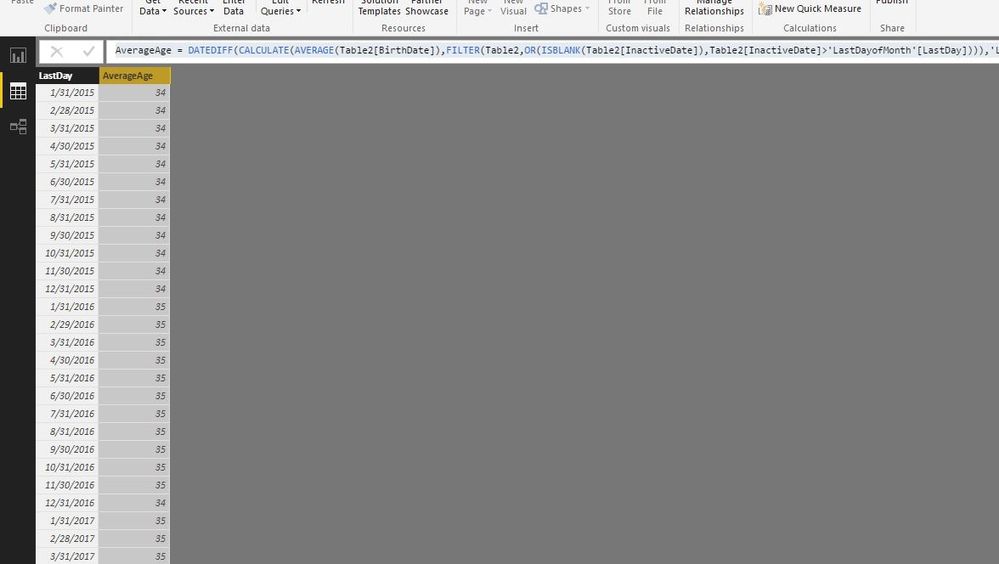
Create a date table to return the last day of each month.
Create a date table
Date = CALENDAR(DATE(2015,1,1),DATE(2017,12,31))
Create a column to get the last day of each month
LastDay = ENDOFMONTH('Date'[Date])
Create another table
LastDayofMonth = SUMMARIZE('Date','Date'[LastDay])
Create a column to get average age.
AverageAge =
DATEDIFF (
CALCULATE (
AVERAGE ( Table2[BirthDate] ),
FILTER (
Table2,
OR (
ISBLANK ( Table2[InactiveDate] ),
Table2[InactiveDate] > 'LastDayofMonth'[LastDay]
)
)
),
'LastDayofMonth'[LastDay],
YEAR
)
Regards,
Charlie Liao
Create a date table to return the last day of each month.
Create a date table
Date = CALENDAR(DATE(2015,1,1),DATE(2017,12,31))
Create a column to get the last day of each month
LastDay = ENDOFMONTH('Date'[Date])
Create another table
LastDayofMonth = SUMMARIZE('Date','Date'[LastDay])
Create a column to get average age.
AverageAge =
DATEDIFF (
CALCULATE (
AVERAGE ( Table2[BirthDate] ),
FILTER (
Table2,
OR (
ISBLANK ( Table2[InactiveDate] ),
Table2[InactiveDate] > 'LastDayofMonth'[LastDay]
)
)
),
'LastDayofMonth'[LastDay],
YEAR
)
Regards,
Charlie Liao
Thank you, @v-caliao-msft!
Almost working. I'm still cheking solution (new with DAX).
I found, that I need one more filter - I need to include only active employees, so I need to filter from "Employment Start Date" too, but not sure - is it correct.
AverageAge =
DATEDIFF (
CALCULATE (
AVERAGE ( Table2[BirthDate] ),
FILTER (
Table2, Table2[Employment Start Date] < 'LastDayofMonth'[LastDay]
),
FILTER (
Table2,
OR (
ISBLANK ( Table2[InactiveDate] ),
Table2[InactiveDate] > 'LastDayofMonth'[LastDay]
)
)
),
'LastDayofMonth'[LastDay],
YEAR
)
If you have recently started exploring Fabric, we'd love to hear how it's going. Your feedback can help with product improvements.
A new Power BI DataViz World Championship is coming this June! Don't miss out on submitting your entry.
| User | Count |
|---|---|
| 45 | |
| 43 | |
| 39 | |
| 19 | |
| 15 |
| User | Count |
|---|---|
| 68 | |
| 65 | |
| 31 | |
| 28 | |
| 24 |