
Don't miss your chance to take the Fabric Data Engineer (DP-600) exam for FREE! Find out how by watching the DP-600 session on-demand now through April 28th.
Learn moreJoin the FabCon + SQLCon recap series. Up next: Power BI, Real-Time Intelligence, IQ and AI, and Data Factory take center stage. All sessions are available on-demand after the live show. Register now
Hi everyone,
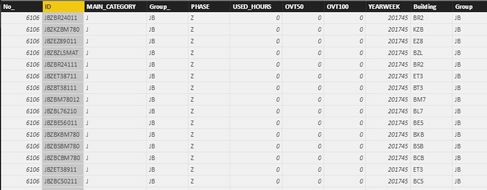
I am making a report in Power BI. I am trying to get used hours per area (Id); building; group(no). I have two tables. The way my data is formatted there are two tables, one (table a) that has used hours with each representing the value of one id per project within one Yearweek.
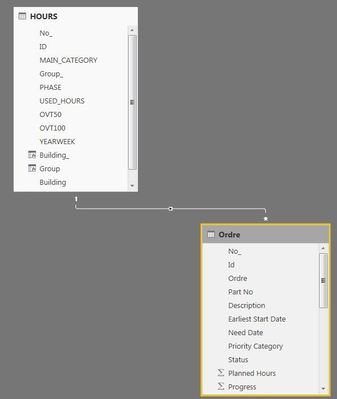
The other (b) (main report) has the ordre, weight status, phase and general information. The tables have a relationship throught the ID column, with the one side being the Used hours and the many being the main report with ordre, weight. Table b is containing less amount of ID`s than table a.
This is what I have written so far in main report table:
Usedhours_measure = CALCULATE(SUM(HOURS[USED_HOURS]);FILTER(HOURS;HOURS[Group]=VALUES(Ordre[Group])))
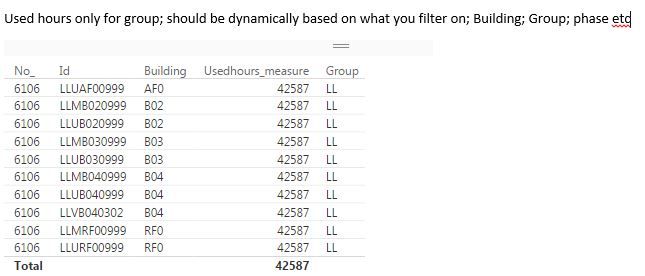
It does give correct sum for group and give an error if I want to show several groups, how do you write dax to sum used order dynamically per building or per phase or per group from main report.
Used hours (a):
Main report (b):
Relations:
Show example main report:
Solved! Go to Solution.
You may use a similar way as shown here.
Thanks, that helps a bit further.
UsedHours_Buildingblock = CALCULATE(SUM(AA_RV_KPI_HOURS_6106[USED_HOURS]);FILTER(AA_RV_KPI_HOURS_6106;AA_RV_KPI_HOURS_6106[Building]=MAX(ReportResult09[Building])&&AA_RV_KPI_HOURS_6106[Discip]=MAX(ReportResult09[Discip])))
However, the table is not showing expected total sum as shown below. Feedback will be appriciated, thanks, rgds H
You may use a similar way as shown here.
Thank you, v-chuncz-msft!
Rgds
Henrik
Here you may use MAX Function instead of VALUES Function.
Check out the April 2026 Power BI update to learn about new features.
If you have recently started exploring Fabric, we'd love to hear how it's going. Your feedback can help with product improvements.
A new Power BI DataViz World Championship is coming this June! Don't miss out on submitting your entry.
| User | Count |
|---|---|
| 43 | |
| 37 | |
| 34 | |
| 21 | |
| 16 |
| User | Count |
|---|---|
| 65 | |
| 64 | |
| 31 | |
| 26 | |
| 25 |