FabCon is coming to Atlanta
Join us at FabCon Atlanta from March 16 - 20, 2026, for the ultimate Fabric, Power BI, AI and SQL community-led event. Save $200 with code FABCOMM.
Register now!- Power BI forums
- Get Help with Power BI
- Desktop
- Service
- Report Server
- Power Query
- Mobile Apps
- Developer
- DAX Commands and Tips
- Custom Visuals Development Discussion
- Health and Life Sciences
- Power BI Spanish forums
- Translated Spanish Desktop
- Training and Consulting
- Instructor Led Training
- Dashboard in a Day for Women, by Women
- Galleries
- Data Stories Gallery
- Themes Gallery
- Contests Gallery
- QuickViz Gallery
- Quick Measures Gallery
- Visual Calculations Gallery
- Notebook Gallery
- Translytical Task Flow Gallery
- TMDL Gallery
- R Script Showcase
- Webinars and Video Gallery
- Ideas
- Custom Visuals Ideas (read-only)
- Issues
- Issues
- Events
- Upcoming Events
The Power BI Data Visualization World Championships is back! Get ahead of the game and start preparing now! Learn more
- Power BI forums
- Forums
- Get Help with Power BI
- Desktop
- Re: Calculated field based on customer history : P...
- Subscribe to RSS Feed
- Mark Topic as New
- Mark Topic as Read
- Float this Topic for Current User
- Bookmark
- Subscribe
- Printer Friendly Page

- Mark as New
- Bookmark
- Subscribe
- Mute
- Subscribe to RSS Feed
- Permalink
- Report Inappropriate Content
Calculated field based on customer history : PowerBI
Hello,
I am a PowerBI new user. I am trying to see how I can create new calculated fields within PowerBI to be able afterwards to use predictive models.
Indicative example:
* To produce predictive variables, I need to enrich each row of the db ("shopping actions" table) with a new field. Each row represents a shopping action from a customer abc (customer id, amount paid, venue date,...). For row "x", I need to have a field (column to add) describing "past buying behaviour from this customer" corresponding at the "x" date in this row (venue date).
I need to go through the whole "shopping actions" table focusing only on rows where customer id = "abc" AND venue date < venue date of row "x".
How can PowerBI DAX functions help me in this please? This calculation should be done for every rows.
Thank you for your help.
Mohamed.
Solved! Go to Solution.
- Mark as New
- Bookmark
- Subscribe
- Mute
- Subscribe to RSS Feed
- Permalink
- Report Inappropriate Content
Hi @mohamedelham,
I think '#days since last Venue','Last Payment status' fields are you wanted, right? If this is a case, please try to use following measures:
History days =
VAR last_date =
    CALCULATE (
        MAX ( 'Sample'[Venue date] ),
        FILTER ( ALLSELECTED ( 'Sample' ), [Venue date] < MAX ( [Venue date] ) ),
        VALUES ( 'Sample'[customerid] )
    )
RETURN
    IF (
        last_date = BLANK (),
        0,
        COUNTROWS ( CALENDAR ( last_date, MAX ( [Venue date] ) ) ) - 1
    )

Lsat Status =
VAR last_date =
    CALCULATE (
        MAX ( 'Sample'[Venue date] ),
        FILTER ( ALLSELECTED ( 'Sample' ), [Venue date] < MAX ( [Venue date] ) ),
        VALUES ( 'Sample'[customerid] )
    )
RETURN
    IF (
        last_date <> BLANK (),
        LOOKUPVALUE (
            'Sample'[Payment status],
            Sample[customerid], SELECTEDVALUE ( 'Sample'[customerid] ),
            Sample[Venue date], last_date
        ),
        SELECTEDVALUE ( 'Sample'[Payment status] )
    )
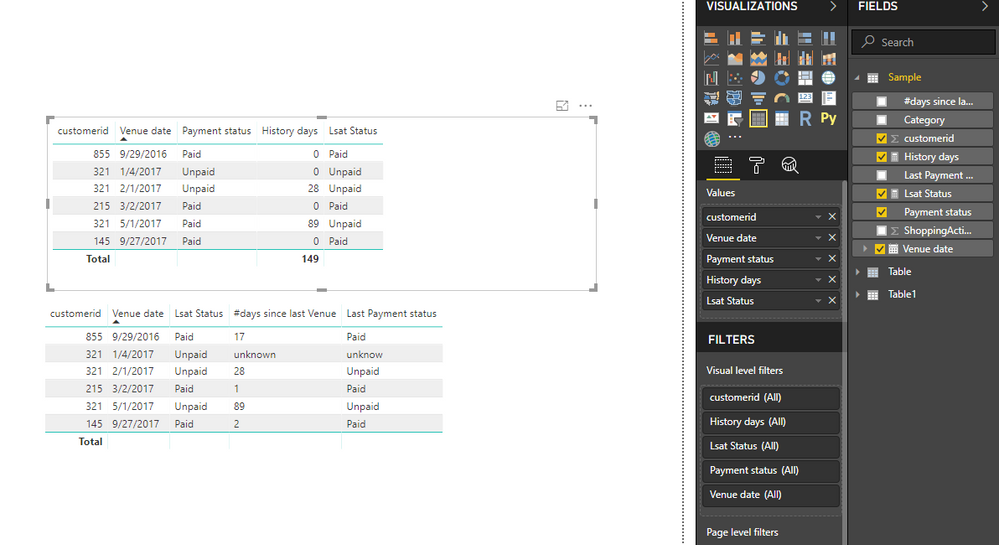
Regards,
Xiaoxin Sheng
- Mark as New
- Bookmark
- Subscribe
- Mute
- Subscribe to RSS Feed
- Permalink
- Report Inappropriate Content
Hello,
I am a PowerBI new user. I am trying to see how I can create new calculated fields within PowerBI to be able afterwards to use predictive models.
Indicative example:
* To produce predictive variables, I need to enrich each row of the db ("shopping actions" table) with a new field. Each row represents a shopping action from a customer abc (customer id, amount paid, venue date,...). For row "x", I need to have a field (column to add) describing "past buying behaviour from this customer" corresponding at the "x" date in this row (venue date).
I need to go through the whole "shopping actions" table focusing only on rows where customer id = "abc" AND venue date < venue date of row "x".
How can PowerBI DAX functions help me in this please? This calculation should be done for every rows.
Thank you for your help.
Kind Regards,
Mohamed.

- Mark as New
- Bookmark
- Subscribe
- Mute
- Subscribe to RSS Feed
- Permalink
- Report Inappropriate Content
Hi @mohamedelham,
Please share some sample data with table format with expected result, it will be help for testing and coding formula.
BTW, dax formula not contain any cache data features, if you means to use dax to record history operations, it is impossible.
Regards,
Xiaxoin Sheng
- Mark as New
- Bookmark
- Subscribe
- Mute
- Subscribe to RSS Feed
- Permalink
- Report Inappropriate Content
Hello,
Thank you for your reply. Below and example:
* the fields 1 to 5 are given from client
* the fields from 6 and 7 should be calculated and based on cutomers history
** example: customer 321 came 3 times
*****the 1st stime he was new and then no field to calculate as no history
*****the 2nd time
************value "28" is calculated from difference between current venue date and last venue date //
************value "Paid" is calculated from payment statuts in his last shoppingAction column.
Thx for hep 🙂
| ShoppingAction id | customerid | Category | Venue date | Payment status | #days since last Venue | Last Payment status |
| 35158497 | 855 | food | 29/09/2016 | Paid | 17 | Paid |
| 54659217 | 321 | food | 04/01/2017 | Unpaid | unknown | unknow |
| 21548956 | 321 | non food | 01/02/2017 | Unpaid | 28 | Unpaid |
| 32658754 | 215 | food | 02/03/2017 | Paid | 1 | Paid |
| 54659887 | 321 | non food | 01/05/2017 | Paid | 89 | Unpaid |
| 15847989 | 145 | non food | 27/09/2017 | Paid | 2 | Paid |
- Mark as New
- Bookmark
- Subscribe
- Mute
- Subscribe to RSS Feed
- Permalink
- Report Inappropriate Content
Hi @mohamedelham,
I think '#days since last Venue','Last Payment status' fields are you wanted, right? If this is a case, please try to use following measures:
History days =
VAR last_date =
    CALCULATE (
        MAX ( 'Sample'[Venue date] ),
        FILTER ( ALLSELECTED ( 'Sample' ), [Venue date] < MAX ( [Venue date] ) ),
        VALUES ( 'Sample'[customerid] )
    )
RETURN
    IF (
        last_date = BLANK (),
        0,
        COUNTROWS ( CALENDAR ( last_date, MAX ( [Venue date] ) ) ) - 1
    )

Lsat Status =
VAR last_date =
    CALCULATE (
        MAX ( 'Sample'[Venue date] ),
        FILTER ( ALLSELECTED ( 'Sample' ), [Venue date] < MAX ( [Venue date] ) ),
        VALUES ( 'Sample'[customerid] )
    )
RETURN
    IF (
        last_date <> BLANK (),
        LOOKUPVALUE (
            'Sample'[Payment status],
            Sample[customerid], SELECTEDVALUE ( 'Sample'[customerid] ),
            Sample[Venue date], last_date
        ),
        SELECTEDVALUE ( 'Sample'[Payment status] )
    )
Regards,
Xiaoxin Sheng
- Mark as New
- Bookmark
- Subscribe
- Mute
- Subscribe to RSS Feed
- Permalink
- Report Inappropriate Content
Dear Xiaoxin,
It works perfect. Thank you for your help. The formula are implemented as "measures" and then I use them as calculated columns.
Kind Regards,
Mohamed.
- Mark as New
- Bookmark
- Subscribe
- Mute
- Subscribe to RSS Feed
- Permalink
- Report Inappropriate Content
Hello Xiaoxin Sheng,
Sorry for late answer, I just came back to work and to PowerBI tests. Thank you for your feedback. I will test this asap and share feedback with you. Could you please explain a bit the formula to be sure I understand.
Kind Regards,
Mohamed.
- Mark as New
- Bookmark
- Subscribe
- Mute
- Subscribe to RSS Feed
- Permalink
- Report Inappropriate Content
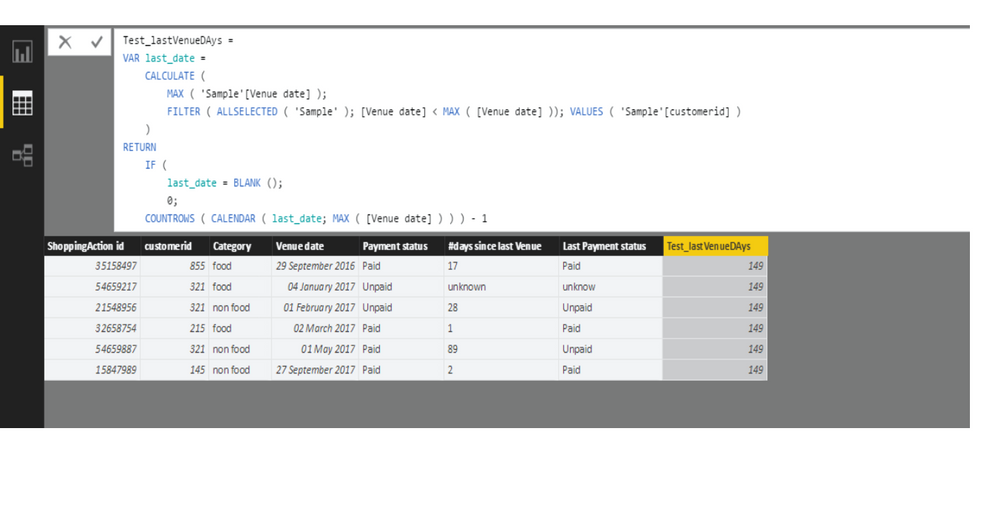
Hello Xiaoxin,
Here is the result I get. The columns 6 and 8 should have the same values as I used the formula on the last column.
I tried to change a few things but nothing gives the right result (column 6).
Kind Regards,
Mohamed.
- Mark as New
- Bookmark
- Subscribe
- Mute
- Subscribe to RSS Feed
- Permalink
- Report Inappropriate Content
Hello,
The formula are actually measures if I understand correctly. It works fine.
Thank you for your help.
Kind regards,
Mohamed.
Helpful resources

Power BI Dataviz World Championships
The Power BI Data Visualization World Championships is back! Get ahead of the game and start preparing now!

Power BI Monthly Update - December 2025
Check out the December 2025 Power BI Holiday Recap!

FabCon Atlanta 2026
Join us at FabCon Atlanta, March 16-20, for the ultimate Fabric, Power BI, AI and SQL community-led event. Save $200 with code FABCOMM.

| User | Count |
|---|---|
| 38 | |
| 36 | |
| 33 | |
| 30 | |
| 28 |


| User | Count |
|---|---|
| 127 | |
| 88 | |
| 78 | |
| 66 | |
| 65 |


