Learn from the best! Meet the four finalists headed to the FINALS of the Power BI Dataviz World Championships! Register now
Hi all,
I need support with something, I assume, pretty easy, however no matter what I try I dont get the results I want.
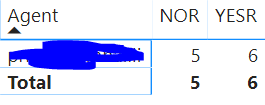
heres what I have in Power BI as Pivot Table:
NOR and YESR those are SUM of values -
I want to add a new column to the pivot table displaying the following result - 54.5%
Which means I need the following formula - =YESR/(YESR+NOR)
However I am unable to get this value 54.5% and I get all kind of other values 😞
thanks in advance!
Solved! Go to Solution.
Hi @IPGeorgiev ,
You need to configure the range of caiculation. You could refer to the following measure.
Measure Y =
SUMX ( ALLEXCEPT ( 'TestTable', 'TestTable'[Agent] ), 'TestTable'[yesr] )
/ SUMX (
ALLEXCEPT ( 'TestTable', 'TestTable'[Agent] ),
'TestTable'[nor] + 'TestTable'[yesr]
)
Then set this measure as percentage style.
Hi @IPGeorgiev ,
You need to configure the range of caiculation. You could refer to the following measure.
Measure Y =
SUMX ( ALLEXCEPT ( 'TestTable', 'TestTable'[Agent] ), 'TestTable'[yesr] )
/ SUMX (
ALLEXCEPT ( 'TestTable', 'TestTable'[Agent] ),
'TestTable'[nor] + 'TestTable'[yesr]
)
Then set this measure as percentage style.
in case YESR in not a calculated measure
Try
sum(YESR)/sumx(table,YESR+NOR)
Appreciate your Kudos. In case, this is the solution you are looking for, mark it as the Solution.
In case it does not help, please provide additional information and mark me with @
Thanks. My Recent Blog -
Decoding Direct Query - Time Intelligence
Winner Coloring on MAP ,
HR Analytics
Power BI Working with Non-Standard TimeAnd
Comparing Data Across Date Ranges
Connect on Linkedin
If you have recently started exploring Fabric, we'd love to hear how it's going. Your feedback can help with product improvements.
A new Power BI DataViz World Championship is coming this June! Don't miss out on submitting your entry.
Share feedback directly with Fabric product managers, participate in targeted research studies and influence the Fabric roadmap.
| User | Count |
|---|---|
| 57 | |
| 38 | |
| 33 | |
| 19 | |
| 16 |
| User | Count |
|---|---|
| 69 | |
| 67 | |
| 41 | |
| 32 | |
| 24 |