Get certified for free when you join Fabric Data Days 2026 and dive into Fabric, Power BI, SQL, AI, and other essential data skills.
Join nowTry your skills in the Power BI Dataviz World Championship! Round one ends June 26. Join now
Hello,
How to create a dynamic virtual table that will be updated every time the user changes his selection in the Slicer?
The virtual table should contain the selected value in the filter + id of each group.
I have been working on a formula for a virtual table, but it doesn't work:
SelectedUsergroups =
FILTER(
ADDCOLUMNS(
VALUES(D_Usergroups[Usergroup Desc]),
"Selected", IF(ISFILTERED(D_Usergroups[Usergroup Desc]), "Yes", "No")
),
[Selected] = "Yes" && NOT(ISBLANK(D_Usergroups[Usergroup Desc])) &&
CONTAINS(D_Usergroups, D_Usergroups[Usergroup Desc], D_Usergroups[Usergroup Desc])
)
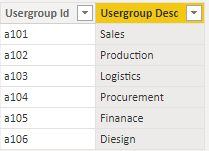
Data sample I have:
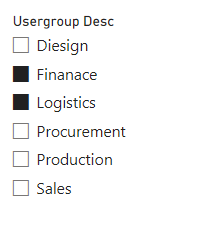
Slicer was added (with pre selected values as example):
@slyfox Maybe you can create calculated table as a exact copy of your original one, and then create some measures to scan what values are selected in the slicer, like the following:
IsSelected = IF(MAX('CalculatedTable'[Usergroup]) in ALLSELECTED('Table'[Usergroup]),1,0)
and then in your table / matrix / bar chart / whatever vis, use the fields in your CALCULATEDTABLE and add [IsSelected]=1 as the visual filter.
Hope you find this helps.
| User | Count |
|---|---|
| 22 | |
| 20 | |
| 20 | |
| 19 | |
| 11 |
| User | Count |
|---|---|
| 62 | |
| 55 | |
| 46 | |
| 45 | |
| 34 |