Join us at FabCon Atlanta from March 16 - 20, 2026, for the ultimate Fabric, Power BI, AI and SQL community-led event. Save $200 with code FABCOMM.
Register now!The Power BI Data Visualization World Championships is back! It's time to submit your entry. Live now!
Hello,
How to create a dynamic virtual table that will be updated every time the user changes his selection in the Slicer?
The virtual table should contain the selected value in the filter + id of each group.
I have been working on a formula for a virtual table, but it doesn't work:
SelectedUsergroups =
FILTER(
ADDCOLUMNS(
VALUES(D_Usergroups[Usergroup Desc]),
"Selected", IF(ISFILTERED(D_Usergroups[Usergroup Desc]), "Yes", "No")
),
[Selected] = "Yes" && NOT(ISBLANK(D_Usergroups[Usergroup Desc])) &&
CONTAINS(D_Usergroups, D_Usergroups[Usergroup Desc], D_Usergroups[Usergroup Desc])
)
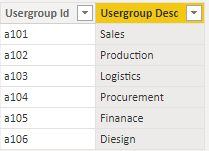
Data sample I have:
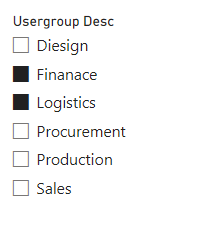
Slicer was added (with pre selected values as example):
@slyfox Maybe you can create calculated table as a exact copy of your original one, and then create some measures to scan what values are selected in the slicer, like the following:
IsSelected = IF(MAX('CalculatedTable'[Usergroup]) in ALLSELECTED('Table'[Usergroup]),1,0)
and then in your table / matrix / bar chart / whatever vis, use the fields in your CALCULATEDTABLE and add [IsSelected]=1 as the visual filter.
Hope you find this helps.
The Power BI Data Visualization World Championships is back! It's time to submit your entry.
| User | Count |
|---|---|
| 52 | |
| 40 | |
| 31 | |
| 24 | |
| 22 |
| User | Count |
|---|---|
| 133 | |
| 115 | |
| 56 | |
| 45 | |
| 40 |