Get certified for free when you join Fabric Data Days 2026 and dive into Fabric, Power BI, SQL, AI, and other essential data skills.
Join nowJuly 7 - July 17 | Round 2 of the Power BI Dataviz World Championships. Don't miss your chance! Learn more
Hi. I am new in Power Bi. Please I need to create a new column with the division between of Sum of PrecioTotal and Count of Razon.
Thanks for your help
| CodVend | Sum of PrecioTotal | Count of Razon |
| 1 | $3.57 | 2 |
| 2 | $6.90 | 3 |
| 3 | $11.23 | 3 |
| 4 | $12.26 | 3 |
| 5 | $16.84 | 4 |
Solved! Go to Solution.
Hi @Anonymous,
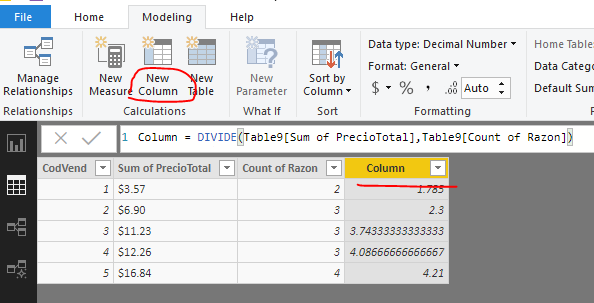
If above sample table is the original data table in excel worksheet, you can refer to below DAX to create a calculated column.
Column = DIVIDE(Table9[Sum of PrecioTotal],Table9[Count of Razon])
If above table is the output in table visual, and the source table contains columns [CodVend], [PrecioTotal] and [Razon]. You can add below measure to table visual.
Measure=SUM(Table9[[PrecioTotal]])/SUM(Table9[Razon])
Best regards,
Yuliana Gu
Hi @Anonymous,
If above sample table is the original data table in excel worksheet, you can refer to below DAX to create a calculated column.
Column = DIVIDE(Table9[Sum of PrecioTotal],Table9[Count of Razon])
If above table is the output in table visual, and the source table contains columns [CodVend], [PrecioTotal] and [Razon]. You can add below measure to table visual.
Measure=SUM(Table9[[PrecioTotal]])/SUM(Table9[Razon])
Best regards,
Yuliana Gu
Hi,
Paste your source data here.
My source data is a excel spreadsheet.
The table of the message is the data of that spreadsheet.
Thanks for your help
Hi,
If the Table in your original post is also your source data, then write this calculated column formula
=[Sum of PrecioTotal]/[Count of Razon]
Hope this helps.
| User | Count |
|---|---|
| 23 | |
| 22 | |
| 20 | |
| 20 | |
| 12 |
| User | Count |
|---|---|
| 63 | |
| 56 | |
| 47 | |
| 44 | |
| 37 |