cancel
Showing results for 
Search instead for 
Did you mean: 

Learn from the best! Meet the four finalists headed to the FINALS of the Power BI Dataviz World Championships! Register now

Reply
Louis63
New Member

Calculated column with differente table

Hello, I am looking to create a calculated column that gives the turnover generated per customer.
Knowing that each sale made is in another table, how can I retrieve the amount of sales for a customer knowing that it is possible that this customer has made several orders?


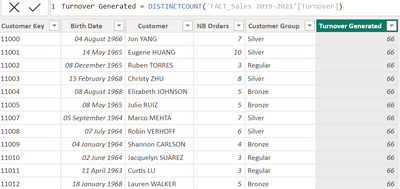
I would point out that the "Customer Key" column appears in both tables :

Louis63_0-1670257890894.png


Thanks for your help.

1 ACCEPTED SOLUTION
Anonymous
Not applicable

Hi @Louis63 ,


You can try SUM() function.

Turnover Generated =
CALCULATE (
    SUM ( 'FACT_Sales 2019-2021'[Turnover] ),
    FILTER (
        'FACT_Sales 2019-2021',
        'FACT_Sales 2019-2021'[Customer Key] = EARLIER ( 'TableName'[Customer Key] )
    )
)


Best Regards,
Rico Zhou


If this post helps, then please consider Accept it as the solution to help the other members find it more quickly.

View solution in original post

3 REPLIES 3
Anonymous
Not applicable

Hi @Louis63 ,


Please try this code to create a calculated column.

Turnover Generated =
CALCULATE (
    DISTINCTCOUNT ( 'FACT_Sales 2019-2021'[Turnover] ),
    FILTER (
        'FACT_Sales 2019-2021',
        'FACT_Sales 2019-2021'[Customer Key] = EARLIER ( 'TableName'[Customer Key] )
    )
)


Best Regards,
Rico Zhou


If this post helps, then please consider Accept it as the solution to help the other members find it more quickly.

Hello @Anonymous , thanks for helping.


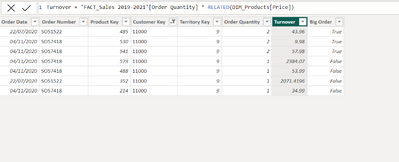
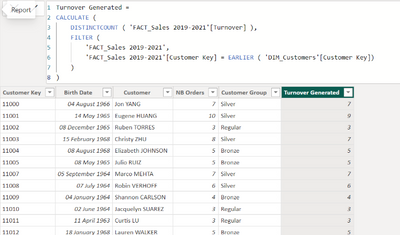
You almost get it. The calculated column you propose gives the number of times the customer appears in the "Sales 2019-2021" table. Do you know how to calculate the amount of turnover generated in the "Turnover" column instead?

Sales 2019-2021 table:

Louis63_0-1670314616488.png

Customers table:

Louis63_1-1670314651140.png


Thanks a lot

Anonymous
Not applicable

Hi @Louis63 ,


You can try SUM() function.

Turnover Generated =
CALCULATE (
    SUM ( 'FACT_Sales 2019-2021'[Turnover] ),
    FILTER (
        'FACT_Sales 2019-2021',
        'FACT_Sales 2019-2021'[Customer Key] = EARLIER ( 'TableName'[Customer Key] )
    )
)


Best Regards,
Rico Zhou


If this post helps, then please consider Accept it as the solution to help the other members find it more quickly.

Helpful resources

Announcements
Join our Fabric User Panel

Join our Fabric User Panel

Share feedback directly with Fabric product managers, participate in targeted research studies and influence the Fabric roadmap.

February Power BI Update Carousel

Power BI Monthly Update - February 2026

Check out the February 2026 Power BI update to learn about new features.

FabCon Atlanta 2026 carousel

FabCon Atlanta 2026

Join us at FabCon Atlanta, March 16-20, for the ultimate Fabric, Power BI, AI and SQL community-led event. Save $200 with code FABCOMM.