Join us at FabCon Atlanta from March 16 - 20, 2026, for the ultimate Fabric, Power BI, AI and SQL community-led event. Save $200 with code FABCOMM.
Register now!Vote for your favorite vizzies from the Power BI Dataviz World Championship submissions. Vote now!
Hello Everyone!
First of all, thanks for alwayg being so helpful!
I am trying to find a formula to determinate if an order is normal or customized.
If my order number contains product type 1 and 2 should be considered as "Custom", otherwise if it only contains 1 should be considered as "Normal order"
This is how my table looks:
| ORDER | PRODUCT TYPE | ORDER TYPE |
| 10 | 1 | CUSTOM |
| 10 | 2 | CUSTOM |
| 12 | 1 | NORMAL |
| 13 | 1 | CUSTOM |
| 13 | 2 | CUSTOM |
| 14 | 1 | NORMAL |
| 15 | 1 | NORMAL |
| 16 | 1 | CUSOTM |
| 16 | 2 | CUSTOM |
Which formula could I use?
Lot of thanks!
Solved! Go to Solution.
Hi @Anonymous ,
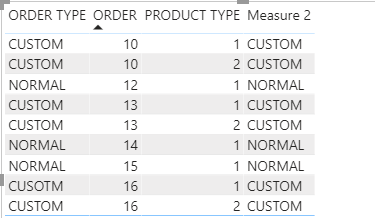
Try this measure:
Measure 2 =
VAR type_no =
CALCULATE (
DISTINCTCOUNT ( 'Table'[PRODUCT TYPE] ),
ALLEXCEPT ( 'Table', 'Table'[ORDER] )
)
RETURN
IF ( type_no > 1, "CUSTOM", "NORMAL" )
Best Regards,
Liang
If this post helps, then please consider Accept it as the solution to help the other members find it more quickly.
Hi @Anonymous
try
Column =
var _custom = CALCULATE(COUNTROWS(Table), ALLEXCEPT(Table, Table[ORDER]), Table[PRODUCT TYPE] = 2)
RETURN
IF (_custom > 0, "Custom", "Normal order")
Hello!
Thanks for your answer.
I have a problem with the formula as it's indicating order as "Custom" if order has two rows instead of indicating Custom when it has type 2.
How could I fixed?
Thanks!
Hi @Anonymous ,
Try this measure:
Measure 2 =
VAR type_no =
CALCULATE (
DISTINCTCOUNT ( 'Table'[PRODUCT TYPE] ),
ALLEXCEPT ( 'Table', 'Table'[ORDER] )
)
RETURN
IF ( type_no > 1, "CUSTOM", "NORMAL" )
Best Regards,
Liang
If this post helps, then please consider Accept it as the solution to help the other members find it more quickly.
Vote for your favorite vizzies from the Power BI World Championship submissions!
If you love stickers, then you will definitely want to check out our Community Sticker Challenge!
Check out the January 2026 Power BI update to learn about new features.
| User | Count |
|---|---|
| 64 | |
| 56 | |
| 43 | |
| 20 | |
| 17 |
| User | Count |
|---|---|
| 123 | |
| 108 | |
| 44 | |
| 32 | |
| 26 |