Don't miss your chance to take the Fabric Data Engineer (DP-600) exam for FREE! Find out how by watching the DP-600 session on-demand now through April 28th.
Learn moreJoin the FabCon + SQLCon recap series. Up next: Power BI, Real-Time Intelligence, IQ and AI, and Data Factory take center stage. All sessions are available on-demand after the live show. Register now
Hi
Team,
Need your help!
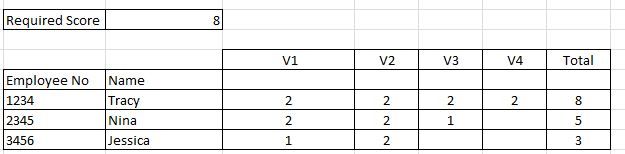
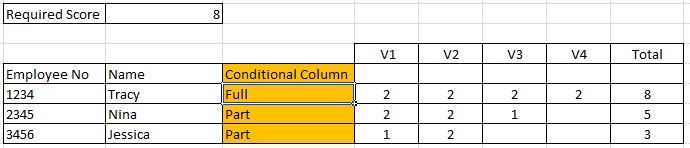
I have a Matrix report on Power BI , where I need to add a column which compares the total of the row against the value of dynamic measure and derived the outcome.
For Example, Total Score of each of the employee needs to match against the required score (which is a dynamic measure based on the slicer value) and calculate whether each employee has full access or partial access.
Current Output.
Desired Output:
Thanks for your help in advance!!
Solved! Go to Solution.
Hi @Chan ,
Not really sure how you have your data setup but I'm assuming is simlar to this:
Employee Name Attribute Value
| 1 | A | V1 | 2 |
| 1 | A | V2 | 2 |
| 1 | A | V3 | 2 |
| 1 | A | V4 | 2 |
| 2 | B | V1 | 2 |
| 2 | B | V2 | 2 |
| 2 | B | V3 | 1 |
| 3 | C | V1 | 1 |
| 3 | C | V2 | 2 |
If this is the case then you need to add a measure that looks like this:
Conditional column =
IF (
CALCULATE ( SUM ( Table1[Value] ); ALLEXCEPT ( Table1; Table1[Employee] ) ) >= 'Required Score'[Required Score Value];
"Full";
"Part"
)
If your table has one column per each V you should do somehting like this:
Conditional column =
IF (
CALCULATE (
SUM ( Table1[V1] ) + SUM ( Table1[V2] )
+ SUM ( Table1[V3] )
+ SUM ( Table1[V4] );
ALLEXCEPT ( Table1; Table1[Employee] )
) >= 'Required Score'[Required Score Value];
"Full";
"Part"
)
Be aware that if you are using a matrix visual in order to use this column you need to make some "tricks",
Add the measure to your values this will make a repeated value for each column you just need to resize all of the columns with conditional except one.
If you want to conditional format that column create the following measure:
Formatting = IF([Conditional column] = "full"; 1; 0)
And then use it's result to conditional formatting, check the image and file attach.
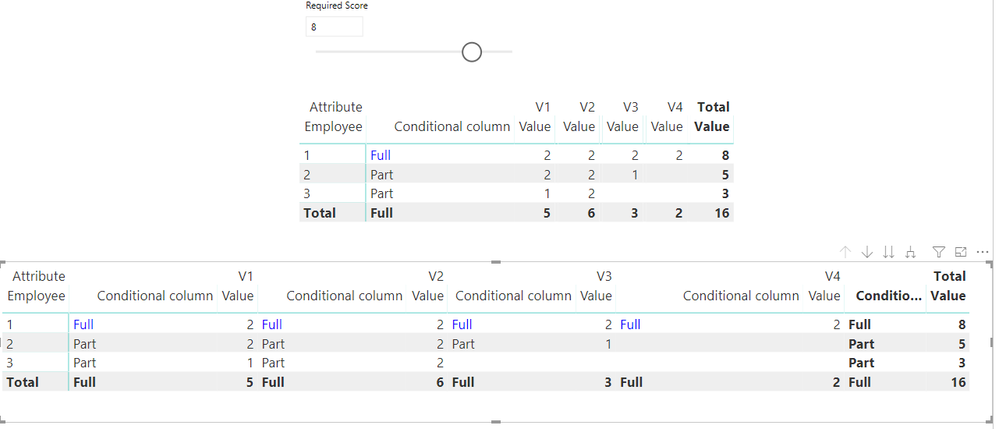
Top table is matrix wiht hidden column, bottom is table in original format.
Regards,
MFelix
Regards
Miguel Félix
Proud to be a Super User!
Check out my blog: Power BI em PortuguêsHi @Chan ,
Not really sure how you have your data setup but I'm assuming is simlar to this:
Employee Name Attribute Value
| 1 | A | V1 | 2 |
| 1 | A | V2 | 2 |
| 1 | A | V3 | 2 |
| 1 | A | V4 | 2 |
| 2 | B | V1 | 2 |
| 2 | B | V2 | 2 |
| 2 | B | V3 | 1 |
| 3 | C | V1 | 1 |
| 3 | C | V2 | 2 |
If this is the case then you need to add a measure that looks like this:
Conditional column =
IF (
CALCULATE ( SUM ( Table1[Value] ); ALLEXCEPT ( Table1; Table1[Employee] ) ) >= 'Required Score'[Required Score Value];
"Full";
"Part"
)
If your table has one column per each V you should do somehting like this:
Conditional column =
IF (
CALCULATE (
SUM ( Table1[V1] ) + SUM ( Table1[V2] )
+ SUM ( Table1[V3] )
+ SUM ( Table1[V4] );
ALLEXCEPT ( Table1; Table1[Employee] )
) >= 'Required Score'[Required Score Value];
"Full";
"Part"
)
Be aware that if you are using a matrix visual in order to use this column you need to make some "tricks",
Add the measure to your values this will make a repeated value for each column you just need to resize all of the columns with conditional except one.
If you want to conditional format that column create the following measure:
Formatting = IF([Conditional column] = "full"; 1; 0)
And then use it's result to conditional formatting, check the image and file attach.
Top table is matrix wiht hidden column, bottom is table in original format.
Regards,
MFelix
Regards
Miguel Félix
Proud to be a Super User!
Check out my blog: Power BI em PortuguêsGreat!!
It works fine now.
Thanks for your support MFelix .
Check out the April 2026 Power BI update to learn about new features.
If you have recently started exploring Fabric, we'd love to hear how it's going. Your feedback can help with product improvements.
A new Power BI DataViz World Championship is coming this June! Don't miss out on submitting your entry.
| User | Count |
|---|---|
| 43 | |
| 38 | |
| 34 | |
| 20 | |
| 16 |
| User | Count |
|---|---|
| 66 | |
| 65 | |
| 30 | |
| 26 | |
| 25 |