Join us at FabCon Atlanta from March 16 - 20, 2026, for the ultimate Fabric, Power BI, AI and SQL community-led event. Save $200 with code FABCOMM.
Register now!Vote for your favorite vizzies from the Power BI Dataviz World Championship submissions. Vote now!
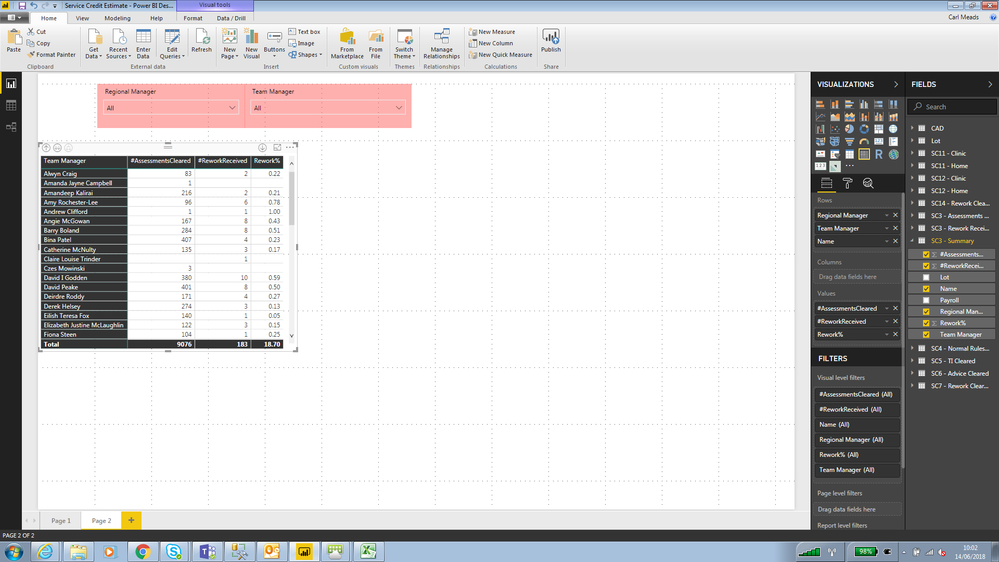
I have the matrix below, Id like to be able to show rework percent (which is currently being calculated in the SQL) so that the total is correctly shown rather than being a sum. Hope this makes sense
I
Solved! Go to Solution.
Hi carlm1975,
To get the correct total percent, create a measure using DAX like below:
Total Percent = SUM ( Table[#ReworkReceived] ) / SUM ( Table[#AssessmentsCleared] )
Regards,
Jimmy Tao
Hi carlm1975,
To get the correct total percent, create a measure using DAX like below:
Total Percent = SUM ( Table[#ReworkReceived] ) / SUM ( Table[#AssessmentsCleared] )
Regards,
Jimmy Tao
Vote for your favorite vizzies from the Power BI World Championship submissions!
If you love stickers, then you will definitely want to check out our Community Sticker Challenge!
Check out the January 2026 Power BI update to learn about new features.
| User | Count |
|---|---|
| 57 | |
| 53 | |
| 40 | |
| 17 | |
| 16 |
| User | Count |
|---|---|
| 116 | |
| 105 | |
| 41 | |
| 34 | |
| 25 |