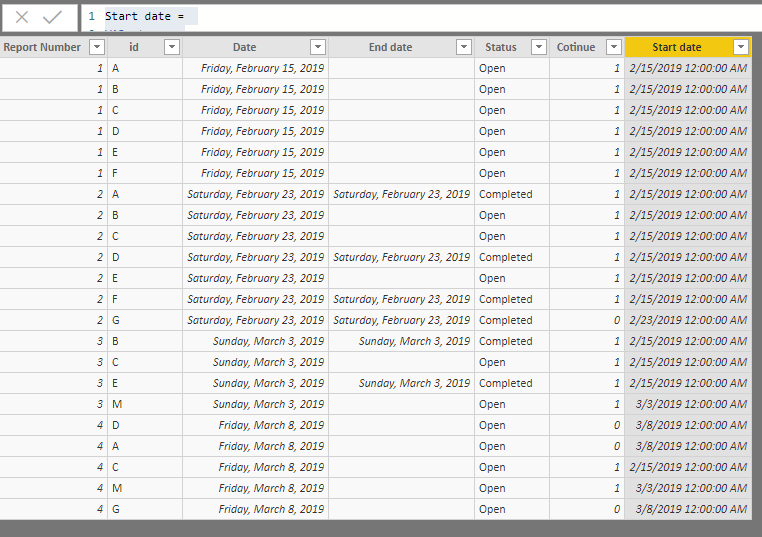
Hi All,
Do you happend to know how to find Start Date, End Date assign status "Open" or "Completed" from my data?
I have 3 columns: Report number, Report Date, ID
| Report Number | id | Date |
| 1 | A | 2/15/2019 |
| 1 | B | 2/15/2019 |
| 1 | C | 2/15/2019 |
| 1 | D | 2/15/2019 |
| 1 | E | 2/15/2019 |
| 1 | F | 2/15/2019 |
| 2 | A | 2/23/2019 |
| 2 | B | 2/23/2019 |
| 2 | C | 2/23/2019 |
| 2 | D | 2/23/2019 |
| 2 | E | 2/23/2019 |
| 2 | F | 2/23/2019 |
| 2 | G | 2/23/2019 |
| 3 | B | 3/3/2019 |
| 3 | C | 3/3/2019 |
| 3 | E | 3/3/2019 |
| 3 | M | 3/3/2019 |
| 4 | D | 3/8/2019 |
| 4 | A | 3/8/2019 |
| 4 | C | 3/8/2019 |
| 4 | M | 3/8/2019 |
| 4 | G | 3/8/2019 |
What i need?
I need to add Start Date, End Date an Status for all ID's.
Start Date is always equal report date when ID's was add and until completed. Completed means ID's is not in next report. End Date is date of next report (it can be calculated as end of the week from report date). Biggest problem is, that ID's are aways repeating, so status is changing from open to completed and vice versa.
Please, look on table with results and with desribe column
| Report Number | id | Report Date | Status | start Date | End Date | Desribe |
| 1 | A | 2/15/2019 | Open | 2/15/2019 | | it is new, so it have "Open" status |
| 1 | B | 2/15/2019 | Open | 2/15/2019 | | it is new, so it have "Open" status |
| 1 | C | 2/15/2019 | Open | 2/15/2019 | | it is new, so it have "Open" status |
| 1 | D | 2/15/2019 | Open | 2/15/2019 | | it is new, so it have "Open" status |
| 1 | E | 2/15/2019 | Open | 2/15/2019 | | it is new, so it have "Open" status |
| 1 | F | 2/15/2019 | Open | 2/15/2019 | | it is new, so it have "Open" status |
| 2 | A | 2/23/2019 | Completed | 2/15/2019 | 3/3/2019 | Continues from report 1, but not in next report "3", so "Completed" status |
| 2 | B | 2/23/2019 | Open | 2/15/2019 | | Continues from report 1 and it is in next report, "Open" Status |
| 2 | C | 2/23/2019 | Open | 2/15/2019 | | Continues from report 1 and it is in next report, "Open" Status |
| 2 | D | 2/23/2019 | Completed | 2/15/2019 | 3/3/2019 | Continues from report 1, but not in next report "3", so "Completed" status |
| 2 | E | 2/23/2019 | Open | 2/15/2019 | | Continues from report 1 and it is in next report, "Open" Status |
| 2 | F | 2/23/2019 | Completed | 2/15/2019 | 3/3/2019 | Continues from report 1, but not in next report "3", so "Completed" status |
| 2 | G | 2/23/2019 | Open | 2/23/2019 | 3/3/2019 | new, but not in next, so "Completed" w date of next report |
| 3 | B | 3/3/2019 | Open | 2/15/2019 | | Continues from report 1 and it is in next report, "Open" Status |
| 3 | C | 3/3/2019 | Open | 2/15/2019 | | Continues from report 1 and it is in next report, "Open" Status |
| 3 | E | 3/3/2019 | Completed | 2/15/2019 | 3/8/2019 | Continues from report 1 and it is in next report, "Open" Status |
| 3 | M | 3/3/2019 | Open | 3/3/2019 | | it is new, so it have "Open" status |
| 4 | D | 3/8/2019 | Open | 3/8/2019 | | not in previous report, Open status |
| 4 | A | 3/8/2019 | Open | 3/8/2019 | | not in previous report, Open status |
| 4 | C | 3/8/2019 | Open | 2/15/2019 | | it is new, so it have "Open" status |
| 4 | M | 3/8/2019 | Open | 3/3/2019 | | it is new, so it have "Open" status |
Thank all of you for your time