Join us at FabCon Atlanta from March 16 - 20, 2026, for the ultimate Fabric, Power BI, AI and SQL community-led event. Save $200 with code FABCOMM.
Register now!The Power BI Data Visualization World Championships is back! Get ahead of the game and start preparing now! Learn more
Long time scroller, first time poster.
I have two tables related by order number. Table1 orders have no duplicates, and table2 orders have as many duplicates as there are items on the order. I want to create a calculated column in Table1 that populates a value based on the existence of a certain item in Table2.
In the example below, Calc_Column says Yes if Table2[Order] has Item x.
Table1 Table2
Order Calc_Column Order Item
1 Yes 1 x
2 No 2 a
3 Yes 3 b
4 No 3 x
5 Yes 3 z
6 No 4 a
5 a
5 x
6 b
Thanks everyone!
Solved! Go to Solution.
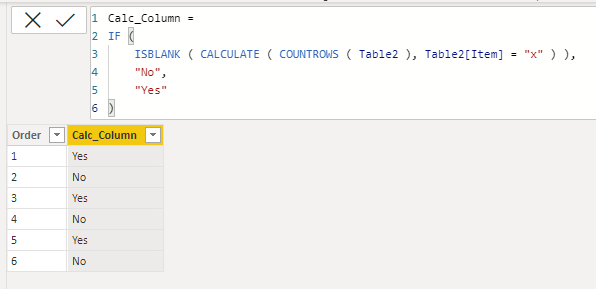
The calculated column would be like this.
Calc_Column =
IF (
ISBLANK ( CALCULATE ( COUNTROWS ( Table2 ), Table2[Item] = "x" ) ),
"No",
"Yes"
)
This worked beautifully. Thank you.
The calculated column would be like this.
Calc_Column =
IF (
ISBLANK ( CALCULATE ( COUNTROWS ( Table2 ), Table2[Item] = "x" ) ),
"No",
"Yes"
)
Check out the November 2025 Power BI update to learn about new features.
Advance your Data & AI career with 50 days of live learning, contests, hands-on challenges, study groups & certifications and more!
| User | Count |
|---|---|
| 56 | |
| 42 | |
| 41 | |
| 20 | |
| 19 |