Join us at FabCon Atlanta from March 16 - 20, 2026, for the ultimate Fabric, Power BI, AI and SQL community-led event. Save $200 with code FABCOMM.
Register now!The Power BI Data Visualization World Championships is back! Get ahead of the game and start preparing now! Learn more
Hi,
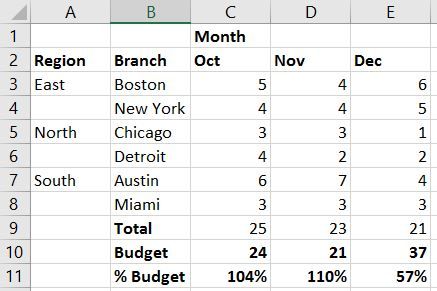
I have a pretty normal matrix layout below. But I need to add a budget (without regional or branch splits) to row 10 and a % variance versus budget row in row 11. Please can you tell me how to do this in Power BI?
Thanks for your help,
CM
Solved! Go to Solution.
Hi @CloudMonkey,
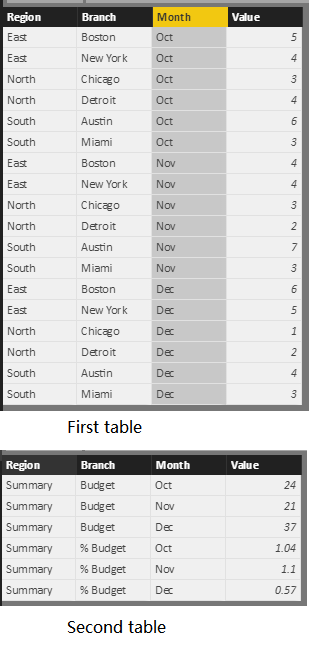
You can refer to below sample if it suitable for your requirement.
Tables:
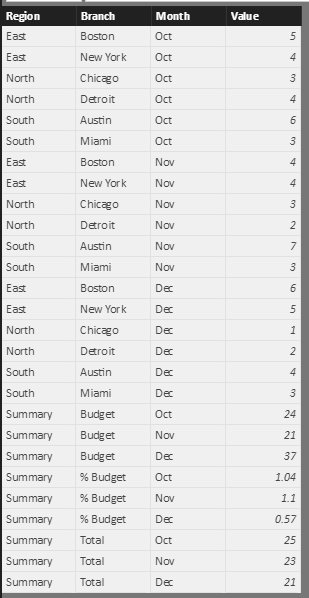
Table formula:
SummaryTable = UNION(FirstTable,SecondTable,SELECTCOLUMNS(SUMMARIZE(FirstTable,FirstTable[Month],"Value",SUM(FirstTable[Value])),"Region","Summary","Branch","Total","Month",[Month],"Value",[Value]))
Regards,
Xiaoxin Sheng
Does my question make sense?
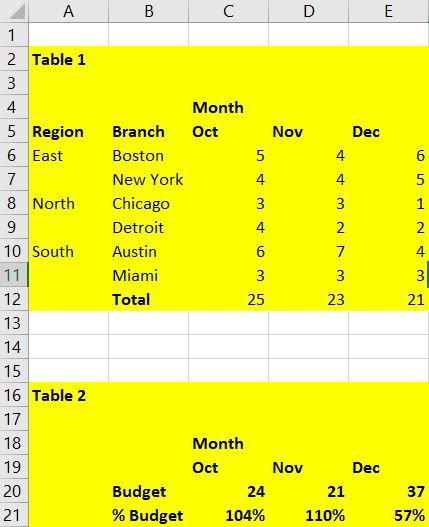
If it's impossible to do this please can someone confirm? How about if I create table 2 below, is this possible? Can I create calculated rows in a table like this (rather than calculated columns?)?
Thanks for any help,
CM
Hi @CloudMonkey,
You can refer to below sample if it suitable for your requirement.
Tables:
Table formula:
SummaryTable = UNION(FirstTable,SecondTable,SELECTCOLUMNS(SUMMARIZE(FirstTable,FirstTable[Month],"Value",SUM(FirstTable[Value])),"Region","Summary","Branch","Total","Month",[Month],"Value",[Value]))
Regards,
Xiaoxin Sheng
The Power BI Data Visualization World Championships is back! Get ahead of the game and start preparing now!
| User | Count |
|---|---|
| 38 | |
| 38 | |
| 36 | |
| 28 | |
| 28 |
| User | Count |
|---|---|
| 124 | |
| 89 | |
| 73 | |
| 66 | |
| 65 |