This time we’re going bigger than ever. Fabric, Power BI, SQL, AI and more. We're covering it all. You won't want to miss it.
Learn moreDid you hear? There's a new SQL AI Developer certification (DP-800). Start preparing now and be one of the first to get certified. Register now
Hi All,
I have created a calculated table using existing table which gives distinct values from table i.e newtable= DISTINCT(table(column). I am trying to merge the newtable with other table in the model but I am not seeing newtable in power query editor or in the merge. Can you please let me know how to do it.
Thanks
Susheel
Solved! Go to Solution.
@Anonymous , for that, create a table is power query.
refer these two videos from tutorial series
refer: https://youtu.be/vHuhbvYCiNc
@Anonymous
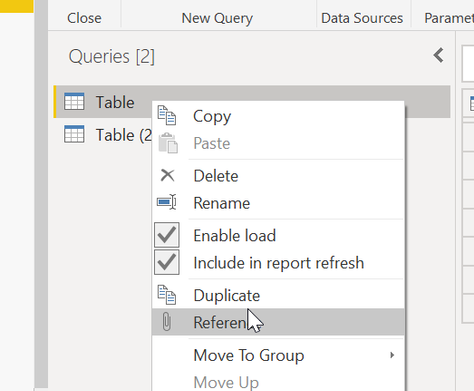
you can try to create a reference table in the PQ.
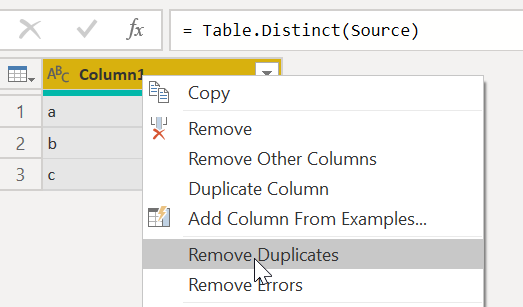
remove the rest columns and remove duplicate
Proud to be a Super User!
@Anonymous Calculated table created in power bi will not be visible in powerquery window. As table is calculated and is being created in powerbi window, you will not be able to merge in powerquery window. You may need to create either in your source file or in powerquery window to be able to merge it with other table.
Proud to be a Super User!
@Anonymous , for that, create a table is power query.
refer these two videos from tutorial series
refer: https://youtu.be/vHuhbvYCiNc
Check out the April 2026 Power BI update to learn about new features.
Sign up to receive a private message when registration opens and key events begin.
If you have recently started exploring Fabric, we'd love to hear how it's going. Your feedback can help with product improvements.
| User | Count |
|---|---|
| 36 | |
| 32 | |
| 27 | |
| 23 | |
| 16 |
| User | Count |
|---|---|
| 65 | |
| 50 | |
| 30 | |
| 25 | |
| 24 |