Join us at FabCon Atlanta from March 16 - 20, 2026, for the ultimate Fabric, Power BI, AI and SQL community-led event. Save $200 with code FABCOMM.
Register now!The Power BI Data Visualization World Championships is back! Get ahead of the game and start preparing now! Learn more
Hello,
I am struggling through something that I'm sure is very simple. I have data
| Store | Invoice | Item |
| Blue | 100 | A |
| Blue | 100 | A |
| Blue | 100 | A |
| Blue | 100 | B |
| Blue | 101 | B |
| Blue | 101 | C |
| Blue | 102 | A |
| Blue | 103 | B |
| Blue | 103 | C |
| Blue | 103 | C |
| Blue | 104 | A |
| Blue | 104 | D |
| Green | 200 | A |
| Green | 200 | B |
| Green | 201 | B |
| Green | 201 | B |
| Green | 201 | C |
| Green | 201 | C |
| Green | 202 | A |
| Green | 203 | B |
| Green | 203 | A |
| Green | 204 | A |
| Green | 204 | A |
| Green | 204 | C |
What I would like to do, is have the frequency of each occurence pulled in. ie, Blue, 100, & A occurs 3 times, while Blue, 100, & B only once. I figured I would set up a Calculated Table to summarize, but can't get the summary to work for me. I want my Calculated table to turn out like my visual here.
My Code
Table = SUMMARIZE(Sheet1,Sheet1[Store],Sheet1[Invoice],Sheet1[Item],"Count",DISTINCTCOUNT(Sheet1[Item]))
is obviously incorrect. Please help. I have the file attached.
https://www.dropbox.com/s/jxzfbfqjm5z3y2i/Sample.pbix?dl=0
Thanks!
Solved! Go to Solution.
@Anonymous
In this case you can just replace
DISTINCTCOUNT ( Sheet1[Item] )
with
COUNTROWS ( Sheet1 )
Out of interest, why is it useful to create this as a calculated table (when you can do the same thing with a visual)?
Hi There,
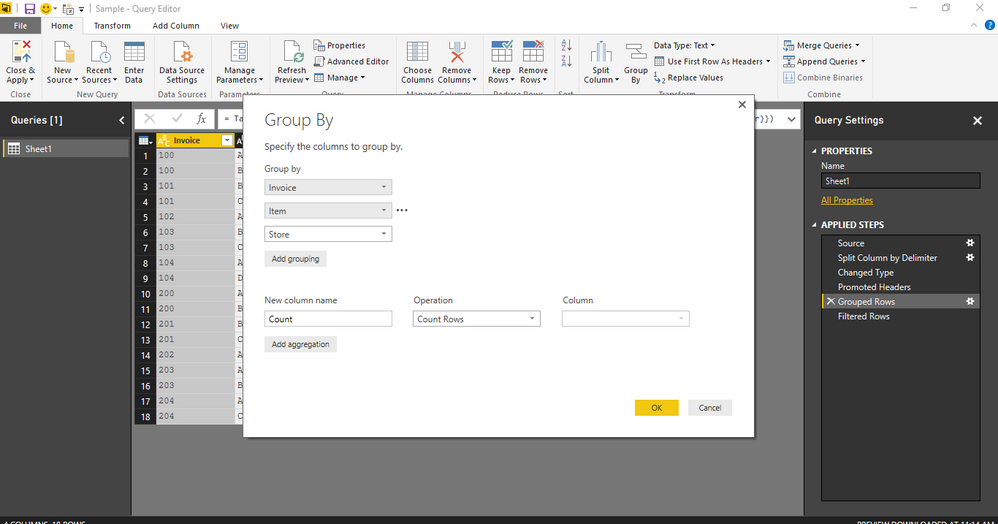
You can also use GROUPBY in the Query Editor for counting the frequency of occurances in this case as shown in the screenshot.GroupBy
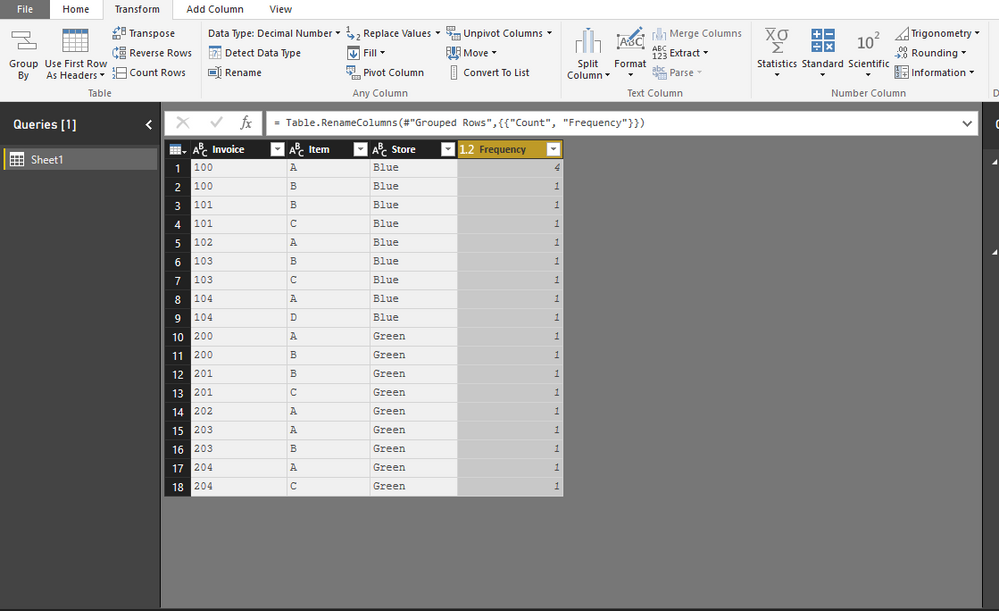
Frequency of occurances
Hi There,
You can also use GROUPBY in the Query Editor for counting the frequency of occurances in this case as shown in the screenshot.GroupBy
Frequency of occurances
Thank you. I would like to do this so that I can filter out items that have only one frequency.
The Power BI Data Visualization World Championships is back! Get ahead of the game and start preparing now!
| User | Count |
|---|---|
| 39 | |
| 37 | |
| 33 | |
| 32 | |
| 29 |
| User | Count |
|---|---|
| 133 | |
| 88 | |
| 85 | |
| 68 | |
| 64 |