Don't miss your chance to take the Fabric Data Engineer (DP-600) exam for FREE! Find out how by attending the DP-600 session on April 23rd (pacific time), live or on-demand.
Learn moreJoin the FabCon + SQLCon recap series. Up next: Power BI, Real-Time Intelligence, IQ and AI, and Data Factory take center stage. All sessions are available on-demand after the live show. Register now
Hello,
I am struggling through something that I'm sure is very simple. I have data
| Store | Invoice | Item |
| Blue | 100 | A |
| Blue | 100 | A |
| Blue | 100 | A |
| Blue | 100 | B |
| Blue | 101 | B |
| Blue | 101 | C |
| Blue | 102 | A |
| Blue | 103 | B |
| Blue | 103 | C |
| Blue | 103 | C |
| Blue | 104 | A |
| Blue | 104 | D |
| Green | 200 | A |
| Green | 200 | B |
| Green | 201 | B |
| Green | 201 | B |
| Green | 201 | C |
| Green | 201 | C |
| Green | 202 | A |
| Green | 203 | B |
| Green | 203 | A |
| Green | 204 | A |
| Green | 204 | A |
| Green | 204 | C |
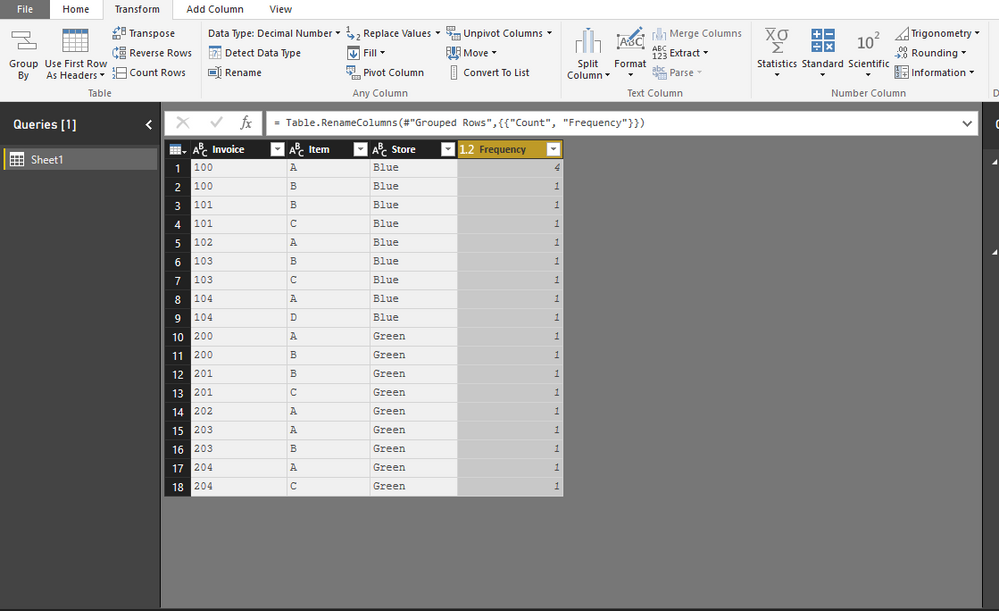
What I would like to do, is have the frequency of each occurence pulled in. ie, Blue, 100, & A occurs 3 times, while Blue, 100, & B only once. I figured I would set up a Calculated Table to summarize, but can't get the summary to work for me. I want my Calculated table to turn out like my visual here.
My Code
Table = SUMMARIZE(Sheet1,Sheet1[Store],Sheet1[Invoice],Sheet1[Item],"Count",DISTINCTCOUNT(Sheet1[Item]))
is obviously incorrect. Please help. I have the file attached.
https://www.dropbox.com/s/jxzfbfqjm5z3y2i/Sample.pbix?dl=0
Thanks!
Solved! Go to Solution.
@Anonymous
In this case you can just replace
DISTINCTCOUNT ( Sheet1[Item] )
with
COUNTROWS ( Sheet1 )
Out of interest, why is it useful to create this as a calculated table (when you can do the same thing with a visual)?
Hi There,
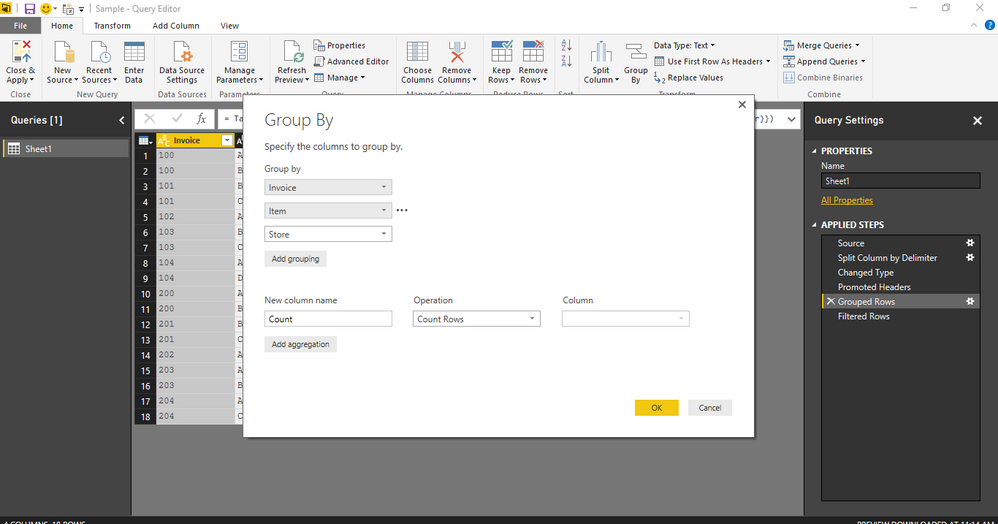
You can also use GROUPBY in the Query Editor for counting the frequency of occurances in this case as shown in the screenshot.GroupBy
Frequency of occurances
Hi There,
You can also use GROUPBY in the Query Editor for counting the frequency of occurances in this case as shown in the screenshot.GroupBy
Frequency of occurances
Thank you. I would like to do this so that I can filter out items that have only one frequency.
Check out the April 2026 Power BI update to learn about new features.
If you have recently started exploring Fabric, we'd love to hear how it's going. Your feedback can help with product improvements.
A new Power BI DataViz World Championship is coming this June! Don't miss out on submitting your entry.
| User | Count |
|---|---|
| 48 | |
| 46 | |
| 41 | |
| 20 | |
| 17 |
| User | Count |
|---|---|
| 70 | |
| 69 | |
| 32 | |
| 27 | |
| 26 |