Join us at FabCon Atlanta from March 16 - 20, 2026, for the ultimate Fabric, Power BI, AI and SQL community-led event. Save $200 with code FABCOMM.
Register now!The Power BI Data Visualization World Championships is back! Get ahead of the game and start preparing now! Learn more
hi there
newby to PowerBi here.
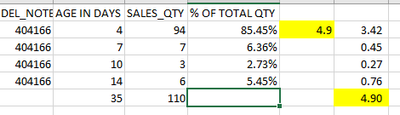
I need to calculate a weighted average on the age of product consignments sold over several days. I get it right on excel with the sumproduct formula. But o my, it's not working on Bi. The values in yellow is what i get on excel and what my answer should be.
however,
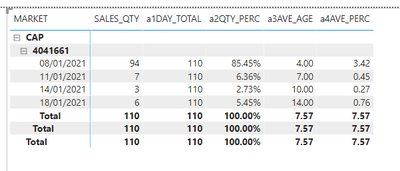
in PowerBi i get the following:
my measures are as follows:
a1DAY_TOTAL = CALCULATE(SUM(SALES[SALES_QTY]),ALL(SALES[SALES_DATE]),FILTERS(SALES[DEL_GRN]))
a2QTY_PERC = DIVIDE(SUM(SALES[SALES_QTY]),[a1DAY_TOTAL])
Solved! Go to Solution.
Hi, @yolandecastle ;
You could create measure as follows:
averge =
var _a=SUMMARIZE('Table',[DEL_ NOTE ],[SALES_ _QTY],"1", SUM([SALES_ _QTY])*SUM([AGE IN DAYS]))
return DIVIDE( SUMX(_a,[1]),SUM([SALES_ _QTY]))
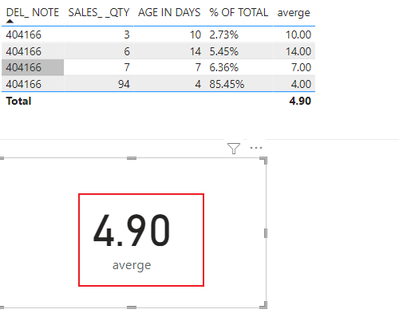
The final output is shown below:
Best Regards,
Community Support Team_ Yalan Wu
If this post helps, then please consider Accept it as the solution to help the other members find it more quickly.
Hi, @yolandecastle ;
You could create measure as follows:
averge =
var _a=SUMMARIZE('Table',[DEL_ NOTE ],[SALES_ _QTY],"1", SUM([SALES_ _QTY])*SUM([AGE IN DAYS]))
return DIVIDE( SUMX(_a,[1]),SUM([SALES_ _QTY]))
The final output is shown below:
Best Regards,
Community Support Team_ Yalan Wu
If this post helps, then please consider Accept it as the solution to help the other members find it more quickly.
The Power BI Data Visualization World Championships is back! Get ahead of the game and start preparing now!
| User | Count |
|---|---|
| 40 | |
| 35 | |
| 34 | |
| 31 | |
| 28 |
| User | Count |
|---|---|
| 137 | |
| 102 | |
| 68 | |
| 66 | |
| 64 |