cancel
Showing results for 
Search instead for 
Did you mean: 

July 28 - August 9 | Final Round of the Power BI Dataviz World Championships. This is your chance. Learn more

Reply
fraza
Frequent Visitor

Calculated Index column based on groups

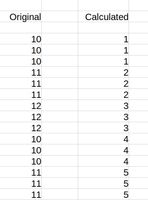
Can anyone help me with this.?


WhatsApp Image 2021-09-28 at 18.36.20.jpeg


I need make the calculated column on the right hand side that only increments when the original field changes its value.


Noticed that the increments should keep increasing even though the a original group value may repeat the index should not.


Is there an option or some dax etc to achieve this?

1 ACCEPTED SOLUTION
Anonymous
Not applicable

@fraza 

This is logically not possible since you don't have a field to group by. As the workaround, you could add an index column and flag column before getting the rank, which is a bit confusing.


1. add an index column in power query

2. create a flag column 

Flag =
var current_=[Original]
var current_1= CALCULATE(MAX([Original]),FILTER('Table',[Index]=EARLIER([Index])-1))
var current_2 = CALCULATE(MAX([Original]),FILTER('Table',[Index]=EARLIER([Index])-2))
var index_1=CALCULATE(SUM('Table'[Index]),FILTER('Table',[Index]=EARLIER([Index])-1))
var index_2=CALCULATE(SUM('Table'[Index]),FILTER('Table',[Index]=EARLIER([Index])-2))
Return
IF(current_=current_1&&current_1=current_2,index_2,IF(current_=current_1,index_1,[Index]))
 
3. create the rank column

Vpazhenmsft_0-1633055760558.png


Paul Zheng _ Community Support Team
If this post helps, please Accept it as the solution to help the other members find it more quickly.

View solution in original post

1 REPLY 1
Anonymous
Not applicable

@fraza 

This is logically not possible since you don't have a field to group by. As the workaround, you could add an index column and flag column before getting the rank, which is a bit confusing.


1. add an index column in power query

2. create a flag column 

Flag =
var current_=[Original]
var current_1= CALCULATE(MAX([Original]),FILTER('Table',[Index]=EARLIER([Index])-1))
var current_2 = CALCULATE(MAX([Original]),FILTER('Table',[Index]=EARLIER([Index])-2))
var index_1=CALCULATE(SUM('Table'[Index]),FILTER('Table',[Index]=EARLIER([Index])-1))
var index_2=CALCULATE(SUM('Table'[Index]),FILTER('Table',[Index]=EARLIER([Index])-2))
Return
IF(current_=current_1&&current_1=current_2,index_2,IF(current_=current_1,index_1,[Index]))
 
3. create the rank column

Vpazhenmsft_0-1633055760558.png


Paul Zheng _ Community Support Team
If this post helps, please Accept it as the solution to help the other members find it more quickly.

Helpful resources

Announcements
FabCon and SQLCon Barcelona 2026

FabCon & SQLCon – Barcelona 2026

Join us in Barcelona for FabCon and SQLCon, the Fabric, Power BI, SQL, and AI community event. Save €200 with code FABCMTY200.

Fabric Community Sticker Design Challenge Barcelona Carousel

Fabric Community Sticker Challenge - Barcelona 2026

If you love stickers, then you will definitely want to check out our community sticker challenge, Barcelona edition!

July Power BI Update Carousel

Power BI Monthly Update - July 2026

Check out the July 2026 Power BI update to learn about new features.

Power BI DataViz World Championships carousel

Power BI DataViz World Championships - June 2026

A new Power BI DataViz World Championship is coming this June! Don't miss out on submitting your entry.

Top Solution Authors