Join us at FabCon Atlanta from March 16 - 20, 2026, for the ultimate Fabric, Power BI, AI and SQL community-led event. Save $200 with code FABCOMM.
Register now!The Power BI Data Visualization World Championships is back! Get ahead of the game and start preparing now! Learn more
Hello,
I seem to be having an issue when trying to pull the amount of participants for a report.
Here is the link to a ZIP file of the report and source files: https://1drv.ms/f/s!Ar-qf5t6I8TOo0ME1gKSvyjbC_JU
There are two reports I run with the membership software we use, and I've been able to get them combined to show the correct amounts per YTD based on the selected month(s) in the slicer.
However, if you look at the 2019 Participants column currently there, the "Membership" category is only listing the total as 390. This should be 402 when you add all the numbers up.
Are my formulas correct? Why would it not be adding everything up correctly?
Hi @TheSAY ,
Your measure is correct in each subtotal as well as in the total count.
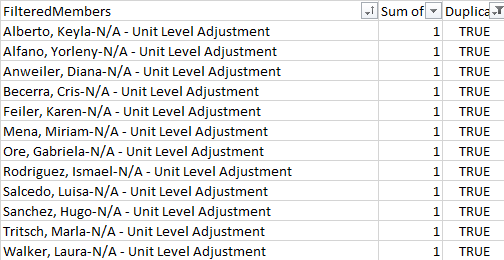
The reason is because you have the same member in different categories, those are:
Regards,
Fernando
Hi Fernando @calerof
Thank you for getting back to me.
Do you know how I would go about getting duplicates included? Would I need to base it off the member name and the adjustment type perhaps?
For example, with one of the names listed below, Keyla Alberto, they're being duplicated due to "7th Grade Initiative" and "Achievers". Since the combination of columns will be "Alberto, Keyla-N/A - Unit Level Adjustment" for both, would I need to do it as "Alberto, Keyla-7th Grade Initiative" and "Alberto, Keyla-Achievers"?
The Power BI Data Visualization World Championships is back! Get ahead of the game and start preparing now!
| User | Count |
|---|---|
| 39 | |
| 37 | |
| 33 | |
| 32 | |
| 29 |
| User | Count |
|---|---|
| 133 | |
| 88 | |
| 85 | |
| 68 | |
| 64 |