Join us at FabCon Atlanta from March 16 - 20, 2026, for the ultimate Fabric, Power BI, AI and SQL community-led event. Save $200 with code FABCOMM.
Register now!The Power BI Data Visualization World Championships is back! Get ahead of the game and start preparing now! Learn more
Dear PowerBI Gurus,
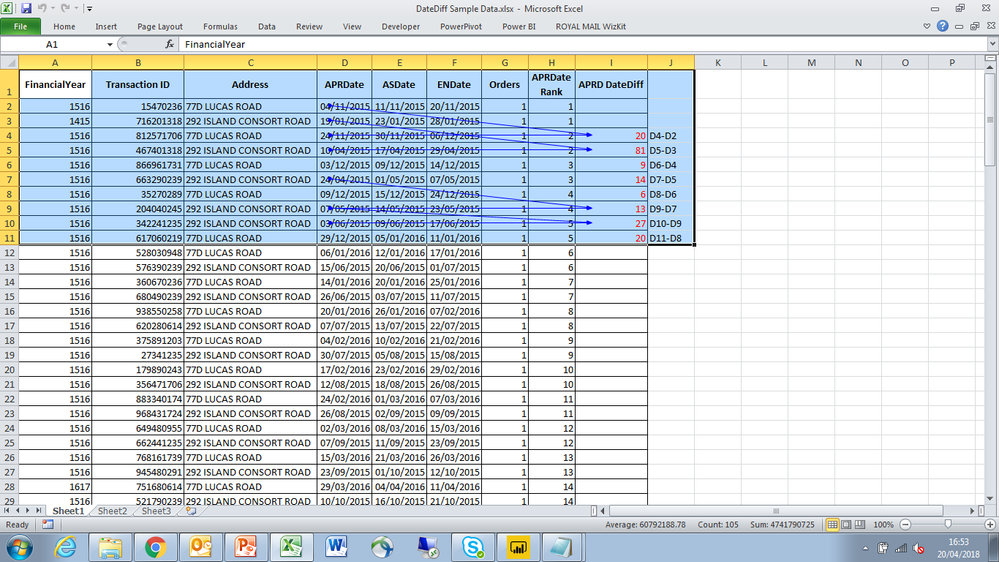
I need your help in calculating the datediff as a calculated column (in colum I:- APRD DateDiff). At the moment, I can't seem to figure out the logic to make this work.
To get started, I reckon I needed to rank each address (column C) by their APRDates (column D), which I managed to do (in colum H) as shown in the attached sample data. The end goal, however, is to find the datediff between RankN and RankN-1 APRDates for each distinct address. i.e for 77D Lucas Road, the first DateDiff is 20days (24//11/2015 - 04/11/2015), etc.
If you need any further clarification, please let me know. I look forward to speedy assistance.
Many thanks.
https://www.dropbox.com/s/bnm2s20neosvep1/DateDiff%20Sample%20Data.xlsx?dl=0
Solved! Go to Solution.
Hi @Zubair_Muhammad,
Thanks for giving me the headstart.
Although, I had to tweak your formular ever so slightly to make it work. So, basically declaring Vars for:
-Min (previous_date),
-Max (next_date) dates,
-Each address line (X1)
and then returning DateDiff between Min and Max got the job done!
Here's what the final solution looked like.
DaysDifference =
Var X1 = Table1[Address]
VAR previous_date =
CALCULATE (
MIN ( Table1[APRDate] ),FILTER(Table1,Table1[Address] =X1)
FILTER (
ALLEXCEPT ( Table1, Table1[Address] ),
Table1[APRDate Rank]
= EARLIER ( Table1[APRDate Rank] ) - 1
)
)
VAR next_date =
CALCULATE (
MAX ( Table1[APRDate] ),FILTER(Table1,Table1[Address] =X1),
FILTER (
ALLEXCEPT ( Table1, Table1[Address] ),
Table1[APRDate Rank]
= EARLIER ( Table1[APRDate Rank] )
)
)
RETURN
IF (
NOT ( ISBLANK ( previous_date ) ),
DATEDIFF ( previous_date, next_date, DAY )
)
HI @cetobs
Try this column
DaysDifference =
VAR previous_date =
CALCULATE (
MAX ( Table1[APRDate] ),
FILTER (
ALLEXCEPT ( Table1, Table1[Address] ),
Table1[APRDate Rank]
= EARLIER ( Table1[APRDate Rank] ) - 1
)
)
RETURN
IF (
NOT ( ISBLANK ( previous_date ) ),
DATEDIFF ( previous_date, Table1[APRDate], DAY )
)
Hi @Zubair_Muhammad,
Thanks for giving me the headstart.
Although, I had to tweak your formular ever so slightly to make it work. So, basically declaring Vars for:
-Min (previous_date),
-Max (next_date) dates,
-Each address line (X1)
and then returning DateDiff between Min and Max got the job done!
Here's what the final solution looked like.
DaysDifference =
Var X1 = Table1[Address]
VAR previous_date =
CALCULATE (
MIN ( Table1[APRDate] ),FILTER(Table1,Table1[Address] =X1)
FILTER (
ALLEXCEPT ( Table1, Table1[Address] ),
Table1[APRDate Rank]
= EARLIER ( Table1[APRDate Rank] ) - 1
)
)
VAR next_date =
CALCULATE (
MAX ( Table1[APRDate] ),FILTER(Table1,Table1[Address] =X1),
FILTER (
ALLEXCEPT ( Table1, Table1[Address] ),
Table1[APRDate Rank]
= EARLIER ( Table1[APRDate Rank] )
)
)
RETURN
IF (
NOT ( ISBLANK ( previous_date ) ),
DATEDIFF ( previous_date, next_date, DAY )
)
Dear PowerBI Gurus,
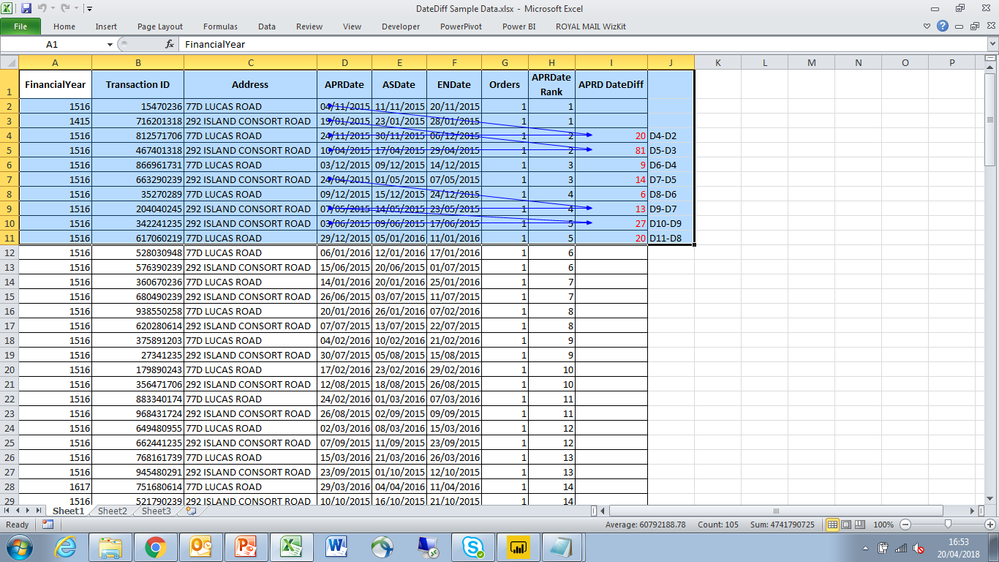
I need your help in calculating the datediff as a calculated column (in colum I:- APRD DateDiff). At the moment, I can't seem to figure out the logic to make this work.
To get started, I reckon I needed to rank each address (column C) by their APRDates (column D), which I managed to do (in colum H) as shown in the attached sample data. The end goal, however, is to calculate the datediff between RankN and RankN-1 APRDates for each distinct address. i.e for 77D Lucas Road, the first DateDiff is 20days (24//11/2015 - 04/11/2015), etc.
If you need any further clarification, please let me know. I look forward to speedy assistance.
Many thanks.
https://www.dropbox.com/s/bnm2s20neosvep1/DateDiff%20Sample%20Data.xlsx?dl=0
The Power BI Data Visualization World Championships is back! Get ahead of the game and start preparing now!
| User | Count |
|---|---|
| 41 | |
| 38 | |
| 36 | |
| 31 | |
| 28 |
| User | Count |
|---|---|
| 128 | |
| 88 | |
| 79 | |
| 68 | |
| 63 |