cancel
Showing results for 
Search instead for 
Did you mean: 

July 7 - July 17 | Round 2 of the Power BI Dataviz World Championships. Don't miss your chance! Learn more

Reply
Gillard_2
Frequent Visitor

Calculated DateDiff between various rows

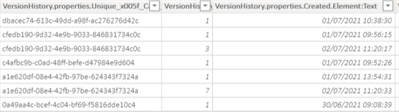
I need a calculated column that will give me the duration between various rows:

Gillard_2_0-1625228632514.png

The table above will always have either one or two records for each unique code.

It will always have when the record was created and if a certain action has been completed it will show a second row of date.

I need a calculated column that will show the DateDiff between the two records that have the same code in the left column.

The versions will always be 1 for the first record but the second record could be anything.

The above table only have two records that have both lines of data so I would expect to see two of the rows in the new column with data and the rest would be blank as the action has not been completed yet.

Hope this makes sense but I am not sure how I can do this.

Thanks in advance

1 ACCEPTED SOLUTION
v-yalanwu-msft
Community Support
Community Support

Hi, @Gillard_2 ;

According to your description, you also could try to create a column as follows:

datediff =
IF (
    CALCULATE ( DISTINCTCOUNT ( [TIME] ), ALLEXCEPT ( 'Table', 'Table'[ID] ) ) = 2
        && CALCULATE ( MAX ( [TIME] ), ALLEXCEPT ( 'Table', 'Table'[ID] ) ) = [TIME],
    DATEDIFF (
        CALCULATE ( MIN ( [TIME] ), ALLEXCEPT ( 'Table', 'Table'[ID] ) ),
        CALCULATE ( MAX ( [TIME] ), ALLEXCEPT ( 'Table', 'Table'[ID] ) ),
        DAY
    )
)

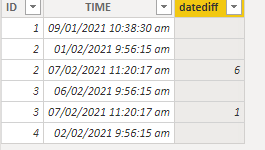
The final output is shown below:

vyalanwumsft_0-1625474828390.png

Best Regards,
Community Support Team_ Yalan Wu
If this post helps, then please consider Accept it as the solution to help the other members find it more quickly.

View solution in original post

2 REPLIES 2
v-yalanwu-msft
Community Support
Community Support

Hi, @Gillard_2 ;

According to your description, you also could try to create a column as follows:

datediff =
IF (
    CALCULATE ( DISTINCTCOUNT ( [TIME] ), ALLEXCEPT ( 'Table', 'Table'[ID] ) ) = 2
        && CALCULATE ( MAX ( [TIME] ), ALLEXCEPT ( 'Table', 'Table'[ID] ) ) = [TIME],
    DATEDIFF (
        CALCULATE ( MIN ( [TIME] ), ALLEXCEPT ( 'Table', 'Table'[ID] ) ),
        CALCULATE ( MAX ( [TIME] ), ALLEXCEPT ( 'Table', 'Table'[ID] ) ),
        DAY
    )
)

The final output is shown below:

vyalanwumsft_0-1625474828390.png

Best Regards,
Community Support Team_ Yalan Wu
If this post helps, then please consider Accept it as the solution to help the other members find it more quickly.

ryan_mayu
Super User
Super User

@Gillard_2 

Is this what you want?

Column = 
var LAST=MAXX(FILTER('Table','Table'[ID]=EARLIER('Table'[ID])&&'Table'[TIME]<EARLIER('Table'[TIME])),'Table'[TIME])
RETURN IF(ISBLANK(LAST),BLANK(),DATEDIFF(LAST,'Table'[TIME],DAY))

pls see the attachment below


Did I answer your question? Mark my post as a solution!

Proud to be a Super User!


Helpful resources

Announcements
FabCon and SQLCon Barcelona 2026

FabCon & SQLCon – Barcelona 2026

Join us in Barcelona for FabCon and SQLCon, the Fabric, Power BI, SQL, and AI community event. Save €200 with code FABCMTY200.

60 days of Data Days Carousel

Data Days 2026

Join Fabric Data Days 2026: 60 days of free live/on-demand sessions, challenges, study groups, and certification opportunities.

Power BI DataViz World Championships carousel

Power BI DataViz World Championships - June 2026

A new Power BI DataViz World Championship is coming this June! Don't miss out on submitting your entry.