cancel
Showing results for 
Search instead for 
Did you mean: 

Next up in the FabCon + SQLCon recap series: The roadmap for Microsoft SQL and Maximizing Developer experiences in Fabric. All sessions are available on-demand after the live show. Register now

Reply
MagisKoen
Frequent Visitor

Calculated Colums with multiple tables

So I have 2 tables and using some formula in the calculated columns section i want to create a new column. It looks like this:


Table 1: 

reference | some string | datetime

r1 | aa | 29/11/2021

r1 | bb | 25/11/2021

r2 | cc | 28/11/2021

r3 | ab | 28/11/2021

r3 | ab | 29/11/2021


For table 2 I want to add a calculated column that includes the most recent date for each reference. It would look like this:

Table 2:

reference | calculated max date

r1 | 29/11/2021

r2 | 28/11/2021

r3 | 29/11/2021


I have tried to program it like this:

DateSolved = 
If (
    ServiceTickets[ServiceTicketStateId] = 4, 
    Calculate(MAX(Mail[DateTimeSent]), Mail[Meldingsnummer] = ServiceTickets[Reference])
    )

This returns difficulties with the filter expression as it does not allow different tables to be used. How can I solve this? Thanks in advance!

1 ACCEPTED SOLUTION
Aburar_123
Solution Supplier
Solution Supplier

Hi @MagisKoen ,


Please find the solution below,


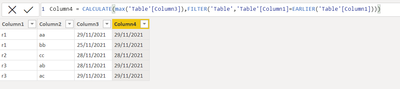
Aburar_123_0-1638204673344.png

Column4 = CALCULATE(max('Table'[Column3]),FILTER('Table','Table'[Column1]=EARLIER('Table'[Column1])))
 
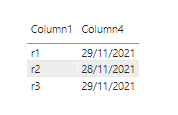
result is as below,
Aburar_123_1-1638204739422.png

Please like and mark it as a solution if it give right answer to you. thanks

View solution in original post

2 REPLIES 2
Aburar_123
Solution Supplier
Solution Supplier

Hi @MagisKoen ,


Please find the solution below,


Aburar_123_0-1638204673344.png

Column4 = CALCULATE(max('Table'[Column3]),FILTER('Table','Table'[Column1]=EARLIER('Table'[Column1])))
 
result is as below,
Aburar_123_1-1638204739422.png

Please like and mark it as a solution if it give right answer to you. thanks

Thank you a lot Aburar_123, I did need to put in a Lookupvalue to transpose the data to the other table but this works!

Helpful resources

Announcements
New to Fabric survey Carousel

New to Fabric Survey

If you have recently started exploring Fabric, we'd love to hear how it's going. Your feedback can help with product improvements.

Power BI DataViz World Championships carousel

Power BI DataViz World Championships - June 2026

A new Power BI DataViz World Championship is coming this June! Don't miss out on submitting your entry.

Join our Fabric User Panel

Join our Fabric User Panel

Share feedback directly with Fabric product managers, participate in targeted research studies and influence the Fabric roadmap.

March Power BI Update Carousel

Power BI Community Update - March 2026

Check out the March 2026 Power BI update to learn about new features.