cancel
Showing results for 
Search instead for 
Did you mean: 

The Power BI Data Visualization World Championships is back! Get ahead of the game and start preparing now! Learn more

Reply
Bokangmaela
Helper I
Helper I

Calculated Columns offset value

Good day 

I am current try to replicate a totalizer reconstructure into power bi using a calculated column. Lets say we have a column named Tagvalues which hold a list of values.  I have created a calculated column called Peviouse Tagvalue which holds which number appeared before the current value. I also created an Index column to help me contruct the Previouse Tagvalue column. This is shown in the picture below.
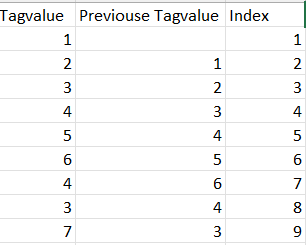
Bokangmaela_0-1678878628498.png


What the Totalizer reconstructed column should do is check if the Tagvalue is greater than the Previous Tagvalue. If the Tagvalue is greater than the Previouse Tagvalue I want to add the previouse value of the totalizer reconstructed column with the Tagvalue and subtract the Previouse Tagvalue. If the Tagvalue is less than the Previous Tagvalue what I want to do is use the previous value that has been calculated by the totalizer reconstructor column and use that as the value as shown in the image below.
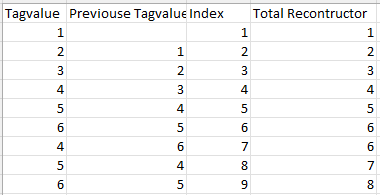
Bokangmaela_1-1678880254014.png

What I had a look at is using the OFFSET like this 

Totalizer reconstructed  = 

var previouseReconstructedValue = Calculate(

                                                    [Totalizer reconstructed], OFFSET(-1)

                                            )

var currentValue= 'Test'[Tagvalue]

var previousTagvalue = 'Test'[Previouse Tagvalue]

var difference = currentValue - previouseValue

Return

IF(

     difference > 0,  previouseReconstructedValue + currentValue - previousTagvalue, 

      IF(

           difference < 0, previouseReconstructedValue 

     )

)


But obivously this is wrong and it won't work because you can't use the offset function like that I would like to find out if there is a way to use the previouse value of a calculated column within the column 

3 REPLIES 3
amitchandak
Super User
Super User

@Bokangmaela , If you want a new column


Previous Tage value = maxx(filter(Table, [Index] = earlier([Index]) -1), [Tag Value])


for measure consider Offset

Power BI Offset Compare Categories, Time Intelligence MOM, QOQ, and YOY: https://youtu.be/5YMlkDNGr0U

Share with Power BI Enthusiasts: Full Power BI Video (20 Hours) YouTube
Microsoft Fabric Series 60+ Videos YouTube
Microsoft Fabric Hindi End to End YouTube

Hello @amitchandak , 
I have similiar problem, 
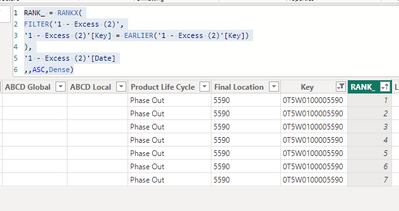
1. I get RANK

betty_bui2602_1-1694063251817.png

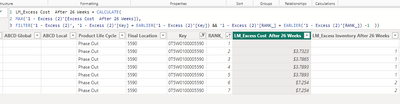
2. Apply Earlier

betty_bui2602_0-1694063225607.png

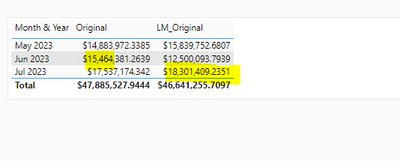
it seems ok on 1 single key, but total is not correct. Do you know where it went wrong? 😞

betty_bui2602_2-1694063508237.png


Thanks for taking your time to look at my question.


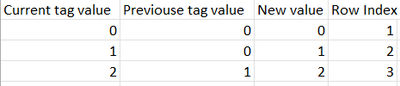
I am able to calculate the previouse the Previouse Tag value using a calculated column. The issue that I am facing is while calculating each row of a column I need to be able to look at the previous row of the column in order to calculate the next value of the column


For example 

Bokangmaela_1-1678951973587.png

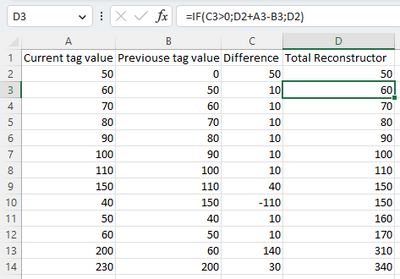
Lets have a look at row index 3. The row value in the New Value column at Row Index 3 is calculated by using the [New Value column at Row Index 2] +  [Current tag value column at Row Index 3] - [Previous tag value column at Row Index 3].  The issue I am have is getting the [New Value column at Row Index 2] in order to calculate the value for the New value column at Row Index 3.  So you can't calculate the next row value without using the previous row value.


If I am using your example I would want to do something like 

Previous Tage value =
var PreviouseValue = maxx(filter(Table, [Index] = earlier([Index]) -1), [Previous Tage value])
 
Here is the Excel equivalent
Bokangmaela_0-1678960460661.png


Please let me know if my explanation provides more clarity in the issue that I am facing. 

Helpful resources

Announcements
Power BI DataViz World Championships

Power BI Dataviz World Championships

The Power BI Data Visualization World Championships is back! Get ahead of the game and start preparing now!

December 2025 Power BI Update Carousel

Power BI Monthly Update - December 2025

Check out the December 2025 Power BI Holiday Recap!

FabCon Atlanta 2026 carousel

FabCon Atlanta 2026

Join us at FabCon Atlanta, March 16-20, for the ultimate Fabric, Power BI, AI and SQL community-led event. Save $200 with code FABCOMM.