cancel
Showing results for 
Search instead for 
Did you mean: 

Get Fabric Certified for FREE during Fabric Data Days. Don't miss your chance! Request now

Reply
justclicknbtns
Frequent Visitor

Calculated Column to Measure

I'm attempting to make the following calculated column, but it requires too much memory. When I try to make it a measure the EARLIER function does not work. 


Operating Days test = CALCULATE(count(DepthVsDays[HoleDepth])/288,
                    FIlter(ALLEXCEPT(DepthVsDays,DepthVsDays[WellName]),DepthVsDays[EdrDateTime]<=EARLIER(depthvsdays[edrdatetime])))

ime])))


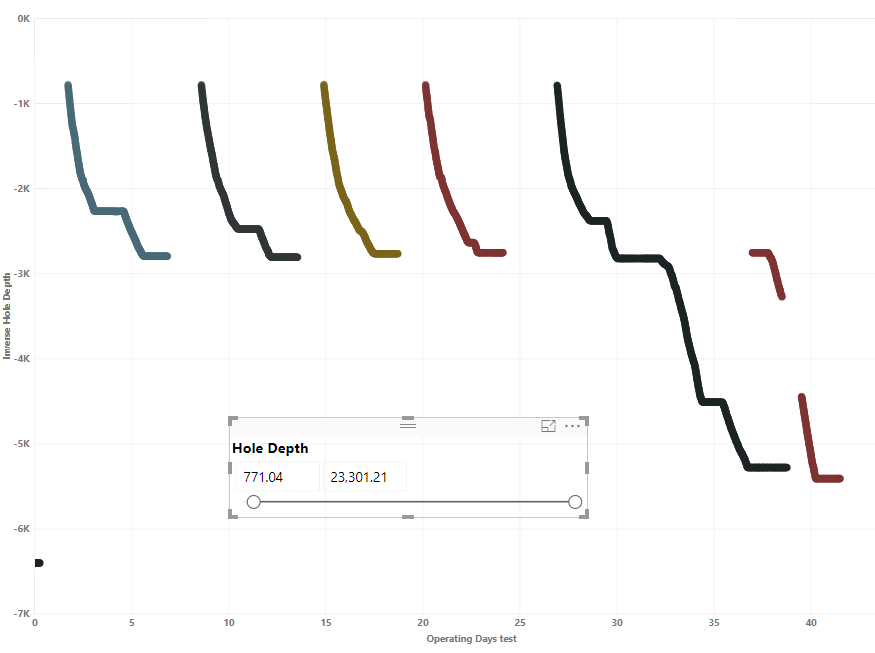
My data table follows this format, but has 6M ish rows. My final goal is to have a scatter plot with a slicer that can filter for different hole depths and it will shift the operating days to the left by not counting operating days that have been filtered out by the slicer. I think I can accomplish this as long as the hole depth column is worked into the operating days formula, but I'm not positive how. The EdrDateTime column is always in 5 minute increments for a particular well.


Data Table for Power Bi Question.PNGVisual for Power Bi Question.PNG


Any help would be greatly appreciated!


Thanks!

4 REPLIES 4
Stachu
Community Champion
Community Champion

can you explain again what do you want to show?
e.g. for well B, what would be the value for Operating Days?


Did I answer your question? Mark my post as a solution!
Thank you for the kudos 🙂

Stachu
Community Champion
Community Champion

I think you actually need a calculated column, something like this:

Operating Days = 
VAR _Well = DepthVsDays[Well]
VAR _First = CALCULATE(MIN(DepthVsDays[ErdDateTime]),FILTER(DepthVsDays, DepthVsDays[Well] = _Well))
RETURN
(DepthVsDays[ErdDateTime]-_First)/288

and then put
in Details - Hole Depth
in Legend - Well
in X axis - Column
in Y Axis - Hole Depth


Did I answer your question? Mark my post as a solution!
Thank you for the kudos 🙂

First off thanks for the response, I initially thought a calculated column wasn't an option since it wouldn't run with my initial code, but your recommendations are running very quickly, so that opens up other options.


Operating Days test = Var _Well = DepthVsDays[WellName] 
                    VAR _First =  CALCULATE(min(DepthVsDays[EdrDateTime]),
                    FIlter(ALL(DepthVsDays),DepthVsDays[WellName] = _Well))
                    Return
                    (DepthVsDays[EdrDateTime]-_First)

I tried running it with the above since you're using a time subtraction the /288 wasn't necessary. Some of the wells have gaps in their operating days though, so a well will accumulate operating days for 5 or 6 days then break for 2 weeks and start accumulating days again in the data set. Since the equation is subtracting from the smallest time it's leaving gaps. It's also not adjusting the operating days to zero from the beginning of the slicer. 


Visual for Power Bi Question 2.PNG

Here's the updated picture. Since the slicer is currently set at 771.04, I'm hoping to have each of the operating days start at 0 from that hole depth. 

The data is all in 5 minute increments, so the first part of the equation is just counting the rows on that particular well and counting each one as 5 minutes, then dividing by 288 to get the units into days. So on well b at hole depth 2034.6 I would have 5 minutes accumulated, then 10 minutes at 2037.8, then 15 minutes at 2040.9, and 20 minutes at 2043.6. 

Helpful resources

Announcements
November Power BI Update Carousel

Power BI Monthly Update - November 2025

Check out the November 2025 Power BI update to learn about new features.

Fabric Data Days Carousel

Fabric Data Days

Advance your Data & AI career with 50 days of live learning, contests, hands-on challenges, study groups & certifications and more!

FabCon Atlanta 2026 carousel

FabCon Atlanta 2026

Join us at FabCon Atlanta, March 16-20, for the ultimate Fabric, Power BI, AI and SQL community-led event. Save $200 with code FABCOMM.

Top Solution Authors
Top Kudoed Authors