Hello -
I am trying to create a calculated column that will provide me the SUM of the cost based on a specific date value for the row in my table.
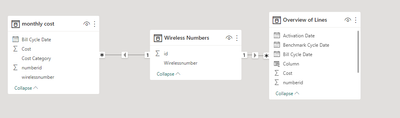
I have 4 main tables:
Wireless_Numbers, Date_Table, Overview of Lines, Monthly_Costs with the below sample data:
Wireless Numbers:
| id | Wirelessnumber |
| 1 | xxxxxxx |
| 2 | xxxxxxx |
| 3 | xxxxxxx |
| 4 | xxxxxxx |
| 5 | xxxxxxx |
| 6 | xxxxxxx |
| 7 | xxxxxxx |
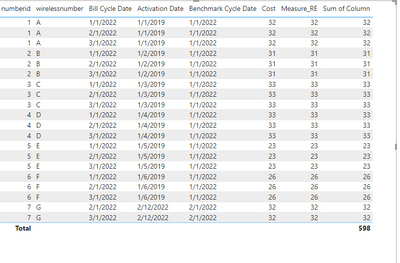
Overview of Lines (Cost is the column i want to calculate):
| numberid | wirelessnumber | Bill Cycle Date | Activation Date | Benchmark Cycle Date | Cost |
| 1 | xxxxxxx | 1/1/2022 | 1/1/2019 | 1/1/2022 | 32.00 |
| 2 | xxxxxxx | 1/1/2022 | 1/2/2019 | 1/1/2022 | 31.00 |
| 3 | xxxxxxx | 1/1/2022 | 1/3/2019 | 1/1/2022 | 33.00 |
| 4 | xxxxxxx | 1/1/2022 | 1/4/2019 | 1/1/2022 | 33.00 |
| 5 | xxxxxxx | 1/1/2022 | 1/5/2019 | 1/1/2022 | 23.00 |
| 6 | xxxxxxx | 1/1/2022 | 1/6/2019 | 1/1/2022 | 26.00 |
| 1 | xxxxxxx | 2/1/2022 | 1/1/2019 | 1/1/2022 | 32.00 |
| 2 | xxxxxxx | 2/1/2022 | 1/2/2019 | 1/1/2022 | 31.00 |
| 3 | xxxxxxx | 2/1/2022 | 1/3/2019 | 1/1/2022 | 33.00 |
| 4 | xxxxxxx | 2/1/2022 | 1/4/2019 | 1/1/2022 | 33.00 |
| 5 | xxxxxxx | 2/1/2022 | 1/5/2019 | 1/1/2022 | 23.00 |
| 6 | xxxxxxx | 2/1/2022 | 1/6/2019 | 1/1/2022 | 26.00 |
| 7 | xxxxxxx | 2/1/2022 | 2/12/2022 | 2/1/2022 | 32.00 |
| 1 | xxxxxxx | 3/1/2022 | 1/1/2019 | 1/1/2022 | 32.00 |
| 2 | xxxxxxx | 3/1/2022 | 1/2/2019 | 1/1/2022 | 31.00 |
| 3 | xxxxxxx | 3/1/2022 | 1/3/2019 | 1/1/2022 | 33.00 |
| 4 | xxxxxxx | 3/1/2022 | 1/4/2019 | 1/1/2022 | 33.00 |
| 5 | xxxxxxx | 3/1/2022 | 1/5/2019 | 1/1/2022 | 23.00 |
| 6 | xxxxxxx | 3/1/2022 | 1/6/2019 | 1/1/2022 | 26.00 |
| 7 | xxxxxxx | 3/1/2022 | 2/12/2022 | 2/1/2022 | 32.00 |
Monthly_Cost
| numberid | wirelessnumber | Bill Cycle Date | Cost Category | Cost |
| 1 | xxxxxxx | 1/1/2022 | Data Usage | 17 |
| 2 | xxxxxxx | 1/1/2022 | Data Usage | 17 |
| 3 | xxxxxxx | 1/1/2022 | Data Usage | 16 |
| 4 | xxxxxxx | 1/1/2022 | Data Usage | 16 |
| 5 | xxxxxxx | 1/1/2022 | Data Usage | 13 |
| 6 | xxxxxxx | 1/1/2022 | Data Usage | 14 |
| 1 | xxxxxxx | 2/1/2022 | Data Usage | 12 |
| 2 | xxxxxxx | 2/1/2022 | Data Usage | 15 |
| 3 | xxxxxxx | 2/1/2022 | Data Usage | 16 |
| 4 | xxxxxxx | 2/1/2022 | Data Usage | 18 |
| 5 | xxxxxxx | 2/1/2022 | Data Usage | 16 |
| 6 | xxxxxxx | 2/1/2022 | Data Usage | 18 |
| 7 | xxxxxxx | 2/1/2022 | Data Usage | 20 |
| 1 | xxxxxxx | 3/1/2022 | Data Usage | 17 |
| 2 | xxxxxxx | 3/1/2022 | Data Usage | 15 |
| 3 | xxxxxxx | 3/1/2022 | Data Usage | 18 |
| 4 | xxxxxxx | 3/1/2022 | Data Usage | 12 |
| 5 | xxxxxxx | 3/1/2022 | Data Usage | 14 |
| 6 | xxxxxxx | 3/1/2022 | Data Usage | 14 |
| 7 | xxxxxxx | 3/1/2022 | Data Usage | 11 |
| 1 | xxxxxxx | 1/1/2022 | Fees and Taxes | 15 |
| 2 | xxxxxxx | 1/1/2022 | Fees and Taxes | 14 |
| 3 | xxxxxxx | 1/1/2022 | Fees and Taxes | 17 |
| 4 | xxxxxxx | 1/1/2022 | Fees and Taxes | 17 |
| 5 | xxxxxxx | 1/1/2022 | Fees and Taxes | 10 |
| 6 | xxxxxxx | 1/1/2022 | Fees and Taxes | 12 |
| 1 | xxxxxxx | 2/1/2022 | Fees and Taxes | 11 |
| 2 | xxxxxxx | 2/1/2022 | Fees and Taxes | 10 |
| 3 | xxxxxxx | 2/1/2022 | Fees and Taxes | 10 |
| 4 | xxxxxxx | 2/1/2022 | Fees and Taxes | 12 |
| 5 | xxxxxxx | 2/1/2022 | Fees and Taxes | 13 |
| 6 | xxxxxxx | 2/1/2022 | Fees and Taxes | 15 |
| 7 | xxxxxxx | 2/1/2022 | Fees and Taxes | 12 |
| 1 | xxxxxxx | 3/1/2022 | Fees and Taxes | 20 |
| 2 | xxxxxxx | 3/1/2022 | Fees and Taxes | 13 |
| 3 | xxxxxxx | 3/1/2022 | Fees and Taxes | 20 |
| 4 | xxxxxxx | 3/1/2022 | Fees and Taxes | 15 |
| 5 | xxxxxxx | 3/1/2022 | Fees and Taxes | 20 |
| 6 | xxxxxxx | 3/1/2022 | Fees and Taxes | 15 |
| 7 | xxxxxxx | 3/1/2022 | Fees and Taxes | 15 |
Date Table is standard date dimensional table that is joined to the fact tables on Bill Cycle Date.
What I am looking to do is calculate the COST from the Monthly_cost table for the Benchmark Date associated with each Wireless number. So even if we are looking at March 2022 reporting, I want to see what our cost was for January 2022 for the wirelessid 1, 2 etc.
We need to compare our benchmark costs, versus our go forward monthly costs to see the monthly savings we are generating for each wireless number.
Is there a way to essentially create this SUMIF excel statement in Power BI:
SUMIFS(Cost, wireless number (Monthly Cost) = Wireless Number (row in Overview of Lines) AND Bill Cycle Date (Monthly Cost) = Benchmark Date (Overview of lines).
I have been trying to figure out this solution with no luck so any help would be great!
Thanks
Ryan