FabCon is coming to Atlanta
Join us at FabCon Atlanta from March 16 - 20, 2026, for the ultimate Fabric, Power BI, AI and SQL community-led event. Save $200 with code FABCOMM.
Register now!- Power BI forums
- Get Help with Power BI
- Desktop
- Service
- Report Server
- Power Query
- Mobile Apps
- Developer
- DAX Commands and Tips
- Custom Visuals Development Discussion
- Health and Life Sciences
- Power BI Spanish forums
- Translated Spanish Desktop
- Training and Consulting
- Instructor Led Training
- Dashboard in a Day for Women, by Women
- Galleries
- Data Stories Gallery
- Themes Gallery
- Contests Gallery
- QuickViz Gallery
- Quick Measures Gallery
- Visual Calculations Gallery
- Notebook Gallery
- Translytical Task Flow Gallery
- TMDL Gallery
- R Script Showcase
- Webinars and Video Gallery
- Ideas
- Custom Visuals Ideas (read-only)
- Issues
- Issues
- Events
- Upcoming Events
The Power BI Data Visualization World Championships is back! Get ahead of the game and start preparing now! Learn more
- Power BI forums
- Forums
- Get Help with Power BI
- Desktop
- Re: Calculated Column of Sum per Month
- Subscribe to RSS Feed
- Mark Topic as New
- Mark Topic as Read
- Float this Topic for Current User
- Bookmark
- Subscribe
- Printer Friendly Page

- Mark as New
- Bookmark
- Subscribe
- Mute
- Subscribe to RSS Feed
- Permalink
- Report Inappropriate Content
Calculated Column of Sum per Month
Hello!
I have a calculation to complete that requires a sum of the current month. Note, I need this to be done with a calculated DAX column, not a measure unfortunately! My calculation is pretty advanced and will be easier if i had this column.
To explain more clearly what I am looking for my desired output is shown below as TotalPerMonth:
| Sales | ||
| Date | Amount | TotalPerMonth |
| 7/1/2018 | 5 | 34 |
| 7/1/2018 | 6 | 34 |
| 7/1/2018 | 7 | 34 |
| 7/2/2018 | 2 | 34 |
| 7/2/2018 | 3 | 34 |
| 7/2/2018 | 3 | 34 |
| 7/3/2018 | 4 | 34 |
| 7/3/2018 | 3 | 34 |
| 7/3/2018 | 1 | 34 |
| 8/1/2018 | 2 | 39 |
| 8/1/2018 | 3 | 39 |
| 8/1/2018 | 3 | 39 |
| 8/2/2018 | 2 | 39 |
| 8/2/2018 | 3 | 39 |
| 8/2/2018 | 5 | 39 |
| 8/3/2018 | 6 | 39 |
| 8/3/2018 | 7 | 39 |
| 8/3/2018 | 8 | 39 |
The above table is should portray most of my caveats of my data, however, attached in the spoiler tag is a more rigororus dataset:
| Date | Amount | TotalPerMonth |
| 5/31/2018 0:00 | 53869.97 | 1259637 |
| 5/31/2018 1:00 | 54058.04 | 1259637 |
| 5/31/2018 2:00 | 53270.37 | 1259637 |
| 5/31/2018 3:00 | 54487.84 | 1259637 |
| 5/31/2018 4:00 | 54003.49 | 1259637 |
| 5/31/2018 5:00 | 52144.59 | 1259637 |
| 5/31/2018 6:00 | 47906.15 | 1259637 |
| 5/31/2018 7:00 | 49621.78 | 1259637 |
| 5/31/2018 8:00 | 54271.14 | 1259637 |
| 5/31/2018 9:00 | 53384.48 | 1259637 |
| 5/31/2018 10:00 | 50849.78 | 1259637 |
| 5/31/2018 11:00 | 53899.41 | 1259637 |
| 5/31/2018 12:00 | 54124.26 | 1259637 |
| 5/31/2018 13:00 | 53406.91 | 1259637 |
| 5/31/2018 14:00 | 48970.37 | 1259637 |
| 5/31/2018 15:00 | 48303.02 | 1259637 |
| 5/31/2018 16:00 | 52115.2 | 1259637 |
| 5/31/2018 17:00 | 53370.16 | 1259637 |
| 5/31/2018 18:00 | 51550.34 | 1259637 |
| 5/31/2018 19:00 | 51057.45 | 1259637 |
| 5/31/2018 20:00 | 52635.51 | 1259637 |
| 5/31/2018 21:00 | 53951.19 | 1259637 |
| 5/31/2018 22:00 | 54479.15 | 1259637 |
| 5/31/2018 23:00 | 53906.86 | 1259637 |
| 6/1/2018 0:00 | 52760.43 | 1234373 |
| 6/1/2018 1:00 | 52897.1 | 1234373 |
| 6/1/2018 2:00 | 50640.63 | 1234373 |
| 6/1/2018 3:00 | 52362.22 | 1234373 |
| 6/1/2018 4:00 | 51984.25 | 1234373 |
| 6/1/2018 5:00 | 51791.6 | 1234373 |
| 6/1/2018 6:00 | 48052.68 | 1234373 |
| 6/1/2018 7:00 | 49226.49 | 1234373 |
| 6/1/2018 8:00 | 53700.4 | 1234373 |
| 6/1/2018 9:00 | 53024.82 | 1234373 |
| 6/1/2018 10:00 | 52481.09 | 1234373 |
| 6/1/2018 11:00 | 53542.61 | 1234373 |
| 6/1/2018 12:00 | 52460.78 | 1234373 |
| 6/1/2018 13:00 | 52598.76 | 1234373 |
| 6/1/2018 14:00 | 52573.91 | 1234373 |
| 6/1/2018 15:00 | 52284.61 | 1234373 |
| 6/1/2018 16:00 | 52712.14 | 1234373 |
| 6/1/2018 17:00 | 47793.63 | 1234373 |
| 6/1/2018 18:00 | 46917.88 | 1234373 |
| 6/1/2018 19:00 | 48769.64 | 1234373 |
| 6/1/2018 20:00 | 51219.08 | 1234373 |
| 6/1/2018 21:00 | 53080.73 | 1234373 |
| 6/1/2018 22:00 | 50553.36 | 1234373 |
| 6/1/2018 23:00 | 50944.62 | 1234373 |
Solved! Go to Solution.


- Mark as New
- Bookmark
- Subscribe
- Mute
- Subscribe to RSS Feed
- Permalink
- Report Inappropriate Content
@Anonymous
Try this calculated column:
TotalPerMonth = CALCULATE(SUM(Table1[Amount]),FILTER(Table1,Table1[Date] = EARLIER(Table1[Date])))
- Mark as New
- Bookmark
- Subscribe
- Mute
- Subscribe to RSS Feed
- Permalink
- Report Inappropriate Content
@Anonymous
Try this calculated column:
TotalPerMonth = CALCULATE(SUM(Table1[Amount]),FILTER(Table1,Table1[Date] = EARLIER(Table1[Date])))

- Mark as New
- Bookmark
- Subscribe
- Mute
- Subscribe to RSS Feed
- Permalink
- Report Inappropriate Content
Hello @danb ,
I am trying to accomplish the same thing, however, I do not have an import file, and therefore, cannot create that in power query...or use the EARLIER function as it is not supported for DirectQuery.
Do you have any ideas of how to achieve this?
Thanks!
- Mark as New
- Bookmark
- Subscribe
- Mute
- Subscribe to RSS Feed
- Permalink
- Report Inappropriate Content
Hey @danb!
The code you posted creates an error "EARLIER/EARLIEST refers to an earlier row context which doesn't exist."
Any Ideas?
- Mark as New
- Bookmark
- Subscribe
- Mute
- Subscribe to RSS Feed
- Permalink
- Report Inappropriate Content
@Anonymous
Enter in the formula as a "New Column" and not a "New Measure"
- Mark as New
- Bookmark
- Subscribe
- Mute
- Subscribe to RSS Feed
- Permalink
- Report Inappropriate Content
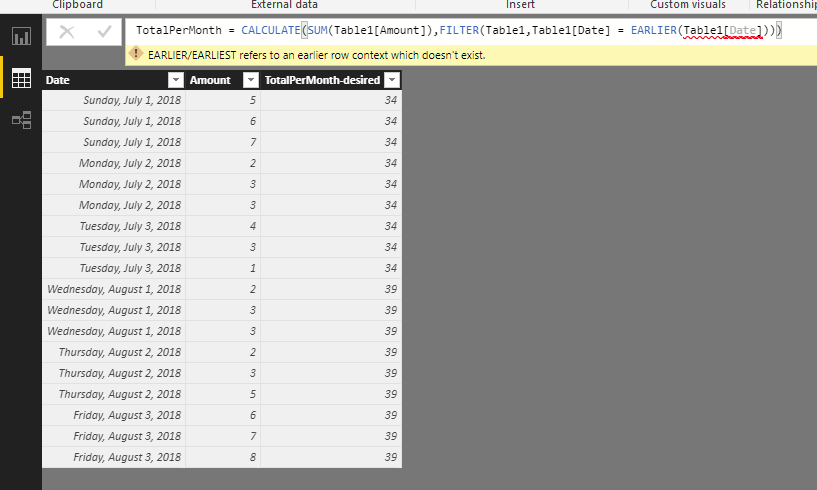
Yup, I am entering it as a new column
- Mark as New
- Bookmark
- Subscribe
- Mute
- Subscribe to RSS Feed
- Permalink
- Report Inappropriate Content
@Anonymous - it appears that you have some type of error occuring after the "earlier" function. Please see my screenshot below. I have the same column in with the May/June data and it is not tripping the error.

- Mark as New
- Bookmark
- Subscribe
- Mute
- Subscribe to RSS Feed
- Permalink
- Report Inappropriate Content
Yes today is a monday, I was adding it as a measure. 
Your function works, thank you
I had to adjust it a bit however:
I made a new column format(table1[date] , "yyyymm")
then filtered using that new column.
By filtering by date, it gives the sum/ per day instead of per month. big thanks though!
Helpful resources

Power BI Dataviz World Championships
The Power BI Data Visualization World Championships is back! Get ahead of the game and start preparing now!

Power BI Monthly Update - December 2025
Check out the December 2025 Power BI Holiday Recap!

FabCon Atlanta 2026
Join us at FabCon Atlanta, March 16-20, for the ultimate Fabric, Power BI, AI and SQL community-led event. Save $200 with code FABCOMM.

| User | Count |
|---|---|
| 41 | |
| 39 | |
| 37 | |
| 29 | |
| 24 |


| User | Count |
|---|---|
| 122 | |
| 111 | |
| 83 | |
| 69 | |
| 68 |


