Join us in Barcelona for FabCon and SQLCon, September 28 - October 1, 2026.
This is best Fabric, Power BI, SQL and AI community event. How do we know? The last event sold out! Save €200 with code FABCMTY200.
Register now- Power BI forums
- Get Help with Power BI
- Desktop
- Service
- Report Server
- Power Query
- Mobile Apps
- Developer
- DAX Commands and Tips
- Custom Visuals Development Discussion
- Health and Life Sciences
- Power BI Spanish forums
- Translated Spanish Desktop
- Training and Consulting
- Instructor Led Training
- Dashboard in a Day for Women, by Women
- Galleries
- Data Stories Gallery
- Themes Gallery
- Contests Gallery
- QuickViz Gallery
- Quick Measures Gallery
- Visual Calculations Gallery
- Notebook Gallery
- Translytical Task Flow Gallery
- TMDL Gallery
- R Script Showcase
- Webinars and Video Gallery
- Ideas
- Custom Visuals Ideas (read-only)
- Issues
- Issues
- Events
- Upcoming Events
A new Data Days event is coming soon! This time we’re going bigger than ever. Fabric, Power BI, SQL, AI and more. Don't miss out.
- Power BI forums
- Forums
- Get Help with Power BI
- Desktop
- Calculated Column between dates
- Subscribe to RSS Feed
- Mark Topic as New
- Mark Topic as Read
- Float this Topic for Current User
- Bookmark
- Subscribe
- Printer Friendly Page


- Mark as New
- Bookmark
- Subscribe
- Mute
- Subscribe to RSS Feed
- Permalink
- Report Inappropriate Content
Calculated Column between dates
Hello everyone!
I am trying to add a new column which will simply number a range of pre-existing dates. Either a date table, or the data table - though my preference is for a new column created with Dax code added to my date table.
The goal is for the range to always begin on the 16th of a month and end on the 15th of the next month.
I want Dec 16th - Jan 15 to be #1
Jan 16th - Feb 15th to be #2
All the way up to Nov 16th - Dec 15th being #12
I have had success with comparing the difference bewteen flat months.. but this query is really just boggling my mind atm !
Any wizards out there that can offer some assistance?
Solved! Go to Solution.


- Mark as New
- Bookmark
- Subscribe
- Mute
- Subscribe to RSS Feed
- Permalink
- Report Inappropriate Content
Hi @StefanM,
Please refer to below DAX formula:
date range =
IF (
    [Date].[Day] >= 16
        && [Date].[MonthNo] = 12,
    1,
    IF ( [Date].[Day] >= 16 && [Date].[MonthNo] < 12, [Date].[MonthNo] + 1, [Date].[MonthNo] )
)
Best regards,
Yuliana Gu
If this post helps, then please consider Accept it as the solution to help the other members find it more quickly.
- Mark as New
- Bookmark
- Subscribe
- Mute
- Subscribe to RSS Feed
- Permalink
- Report Inappropriate Content
Hi @StefanM,
Please refer to below DAX formula:
date range =
IF (
    [Date].[Day] >= 16
        && [Date].[MonthNo] = 12,
    1,
    IF ( [Date].[Day] >= 16 && [Date].[MonthNo] < 12, [Date].[MonthNo] + 1, [Date].[MonthNo] )
)
Best regards,
Yuliana Gu
If this post helps, then please consider Accept it as the solution to help the other members find it more quickly.
- Mark as New
- Bookmark
- Subscribe
- Mute
- Subscribe to RSS Feed
- Permalink
- Report Inappropriate Content
Oh wow, thanks guys! I thought I had responded to @Greg_Deckler as I was leaving work on Monday, but the post didnt send due to some HTML formatting (copied the table from google sheets :P) I will leave it below for posterity sake though : D
@v-yulgu-msftthat works perfectly! And looking at it, I can see why. Thank you very much! I should be able to work out the rest of the stuff I need from this.
Thanks again!
Hi Greg! Thanks for reaching out.
Yep, thats pretty much spot on. This is generally what I am looking for as an end result:
| Existing in table | To be Created | To be Created |
| 16/11/2018 | 12: Nov - Dec | 12: Week 1 |
| 17/11/2018 | 12: Nov - Dec | 12: Week 1 |
| 18/11/2018 | 12: Nov - Dec | 12: Week 1 |
| 19/11/2018 | 12: Nov - Dec | 12: Week 1 |
| 20/11/2018 | 12: Nov - Dec | 12: Week 1 |
| 21/11/2018 | 12: Nov - Dec | 12: Week 1 |
| 22/11/2018 | 12: Nov - Dec | 12: Week 1 |
| 23/11/2018 | 12: Nov - Dec | 12: Week 2 |
| 24/11/2018 | 12: Nov - Dec | 12: Week 2 |
| 25/11/2018 | 12: Nov - Dec | 12: Week 2 |
| 26/11/2018 | 12: Nov - Dec | 12: Week 2 |
| 27/11/2018 | 12: Nov - Dec | 12: Week 2 |
| 28/11/2018 | 12: Nov - Dec | 12: Week 2 |
| 29/11/2018 | 12: Nov - Dec | 12: Week 2 |
| 30/11/2018 | 12: Nov - Dec | 12: Week 3 |
| 1/12/2018 | 12: Nov - Dec | 12: Week 3 |
| 2/12/2018 | 12: Nov - Dec | 12: Week 3 |
| 3/12/2018 | 12: Nov - Dec | 12: Week 3 |
| 4/12/2018 | 12: Nov - Dec | 12: Week 3 |
| 5/12/2018 | 12: Nov - Dec | 12: Week 3 |
| 6/12/2018 | 12: Nov - Dec | 12: Week 3 |
| 7/12/2018 | 12: Nov - Dec | 12: Week 4 |
| 8/12/2018 | 12: Nov - Dec | 12: Week 4 |
| 9/12/2018 | 12: Nov - Dec | 12: Week 4 |
| 10/12/2018 | 12: Nov - Dec | 12: Week 4 |
| 11/12/2018 | 12: Nov - Dec | 12: Week 4 |
| 12/12/2018 | 12: Nov - Dec | 12: Week 4 |
| 13/12/2018 | 12: Nov - Dec | 12: Week 4 |
| 14/12/2018 | 12: Nov - Dec | 12: Week 5 |
| 15/12/2018 | 12: Nov - Dec | 12: Week 5 |
| 16/12/2018 | 12: Nov - Dec | 12: Week 5 |
| 17/12/2018 | 1: Dec - Jan | 1: Week 1 |
I tried a bunch of time based things, but none worked for me 😕


- Mark as New
- Bookmark
- Subscribe
- Mute
- Subscribe to RSS Feed
- Permalink
- Report Inappropriate Content
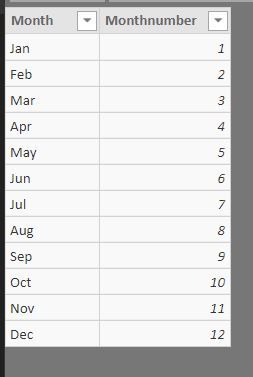
I used your sample data and created two test columns for you. Please try this.

Did I answer your question? Mark my post as a solution!
Proud to be a Super User!
- Mark as New
- Bookmark
- Subscribe
- Mute
- Subscribe to RSS Feed
- Permalink
- Report Inappropriate Content
Wow @ryan_mayu, I must have missed your message with the end of year turnover but that is some good work! I have managed to incorporate it into my data set quite nicely, tyvm!
Test 1 is working as expected. However, I am having some issues with Test 2.
The dataset works over many years, going back to 2017. What I am seeing atm is something like this:
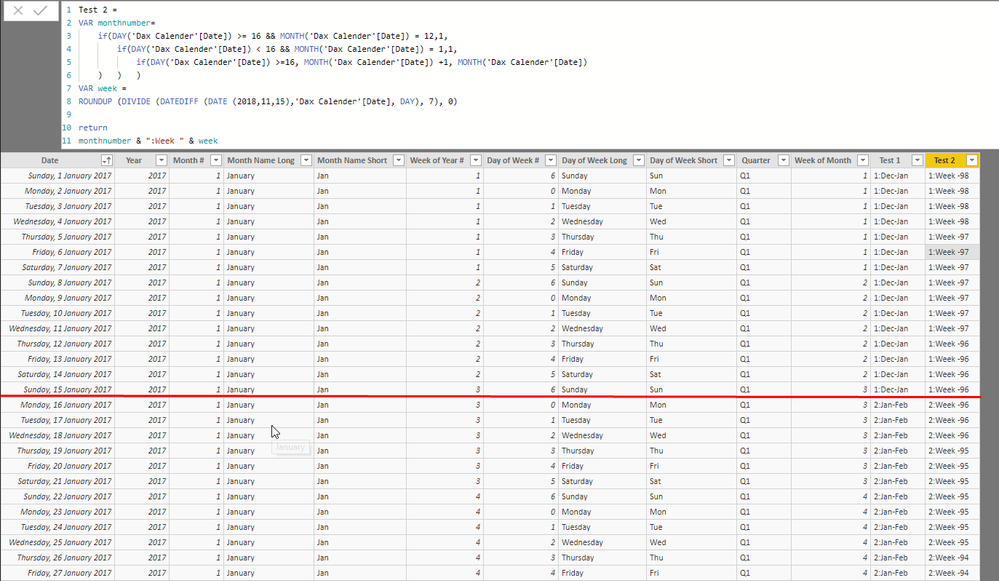
I have to admit, I actually dont have any understanding on the Week variable you used. I could follow along with month number, oh man, I am just not advanced enough to follow along with week. I didnt even know roundup was a thing! ^^
Is there perhaps something wrong with the way I have implemented your code?
- Mark as New
- Bookmark
- Subscribe
- Mute
- Subscribe to RSS Feed
- Permalink
- Report Inappropriate Content
I didn't see your example clearly. I thought you want the continous week number. If you want the result the same as your example. The logic is a little complicated.
Please try the below one. Hope this is helpful. Thanks
test2 =
VAR MON=MONTH(EDATE('Sheet28'[date],-1))
VAR YR=YEAR(EDATE('Sheet28'[date],-1))
VAR monthnumber=if(DAY('Sheet28'[date])>=16&&MONTH('Sheet28'[date])=12,1,
if(DAY('Sheet28'[date])<16&&MONTH('Sheet28'[date])=1,1,
if(DAY('Sheet28'[date])>=16,MONTH('Sheet28'[date])+1,MONTH('Sheet28'[date]))))

VAR WEEKNUMBER= if(DAY('Sheet28'[date])>15,ROUNDUP(DIVIDE(DAY('Sheet28'[date])-15,7),0),ROUNDUP(DIVIDE((day('Sheet28'[date])+Mod(CALCULATE(COUNT('Sheet28'[date]),FILTER('Sheet28',MONTH('Sheet28'[date])=MON&&YEAR('Sheet28'[date])=YR&&DAY('Sheet28'[date])>15)),7)),7),0)+2)
RETURN monthnumber&":Week "&WEEKNUMBER
Did I answer your question? Mark my post as a solution!
Proud to be a Super User!


- Mark as New
- Bookmark
- Subscribe
- Mute
- Subscribe to RSS Feed
- Permalink
- Report Inappropriate Content
So, you have a date table and you want each day assigned to your group, is that correct?
Follow on LinkedIn
@ me in replies or I'll lose your thread!!!
Instead of a Kudo, please vote for this idea
Become an expert!: Enterprise DNA
External Tools: MSHGQM
YouTube Channel!: Microsoft Hates Greg
Latest book!: DAX For Humans
DAX is easy, CALCULATE makes DAX hard...

Helpful resources

Power BI Monthly Update - May 2026
Check out the May 2026 Power BI update to learn about new features.

Data Days 2026 coming soon!
Sign up to receive a private message when registration opens and key events begin.

New to Fabric Survey
If you have recently started exploring Fabric, we'd love to hear how it's going. Your feedback can help with product improvements.

Power BI DataViz World Championships - June 2026
A new Power BI DataViz World Championship is coming this June! Don't miss out on submitting your entry.

| User | Count |
|---|---|
| 26 | |
| 25 | |
| 22 | |
| 19 | |
| 17 |


| User | Count |
|---|---|
| 42 | |
| 41 | |
| 40 | |
| 21 | |
| 20 |


