
Don't miss your chance to take the Fabric Data Engineer (DP-700) exam on us!
Learn moreNext up in the FabCon + SQLCon recap series: The roadmap for Microsoft SQL and Maximizing Developer experiences in Fabric. All sessions are available on-demand after the live show. Register now
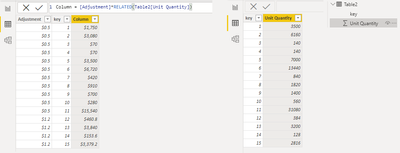
I am trying to create a calculated column where I simply multiply two values together originating from two different tables. The column should equal $ Adjustment multiplied by Unit Quantity to equal Commisson. My results are repeating rows with the same value, but they should be different. I have attached a screenshot of my DAX formula and the columns I am working with. Thanks!
Solved! Go to Solution.
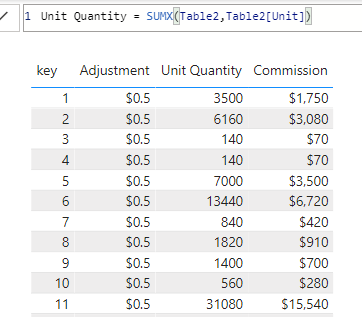
Hi @CoopyJoe
Column expression:
measure expression:
Best Regards,
Community Support Team _Tang
If this post helps, please consider Accept it as the solution to help the other members find it more quickly.
Hi @CoopyJoe
Column expression:
measure expression:
Best Regards,
Community Support Team _Tang
If this post helps, please consider Accept it as the solution to help the other members find it more quickly.
Hi,
Write that formula as a calculated column formula (not a measure)
As @ribisht17 suggests, the RELATED function is likely useful here. Something like this:
RELATED ( Product[Quantity] ) * Commission[$ Adjustment]
This makes some assumptions about how the tables are related though, so I can't guarantee it'll work without seeing how your tables are structured and related to each other.
Please refer to this one Solved: DAX multiply two columns in separate tables - Microsoft Power BI Community
>>RELATED function
Regards,
Ritesh
Mark my post as a solution if it helped you| Munde and Kudis (Ladies and Gentlemen) I like your Kudos!! !!
My YT Channel Dancing With Data !! Connect on Linkedin !!Power BI for Tableau Users
Hi,
The type of the columns are correct? (number)
If you have recently started exploring Fabric, we'd love to hear how it's going. Your feedback can help with product improvements.
A new Power BI DataViz World Championship is coming this June! Don't miss out on submitting your entry.
Share feedback directly with Fabric product managers, participate in targeted research studies and influence the Fabric roadmap.
| User | Count |
|---|---|
| 48 | |
| 45 | |
| 41 | |
| 19 | |
| 18 |
| User | Count |
|---|---|
| 69 | |
| 68 | |
| 33 | |
| 33 | |
| 31 |