cancel
Showing results for 
Search instead for 
Did you mean: 

Get Fabric Certified for FREE during Fabric Data Days. Don't miss your chance! Request now

Reply
cmarfisi
New Member

Calculated Column Using RANKX Within Groups

I have a simple one table model. It contains invoices that each have a Tax ID, State, and Discount %. For example, in the screenshot below, TIN 99-9999999 in NH has 15 Invoices at 0% discount and 1 invoice at 0% discount.


I need a calculated column that ranks Discount % by invoice count within a given Tax ID/State combo. This column will be used for filtering.


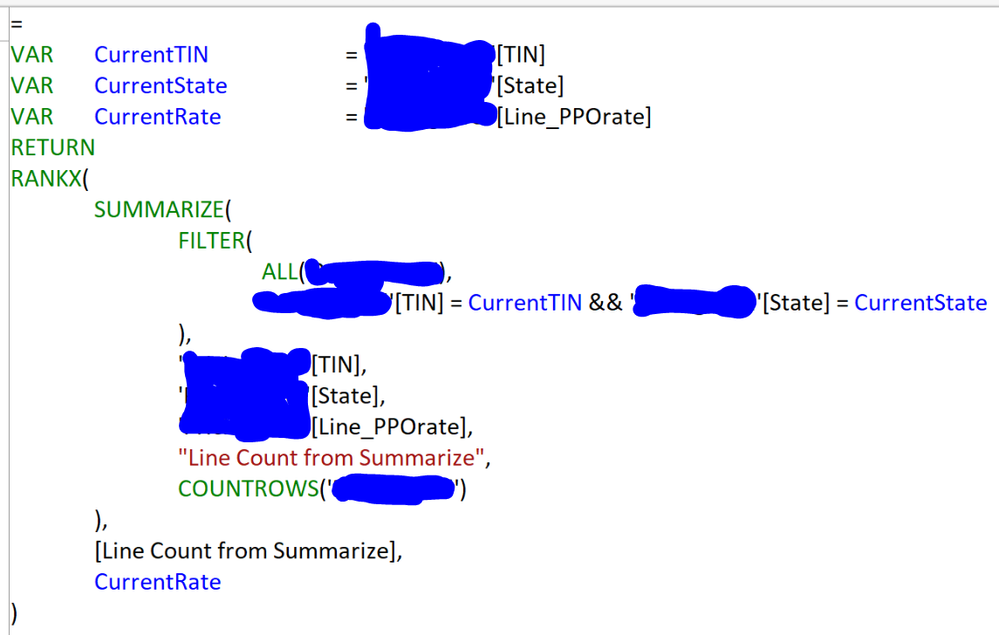
I tried using SUMMARIZE to get counts for TIN/State/Discount, then RANKX on top of it. Screen shot below, table name redacted in blue.


In the output you can see the column (Rate Rank in orange) is doing some sort of state ranking but not what I'm looking for. My desired ranking is highlighted yellow.


Any advice would be greatly appreciated! I've tried many different arrangements of arguments but nothing is working. I've always been mystified by RANKX. Thanks.
 

Capture.PNG


Capture1.PNG

1 ACCEPTED SOLUTION
v-huizhn-msft
Microsoft Employee
Microsoft Employee

Hi @cmarfisi,

From the screenshot, it is a matrix, and the [invoice count] is a column, you can create a calculated column using the following formula.

RANK =
RANKX (
    FILTER (
        Table,
        Table[TIN] = EARLIER ( Table[TIN] )
            && Table[State] = EARLIER ( Table[State] )
    ),
    Table[invoice count],
    ,
    ASC,
    DENSE
)


If this doesn't resolve your issue, you can create dummy data similar with you for further analysis.

Thanks,
Angelia

View solution in original post

2 REPLIES 2
v-huizhn-msft
Microsoft Employee
Microsoft Employee

Hi @cmarfisi,

From the screenshot, it is a matrix, and the [invoice count] is a column, you can create a calculated column using the following formula.

RANK =
RANKX (
    FILTER (
        Table,
        Table[TIN] = EARLIER ( Table[TIN] )
            && Table[State] = EARLIER ( Table[State] )
    ),
    Table[invoice count],
    ,
    ASC,
    DENSE
)


If this doesn't resolve your issue, you can create dummy data similar with you for further analysis.

Thanks,
Angelia

Hi @cmarfisi,

Have you resolved your issue? If you have, please mark the right/helpful reply as answer. More people will new things here.  If you haven't, please feel free to ask.

Best Regards,
Angelia

Helpful resources

Announcements
November Power BI Update Carousel

Power BI Monthly Update - November 2025

Check out the November 2025 Power BI update to learn about new features.

Fabric Data Days Carousel

Fabric Data Days

Advance your Data & AI career with 50 days of live learning, contests, hands-on challenges, study groups & certifications and more!

FabCon Atlanta 2026 carousel

FabCon Atlanta 2026

Join us at FabCon Atlanta, March 16-20, for the ultimate Fabric, Power BI, AI and SQL community-led event. Save $200 with code FABCOMM.

Top Solution Authors
Top Kudoed Authors