Join us at FabCon Atlanta from March 16 - 20, 2026, for the ultimate Fabric, Power BI, AI and SQL community-led event. Save $200 with code FABCOMM.
Register now!The Power BI Data Visualization World Championships is back! Get ahead of the game and start preparing now! Learn more
I am trying to create a calculated column for my sales data. For example, if customer A has made 3 purchases in the whole sales history, I would want the most recent transaction rows be labelled "3" and the earliest "1", etc. The same thing goes for customers B, C, D, etc.
I think the formula involves RANKX and EARLIER, but I'm at loss over how it should work. Can anyone help?
Here's the onedrive link to my sample orders data file: https://1drv.ms/u/s!ApcbjU3iSiOxgqAkFM-5tqlTfoMasA
Thank you!
Solved! Go to Solution.
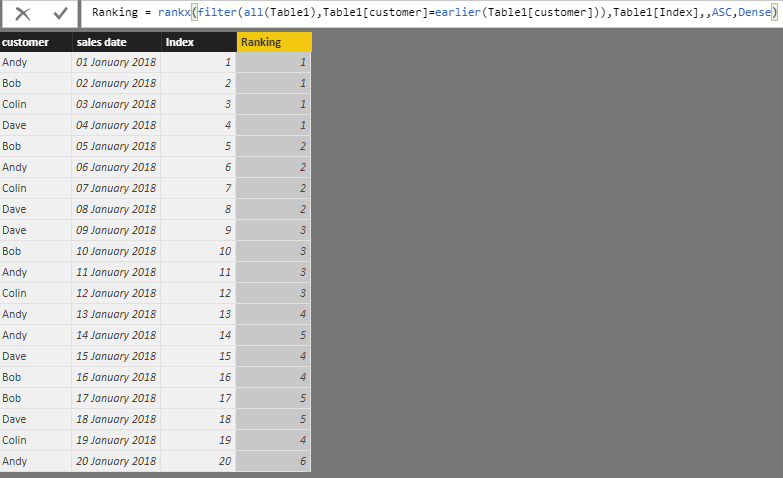
I've not looked at your data, but make an index column ordering all your transactions (if you don't already have a transaction ID column that runs sequentially in order already) then go with something like this:
omg how did you manage to come up with this formula? Can you share your thought process behind it?
For example, why did you use ALL()? And why is it that we can just specify a column for the <Expression> parameter of the RANKX function? What is DENSE for?
Thank you so much! I've marked your post as the solution.
The Power BI Data Visualization World Championships is back! Get ahead of the game and start preparing now!
| User | Count |
|---|---|
| 39 | |
| 37 | |
| 33 | |
| 33 | |
| 29 |
| User | Count |
|---|---|
| 132 | |
| 90 | |
| 78 | |
| 66 | |
| 65 |