
This time we’re going bigger than ever. Fabric, Power BI, SQL, AI and more. We're covering it all. You won't want to miss it.
Learn moreDid you hear? There's a new SQL AI Developer certification (DP-800). Start preparing now and be one of the first to get certified. Register now
Hello! I was hoping I could ask for your help on a query issue I have ran up against. I put this on the forum but thought I would ask any SMEs in Power BI I knew as well.
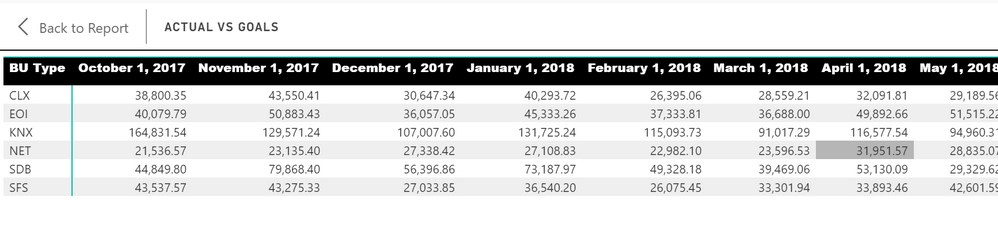
I have the attached pbix file and a BU TYPE 2 column that I am trying to pull in the area from a different table. Long story short I am trying to get the 2 visuals below to have matching totals across each month. One is for BU Type and the other even though it is titled BU Type 2 it is really AREA. Essentially I need my bottom graph to match the top one except using the EA, FA, Other or blank options.
correct using bu type
incorrect using bu2
I would love to get my BU2 or my BU Type 2 fields to work correctly and match from a total perspective with the top chart. Any help would be amazing. The pbix file is below.
https://drive.google.com/file/d/1PvVODz4RZ6NyihKiVK32WkPUE_ysIiOo/view?usp=sharing
Hi @nmck86,
After I check your sample file, I found your table are made of complex lookup columns to lookup value from other tables and link with one to many relationship.
AFAIK, nested measure not direct calculate on summary value, it will drill to detail records level to calculate and summary these results.
I think your issue is caused with this, when I put amount column to instead, it group and summarize correctly.
Regards,
Xiaoxin Sheng
Check out the April 2026 Power BI update to learn about new features.
Sign up to receive a private message when registration opens and key events begin.
If you have recently started exploring Fabric, we'd love to hear how it's going. Your feedback can help with product improvements.
| User | Count |
|---|---|
| 34 | |
| 31 | |
| 25 | |
| 20 | |
| 16 |
| User | Count |
|---|---|
| 61 | |
| 49 | |
| 28 | |
| 23 | |
| 23 |