cancel
Showing results for 
Search instead for 
Did you mean: 

The FabCon + SQLCon recap series starts April 14th at 8am Pacific. If you’re tracking where AI is going inside Fabric, this first session is a can't miss. Register now

Reply
bbwong
Helper I
Helper I

Calculated Column Flag - 2nd Condition

I'm using the below with success however would like to add a 2nd condition to Agreement Status.
 
How can I add a 2nd condition of Agreement Status of "Draft" to share the same "Current/Draft Agreement" flag?
 
CURRENT/DRAFT AGREEMENT FLAG =
VAR _A =
CALCULATE (
MAX ( 'Table 1'[Client Id] ),
FILTER ( ALLEXCEPT ( 'Table 1', 'Table 1'[Client Id] ), 'Table 1'[Agreement Status]= "Current" ))
RETURN
IF ( _A <> BLANK (), "Current/Draft Agreement", " " )
 
With thanks,
1 ACCEPTED SOLUTION
Fowmy
Super User
Super User

@bbwong 

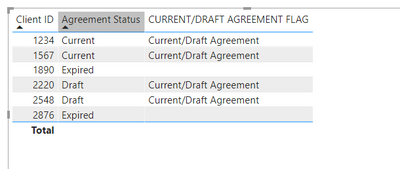
Try the following measure:

CURRENT/DRAFT AGREEMENT FLAG = 
VAR _A =
CALCULATE (
MAX ( 'Table3'[Client Id] ),
FILTER ( ALLEXCEPT ( 'Table3', 'Table3'[Client Id] ), 'Table3'[Agreement Status] IN {"Current","Draft"} ))
RETURN
IF ( _A <> BLANK () && HASONEVALUE(Table3[Client ID]), "Current/Draft Agreement", " " )


Fowmy_1-1622011927644.png


Did I answer your question? Mark my post as a solution! and hit thumbs up


Subscribe and learn Power BI from these videos

Website LinkedIn PBI User Group

View solution in original post

6 REPLIES 6
Fowmy
Super User
Super User

@bbwong 

Try the following measure:

CURRENT/DRAFT AGREEMENT FLAG = 
VAR _A =
CALCULATE (
MAX ( 'Table3'[Client Id] ),
FILTER ( ALLEXCEPT ( 'Table3', 'Table3'[Client Id] ), 'Table3'[Agreement Status] IN {"Current","Draft"} ))
RETURN
IF ( _A <> BLANK () && HASONEVALUE(Table3[Client ID]), "Current/Draft Agreement", " " )


Fowmy_1-1622011927644.png


Did I answer your question? Mark my post as a solution! and hit thumbs up


Subscribe and learn Power BI from these videos

Website LinkedIn PBI User Group

Thanks - that worked.

amitchandak
Super User
Super User

@bbwong , Try like


CURRENT/DRAFT AGREEMENT FLAG =
VAR _A =
CALCULATE (
MAX ( 'Table 1'[Client Id] ),
FILTER ( 'Table 1', 'Table 1'[Agreement Status]= "Current" ), ALLEXCEPT ( 'Table 1', 'Table 1'[Client Id] ))
RETURN
IF ( _A <> BLANK (), "Current/Draft Agreement", " " )

Share with Power BI Enthusiasts: Full Power BI Video (20 Hours) YouTube
Microsoft Fabric Series 60+ Videos YouTube
Microsoft Fabric Hindi End to End YouTube

Thanks for the quick response, the suggest calculated column is great to pick up where Agreement Status = Current.

However, it's not also flagging where Agreement Status = Draft.


Cheers,

@bbwong , Not very clear. Can you share sample data and sample output in table format? Or a sample pbix after removing sensitive data.

Share with Power BI Enthusiasts: Full Power BI Video (20 Hours) YouTube
Microsoft Fabric Series 60+ Videos YouTube
Microsoft Fabric Hindi End to End YouTube

Please see below table - hope this helps.

Client IDAgreement StatusFlag
1234CurrentCurrent/Draft Agreement
2220DraftCurrent/Draft Agreement
1890Expired 
2548DraftCurrent/Draft Agreement
1567CurrentCurrent/Draft Agreement
2876Expired 

Helpful resources

Announcements
New to Fabric survey Carousel

New to Fabric Survey

If you have recently started exploring Fabric, we'd love to hear how it's going. Your feedback can help with product improvements.

Power BI DataViz World Championships carousel

Power BI DataViz World Championships - June 2026

A new Power BI DataViz World Championship is coming this June! Don't miss out on submitting your entry.

Join our Fabric User Panel

Join our Fabric User Panel

Share feedback directly with Fabric product managers, participate in targeted research studies and influence the Fabric roadmap.

March Power BI Update Carousel

Power BI Community Update - March 2026

Check out the March 2026 Power BI update to learn about new features.