This is best Fabric, Power BI, SQL and AI community event. How do we know? The last event sold out! Save €200 with code FABCMTY200.
Register nowA new Data Days event is coming soon! This time we’re going bigger than ever. Fabric, Power BI, SQL, AI and more. Don't miss out.
Hi,
I'm trying to create a Calculated Column in PowerBI that provides me with the result shown in Table A, Column "ActiveWeight_vs_AAA" below.
This is a simple conditional sumif calculation: security weight in the current row minus security weight in portfolio AAA. If I was using Excel I would write and drag down the formula as:
=C2-SUMIFS($C:$C, $A:$A,"AAA", $B:$B, B2)
Examples:
(1) In Table A/Row 2, [ActiveWeight_vs_AAA] = 5%-5% = 0%.
(3) In Table A/Row 4, [ActiveWeight_vs_AAA] = 8%-5% = 3%.
(3) In Table A/Row 6, [ActiveWeight_vs_AAA] = 18%-0% = 18%.
It feels like it should be very straight forward but I am struggling. Any thoughts would be sincerely appreciated.
(Also any advice on Calculated Column vs. Measure would be useful - for instance, it would be great to have Portfolio AAA controlled by a portfolio dropdown slicer in the PowerBI dashboard).
Table A
| Portfolio | SecurityID | Weight | ActiveWeight_vs_AAA |
| AAA | bond_1 | 5% | 0% |
| BBB | bond_1 | 1% | -4% |
| CCC | bond_1 | 8% | 3% |
| DDD | bond_1 | 10% | 5% |
| BBB | bond_2 | 18% | 18% |
| CCC | bond_2 | 15% | 15% |
| DDD | bond_2 | 10% | 10% |
Solved! Go to Solution.
@Anonymous
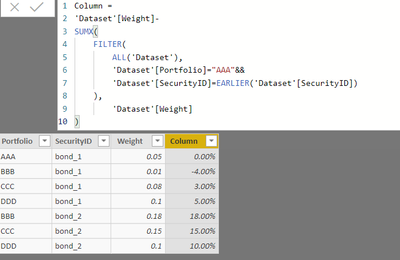
Try this column formula
Column =
'Dataset'[Weight]-
SUMX(
FILTER(
ALL('Dataset'),
'Dataset'[Portfolio]="AAA"&&
'Dataset'[SecurityID]=EARLIER('Dataset'[SecurityID])
),
'Dataset'[Weight]
)
Thanks
@Anonymous
For making it dynamic through a slicer, please refer to the Power BI file
Hope this helps
Thanks
@Anonymous
Try this column formula
Column =
'Dataset'[Weight]-
SUMX(
FILTER(
ALL('Dataset'),
'Dataset'[Portfolio]="AAA"&&
'Dataset'[SecurityID]=EARLIER('Dataset'[SecurityID])
),
'Dataset'[Weight]
)
Thanks
Check out the May 2026 Power BI update to learn about new features.
Sign up to receive a private message when registration opens and key events begin.
If you have recently started exploring Fabric, we'd love to hear how it's going. Your feedback can help with product improvements.
| User | Count |
|---|---|
| 32 | |
| 26 | |
| 25 | |
| 24 | |
| 15 |
| User | Count |
|---|---|
| 63 | |
| 48 | |
| 27 | |
| 23 | |
| 20 |