cancel
Showing results for 
Search instead for 
Did you mean: 

The Power BI Data Visualization World Championships is back! Get ahead of the game and start preparing now! Learn more

Reply
Kumkrong_K
Frequent Visitor

Calculate with multiple table filter(?)

Hello, firstly I'm kinda new to this power bi, and been trying to understand it

I have 2 tables, they relate to each other using saleID with one to many relationship
the sale data has price and status for each bill with saleID as unique index
while the sale_data_detail has what products are on each bill
example of detail table is like this
saleID[1] have 2 rows, "Coach" and "Drink"
saleID[2] have only 1 row, "Coach"
saleID[3] have 3 rows, "Drink" "Coart" and "Souvenir"
so for saleID 1 2 3, the detail table will have 6 rows total

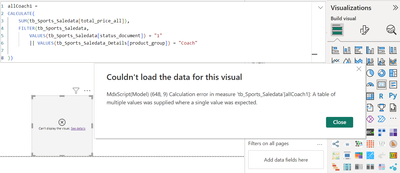
now I want to do something like this, the DAX show no error
but the sum number cannot be show in card

Kumkrong_K_0-1710504944014.png

the number show up if the FILTER condition is only one of the two, but not both
could somebody please explain to me why? and how to achieve the result using some other mean?

Thank you in advance !!

1 ACCEPTED SOLUTION
DataInsights
Super User
Super User

@Kumkrong_K,


Try this measure:


allCoach1 =
VAR vFilterTable =
    FILTER (
        CROSSJOIN (
            ALL ( tb_Sports_Saledata[status_document] ),
            ALL ( tb_Sports_Saledata_Details[product_group] )
        ),
        tb_Sports_Saledata[status_document] = "1"
            || tb_Sports_Saledata_Details[product_group] = "Coach"
    )
VAR vResult =
    CALCULATE (
        SUM ( tb_Sports_Saledata[total_price_all] ),
        KEEPFILTERS ( vFilterTable )
    )
RETURN
    vResult


Did I answer your question? Mark my post as a solution!

Proud to be a Super User!


View solution in original post

3 REPLIES 3
DataInsights
Super User
Super User

@Kumkrong_K,


Try this measure:


allCoach1 =
VAR vFilterTable =
    FILTER (
        CROSSJOIN (
            ALL ( tb_Sports_Saledata[status_document] ),
            ALL ( tb_Sports_Saledata_Details[product_group] )
        ),
        tb_Sports_Saledata[status_document] = "1"
            || tb_Sports_Saledata_Details[product_group] = "Coach"
    )
VAR vResult =
    CALCULATE (
        SUM ( tb_Sports_Saledata[total_price_all] ),
        KEEPFILTERS ( vFilterTable )
    )
RETURN
    vResult


Did I answer your question? Mark my post as a solution!

Proud to be a Super User!


Thank you, your solution work 👍

By the way, could you please explain what went wrong with my DAX?
so that I won't repeat the same mistake
I still don't understand what the error mean by saying it was a table with multiple values.

Again, thank you.

@Kumkrong_K,


Glad to hear it works. The VALUES function returns a table of values, but the second argument of FILTER is evaluated in a row context and thus requires a single value.


Did I answer your question? Mark my post as a solution!

Proud to be a Super User!


Helpful resources

Announcements
Power BI DataViz World Championships

Power BI Dataviz World Championships

The Power BI Data Visualization World Championships is back! Get ahead of the game and start preparing now!

December 2025 Power BI Update Carousel

Power BI Monthly Update - December 2025

Check out the December 2025 Power BI Holiday Recap!

FabCon Atlanta 2026 carousel

FabCon Atlanta 2026

Join us at FabCon Atlanta, March 16-20, for the ultimate Fabric, Power BI, AI and SQL community-led event. Save $200 with code FABCOMM.