FabCon is coming to Atlanta
Join us at FabCon Atlanta from March 16 - 20, 2026, for the ultimate Fabric, Power BI, AI and SQL community-led event. Save $200 with code FABCOMM.
Register now!- Power BI forums
- Get Help with Power BI
- Desktop
- Service
- Report Server
- Power Query
- Mobile Apps
- Developer
- DAX Commands and Tips
- Custom Visuals Development Discussion
- Health and Life Sciences
- Power BI Spanish forums
- Translated Spanish Desktop
- Training and Consulting
- Instructor Led Training
- Dashboard in a Day for Women, by Women
- Galleries
- Data Stories Gallery
- Themes Gallery
- Contests Gallery
- QuickViz Gallery
- Quick Measures Gallery
- Visual Calculations Gallery
- Notebook Gallery
- Translytical Task Flow Gallery
- TMDL Gallery
- R Script Showcase
- Webinars and Video Gallery
- Ideas
- Custom Visuals Ideas (read-only)
- Issues
- Issues
- Events
- Upcoming Events
The Power BI Data Visualization World Championships is back! Get ahead of the game and start preparing now! Learn more
- Power BI forums
- Forums
- Get Help with Power BI
- Desktop
- Re: Calculate weeks of stock based on future deman...
- Subscribe to RSS Feed
- Mark Topic as New
- Mark Topic as Read
- Float this Topic for Current User
- Bookmark
- Subscribe
- Printer Friendly Page

- Mark as New
- Bookmark
- Subscribe
- Mute
- Subscribe to RSS Feed
- Permalink
- Report Inappropriate Content
Calculate weeks of stock based on future demand
I have 2 tables: (1) Current Items & on-hand counts, (2) Forecasted weekly demand by item for the next year. Linked by item number.
I'm trying to understand how many weeks of stock (WOS) I have on-hand for each item today.
For example I have 100 units of Item A. The next 5 weeks of demand look like this:
Week 1: 20
Week 2: 12
Week 3: 40
Week 4: 55
Week 5: 30
In the 4th week, I run out of stock, so my WOS is 3 or 3.5 (I'm ok with either). How do I calculate this, by item? I'm comfortable with DAX but have a feeling Power Query is the answer here. Thanks!
Solved! Go to Solution.
- Mark as New
- Bookmark
- Subscribe
- Mute
- Subscribe to RSS Feed
- Permalink
- Report Inappropriate Content
HI @Anonymous,
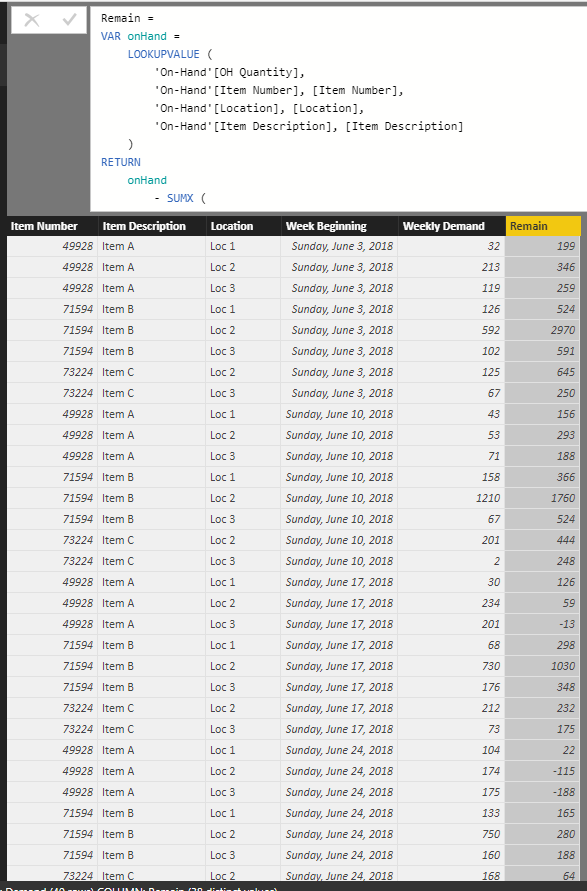
If you mean calculate max available week of forecasted data, you can refer to below formula.
Calculate column at demand table:
Remain =
VAR onHand =
    LOOKUPVALUE (
        'On-Hand'[OH Quantity],
        'On-Hand'[Item Number], [Item Number],
        'On-Hand'[Location], [Location],
        'On-Hand'[Item Description], [Item Description]
    )
RETURN
    onHand
        - SUMX (
            FILTER (
                ALL ( Demand ),
                [Week Beginning] <= EARLIER ( Demand[Week Beginning] )
                    && [Item Number] = EARLIER ( Demand[Item Number] )
                    && [Item Description] = EARLIER ( Demand[Item Description] )
                    && [Location] = EARLIER ( Demand[Location] )
            ),
            [Weekly Demand]
        )
Calculate column at On-hand table:
Forecasted available Week =
VAR _date =
    MAXX (
        FILTER (
            ALL ( Demand ),
            Demand[Item Description] = 'On-Hand'[Item Description]
                && Demand[Item Number] = 'On-Hand'[Item Number]
                && Demand[Location] = 'On-Hand'[Location]
                && [Remain] >= 0
        ),
        [Week Beginning]
    )
RETURN
    WEEKNUM ( _date, 1 ) & "/"
        & YEAR ( _date )
Result:

Regards,
Xiaoxin Sheng


- Mark as New
- Bookmark
- Subscribe
- Mute
- Subscribe to RSS Feed
- Permalink
- Report Inappropriate Content
@Anonymous possible for you to share the pbix file with measure accepted as solution below please? I am struggling with similar scenario.


- Mark as New
- Bookmark
- Subscribe
- Mute
- Subscribe to RSS Feed
- Permalink
- Report Inappropriate Content
Hi @Anonymous,
Can you post some sample data from your two tables?
Or if it's sensitive, create some dummy data?
Alex
- Mark as New
- Bookmark
- Subscribe
- Mute
- Subscribe to RSS Feed
- Permalink
- Report Inappropriate Content
On-hands:
| Item Number | Item Description | Location | OH Quantity |
| 49928 | Item A | Loc 1 | 231 |
| 49928 | Item A | Loc 2 | 559 |
| 49928 | Item A | Loc 3 | 378 |
| 71594 | Item B | Loc 1 | 650 |
| 71594 | Item B | Loc 2 | 3562 |
| 71594 | Item B | Loc 3 | 693 |
| 73224 | Item C | Loc 2 | 770 |
| 73224 | Item C | Loc 3 | 317 |
Demand:
| Item Number | Item Description | Location | Week Beginning | Weekly Demand |
| 49928 | Item A | Loc 1 | 6/3/2018 | 32 |
| 49928 | Item A | Loc 2 | 6/3/2018 | 213 |
| 49928 | Item A | Loc 3 | 6/3/2018 | 119 |
| 71594 | Item B | Loc 1 | 6/3/2018 | 126 |
| 71594 | Item B | Loc 2 | 6/3/2018 | 592 |
| 71594 | Item B | Loc 3 | 6/3/2018 | 102 |
| 73224 | Item C | Loc 2 | 6/3/2018 | 125 |
| 73224 | Item C | Loc 3 | 6/3/2018 | 67 |
| 49928 | Item A | Loc 1 | 6/10/2018 | 43 |
| 49928 | Item A | Loc 2 | 6/10/2018 | 53 |
| 49928 | Item A | Loc 3 | 6/10/2018 | 71 |
| 71594 | Item B | Loc 1 | 6/10/2018 | 158 |
| 71594 | Item B | Loc 2 | 6/10/2018 | 1210 |
| 71594 | Item B | Loc 3 | 6/10/2018 | 67 |
| 73224 | Item C | Loc 2 | 6/10/2018 | 201 |
| 73224 | Item C | Loc 3 | 6/10/2018 | 2 |
| 49928 | Item A | Loc 1 | 6/17/2018 | 30 |
| 49928 | Item A | Loc 2 | 6/17/2018 | 234 |
| 49928 | Item A | Loc 3 | 6/17/2018 | 201 |
| 71594 | Item B | Loc 1 | 6/17/2018 | 68 |
| 71594 | Item B | Loc 2 | 6/17/2018 | 730 |
| 71594 | Item B | Loc 3 | 6/17/2018 | 176 |
| 73224 | Item C | Loc 2 | 6/17/2018 | 212 |
| 73224 | Item C | Loc 3 | 6/17/2018 | 73 |
| 49928 | Item A | Loc 1 | 6/24/2018 | 104 |
| 49928 | Item A | Loc 2 | 6/24/2018 | 174 |
| 49928 | Item A | Loc 3 | 6/24/2018 | 175 |
| 71594 | Item B | Loc 1 | 6/24/2018 | 133 |
| 71594 | Item B | Loc 2 | 6/24/2018 | 750 |
| 71594 | Item B | Loc 3 | 6/24/2018 | 160 |
| 73224 | Item C | Loc 2 | 6/24/2018 | 168 |
| 73224 | Item C | Loc 3 | 6/24/2018 | 199 |
| 49928 | Item A | Loc 1 | 7/1/2018 | 64 |
| 49928 | Item A | Loc 2 | 7/1/2018 | 176 |
| 49928 | Item A | Loc 3 | 7/1/2018 | 184 |
| 71594 | Item B | Loc 1 | 7/1/2018 | 174 |
| 71594 | Item B | Loc 2 | 7/1/2018 | 480 |
| 71594 | Item B | Loc 3 | 7/1/2018 | 188 |
| 73224 | Item C | Loc 2 | 7/1/2018 | 124 |
| 73224 | Item C | Loc 3 | 7/1/2018 | 84 |
- Mark as New
- Bookmark
- Subscribe
- Mute
- Subscribe to RSS Feed
- Permalink
- Report Inappropriate Content
HI @Anonymous,
If you mean calculate max available week of forecasted data, you can refer to below formula.
Calculate column at demand table:
Remain =
VAR onHand =
    LOOKUPVALUE (
        'On-Hand'[OH Quantity],
        'On-Hand'[Item Number], [Item Number],
        'On-Hand'[Location], [Location],
        'On-Hand'[Item Description], [Item Description]
    )
RETURN
    onHand
        - SUMX (
            FILTER (
                ALL ( Demand ),
                [Week Beginning] <= EARLIER ( Demand[Week Beginning] )
                    && [Item Number] = EARLIER ( Demand[Item Number] )
                    && [Item Description] = EARLIER ( Demand[Item Description] )
                    && [Location] = EARLIER ( Demand[Location] )
            ),
            [Weekly Demand]
        )
Calculate column at On-hand table:
Forecasted available Week =
VAR _date =
    MAXX (
        FILTER (
            ALL ( Demand ),
            Demand[Item Description] = 'On-Hand'[Item Description]
                && Demand[Item Number] = 'On-Hand'[Item Number]
                && Demand[Location] = 'On-Hand'[Location]
                && [Remain] >= 0
        ),
        [Week Beginning]
    )
RETURN
    WEEKNUM ( _date, 1 ) & "/"
        & YEAR ( _date )
Result:
Regards,
Xiaoxin Sheng


- Mark as New
- Bookmark
- Subscribe
- Mute
- Subscribe to RSS Feed
- Permalink
- Report Inappropriate Content
HI,
I have exactly similar requirement. The Solution provided here does not give the expected WOS - 3.5 or 3. It is returning the forecasted available date
Can someone help me by taking the same data as sample , but i will need a measure to calculate WOS based on selection of product
- Mark as New
- Bookmark
- Subscribe
- Mute
- Subscribe to RSS Feed
- Permalink
- Report Inappropriate Content
I have the same requirement, Do you have any solution so far? Thanks
Helpful resources

Power BI Monthly Update - November 2025
Check out the November 2025 Power BI update to learn about new features.

Fabric Data Days
Advance your Data & AI career with 50 days of live learning, contests, hands-on challenges, study groups & certifications and more!

FabCon Atlanta 2026
Join us at FabCon Atlanta, March 16-20, for the ultimate Fabric, Power BI, AI and SQL community-led event. Save $200 with code FABCOMM.


