FabCon is coming to Atlanta
Join us at FabCon Atlanta from March 16 - 20, 2026, for the ultimate Fabric, Power BI, AI and SQL community-led event. Save $200 with code FABCOMM.
Register now!- Power BI forums
- Get Help with Power BI
- Desktop
- Service
- Report Server
- Power Query
- Mobile Apps
- Developer
- DAX Commands and Tips
- Custom Visuals Development Discussion
- Health and Life Sciences
- Power BI Spanish forums
- Translated Spanish Desktop
- Training and Consulting
- Instructor Led Training
- Dashboard in a Day for Women, by Women
- Galleries
- Data Stories Gallery
- Themes Gallery
- Contests Gallery
- QuickViz Gallery
- Quick Measures Gallery
- Visual Calculations Gallery
- Notebook Gallery
- Translytical Task Flow Gallery
- TMDL Gallery
- R Script Showcase
- Webinars and Video Gallery
- Ideas
- Custom Visuals Ideas (read-only)
- Issues
- Issues
- Events
- Upcoming Events
The Power BI Data Visualization World Championships is back! Get ahead of the game and start preparing now! Learn more
- Power BI forums
- Forums
- Get Help with Power BI
- Desktop
- Re: Calculate transactions that contain items in c...
- Subscribe to RSS Feed
- Mark Topic as New
- Mark Topic as Read
- Float this Topic for Current User
- Bookmark
- Subscribe
- Printer Friendly Page

- Mark as New
- Bookmark
- Subscribe
- Mute
- Subscribe to RSS Feed
- Permalink
- Report Inappropriate Content
Calculate transactions that contain items in category A only, B only, C only, or a combo
Hi all,
I'm working on a problem that seems like it should have a simple answer, but I have had some trouble finding a good way to write out the DAX formula.
I have a dataset consisting of sales and orders for categories A, B, and C. I need to flag each order as consisting of A only, B only, C only, or a combo of any of A/B/C. Is there an easy way to do this?
I've found a similar answer to what I'm looking for on one of these posts, so maybe I can still use this, but I need to be able to perform other calculations (such as total orders, total revenue, AOV, avg units per order, median order value, etc.) for each category. E.g. I need to be able to show total orders for A only, B only, C only, or combo:
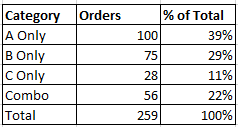
I'm currently calculating a separate measure for category A total orders, separate measure for category B total orders, separate measure for category C total orders, etc. but I need to be able to create one measure/column to calculate total orders split out by category, otherwise I'm looking at 50+ measures as you can imagine. It would be much better if I can perform calculations for total orders, total revenue, AOV, etc. on one column.
Here's what I'm using as a calculated column to find orders that contain category A only (repeating the same for category B and category C), so a category A returns as 'A', otherwise returns as 'NO':
Solved! Go to Solution.


- Mark as New
- Bookmark
- Subscribe
- Mute
- Subscribe to RSS Feed
- Permalink
- Report Inappropriate Content
Ah, I forgot HASONEVALUE doesn't work on variables.
This should work and be a bit cleaner than all the calculated columns and a SWITCH:
OrderCategory =
VAR Categories =
    CALCULATETABLE (
        VALUES ( OrderTable[Category] ),
        ALLEXCEPT ( OrderTable, OrderTable[Order ID] )
    )
RETURN
    IF ( COUNTROWS ( Categories ) = 1, Categories, "Combo" )
- Mark as New
- Bookmark
- Subscribe
- Mute
- Subscribe to RSS Feed
- Permalink
- Report Inappropriate Content
A sample dataset is almost always useful. Sharing an example .pbix is even better.
I think creating a calculated column like this on OrderTable might be useful:
OrderCategory =
VAR Categories =
    CALCULATETABLE (
        VALUES ( OrderTable[Category] ),
        ALLEXCEPT ( OrderTable, OrderTable[Order ID] )
    )
RETURN
IF ( HASONEVALUE ( Categories ), Categories & " Only", "Combo" )- Mark as New
- Bookmark
- Subscribe
- Mute
- Subscribe to RSS Feed
- Permalink
- Report Inappropriate Content
Hi @AlexisOlson ,
Thank you for your quick reply. I tried the above formula but it labeled all orders as 'Combo'. Do you know how I can add a sample .pbix file? I don't see an attachment option - should I publish to PBI Service? I don't think you'd have the ability to see the backend tables if I did that.
Thank you!
- Mark as New
- Bookmark
- Subscribe
- Mute
- Subscribe to RSS Feed
- Permalink
- Report Inappropriate Content
Upload it to e.g. DropBox/Google Drive/OneDrive and share the link.
- Mark as New
- Bookmark
- Subscribe
- Mute
- Subscribe to RSS Feed
- Permalink
- Report Inappropriate Content
@AlexisOlson Ah, understood - please let me know if you have trouble accessing this file: https://drive.google.com/file/d/1_3ZjQkiw0u8N88YjRbYHW6VFvCvBiizb/view?usp=sharing
- Mark as New
- Bookmark
- Subscribe
- Mute
- Subscribe to RSS Feed
- Permalink
- Report Inappropriate Content
@AlexisOlson I was able to figure this out using SWITCH() true logic:
- Mark as New
- Bookmark
- Subscribe
- Mute
- Subscribe to RSS Feed
- Permalink
- Report Inappropriate Content
Ah, I forgot HASONEVALUE doesn't work on variables.
This should work and be a bit cleaner than all the calculated columns and a SWITCH:
OrderCategory =
VAR Categories =
    CALCULATETABLE (
        VALUES ( OrderTable[Category] ),
        ALLEXCEPT ( OrderTable, OrderTable[Order ID] )
    )
RETURN
    IF ( COUNTROWS ( Categories ) = 1, Categories, "Combo" )
- Mark as New
- Bookmark
- Subscribe
- Mute
- Subscribe to RSS Feed
- Permalink
- Report Inappropriate Content
@AlexisOlson excellent - this is much cleaner and I really like not have to using those additional calculated columns.
Thank you much!

Helpful resources

Power BI Dataviz World Championships
The Power BI Data Visualization World Championships is back! Get ahead of the game and start preparing now!

Power BI Monthly Update - December 2025
Check out the December 2025 Power BI Holiday Recap!

FabCon Atlanta 2026
Join us at FabCon Atlanta, March 16-20, for the ultimate Fabric, Power BI, AI and SQL community-led event. Save $200 with code FABCOMM.

| User | Count |
|---|---|
| 41 | |
| 38 | |
| 36 | |
| 30 | |
| 28 |


| User | Count |
|---|---|
| 128 | |
| 88 | |
| 79 | |
| 67 | |
| 62 |


