Reply
Topic Options
- Subscribe to RSS Feed
- Mark Topic as New
- Mark Topic as Read
- Float this Topic for Current User
- Bookmark
- Subscribe
- Printer Friendly Page

- Mark as New
- Bookmark
- Subscribe
- Mute
- Subscribe to RSS Feed
- Permalink
- Report Inappropriate Content

Calculate total sales for the last period
04-19-2022
02:40 AM
Hello,
I am trying to calculate the sales for the last n periods in n different measures.
I have the following custom calendar table. How can I create the measures that calculate the sales in the previous periods?
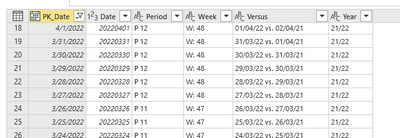
For the month -1,-2,...,-n, I've found the following measure that works. But I can't create a measure for period -1,-2,...-n.
Month - 1 QTY =
VAR _index = 1
VAR _StartMonth = DATE( YEAR( TODAY() ), MONTH( TODAY() ) - _index , 1)
VAR _StartNextMonth = EOMONTH( _StartMonth, 0) + 1
VAR _Amount = CALCULATE(SUM(l2y_sales[QUANTITY]) , periodsfulldata[PK_Date] >= _StartMonth, periodsfulldata[PK_Date] < _StartNextMonth)
RETURN _Amount
Solved! Go to Solution.
1 ACCEPTED SOLUTION


- Mark as New
- Bookmark
- Subscribe
- Mute
- Subscribe to RSS Feed
- Permalink
- Report Inappropriate Content
05-03-2022
07:46 PM

Hi, @andreas789
Please first make sure that the data type of your Column 'Period' is 'whole number'.
Then try formula as below:
Period1 =
VAR _period =
    CALCULATE (
        MAX ( periodsfulldata[Period] ),
        FILTER ( periodsfulldata, periodsfulldata[PK_Date] = TODAY () )
    )
VAR _lastperiod = _period - 1
VAR _StartNextWeek =
    CALCULATE (
        MAX ( periodsfulldata[PK_Date] ),
        FILTER ( ALL ( periodsfulldata ), periodsfulldata[Period] = _lastperiod )
    )
VAR _StartDate =
    CALCULATE (
        MIN ( periodsfulldata[PK_Date] ),
        FILTER ( ALL ( periodsfulldata ), periodsfulldata[Period] = _lastperiod )
    )
VAR _Amount =
    CALCULATE (
        SUM ( l2y_sales[QUANTITY] ),
        periodsfulldata[PK_Date] >= _StartDate,
        periodsfulldata[PK_Date] < _StartNextWeek
    )
RETURN
    _Amount
Best Regards,
Community Support Team _ Eason
4 REPLIES 4
- Mark as New
- Bookmark
- Subscribe
- Mute
- Subscribe to RSS Feed
- Permalink
- Report Inappropriate Content
04-22-2022
02:08 AM
Hi, @andreas789
If your 'period' corresponds to 'week', you can try formula as below:
Week - 1 QTY =
VAR _index = 1
VAR _StartDate =
    TODAY () - WEEKDAY ( TODAY (), 2 ) - 7 * _index
VAR _StartNextWeek = _StartDate + 6
VAR _Amount =
    CALCULATE (
        SUM ( l2y_sales[QUANTITY] ),
        periodsfulldata[PK_Date] >= _StartDate,
        periodsfulldata[PK_Date] < _StartNextWeek
    )
RETURN
    _Amount
Best Regards,
Community Support Team _ Eason
- Mark as New
- Bookmark
- Subscribe
- Mute
- Subscribe to RSS Feed
- Permalink
- Report Inappropriate Content
04-25-2022
11:37 PM
Hey @v-easonf-msft, thanks for the reply but unfortuantelly this is not the case. I need to calculate the sales based on the column 'Period'.
- Mark as New
- Bookmark
- Subscribe
- Mute
- Subscribe to RSS Feed
- Permalink
- Report Inappropriate Content
05-03-2022
07:46 PM
Hi, @andreas789
Please first make sure that the data type of your Column 'Period' is 'whole number'.
Then try formula as below:
Period1 =
VAR _period =
    CALCULATE (
        MAX ( periodsfulldata[Period] ),
        FILTER ( periodsfulldata, periodsfulldata[PK_Date] = TODAY () )
    )
VAR _lastperiod = _period - 1
VAR _StartNextWeek =
    CALCULATE (
        MAX ( periodsfulldata[PK_Date] ),
        FILTER ( ALL ( periodsfulldata ), periodsfulldata[Period] = _lastperiod )
    )
VAR _StartDate =
    CALCULATE (
        MIN ( periodsfulldata[PK_Date] ),
        FILTER ( ALL ( periodsfulldata ), periodsfulldata[Period] = _lastperiod )
    )
VAR _Amount =
    CALCULATE (
        SUM ( l2y_sales[QUANTITY] ),
        periodsfulldata[PK_Date] >= _StartDate,
        periodsfulldata[PK_Date] < _StartNextWeek
    )
RETURN
    _Amount
Best Regards,
Community Support Team _ Eason

- Mark as New
- Bookmark
- Subscribe
- Mute
- Subscribe to RSS Feed
- Permalink
- Report Inappropriate Content
06-16-2023
12:04 PM
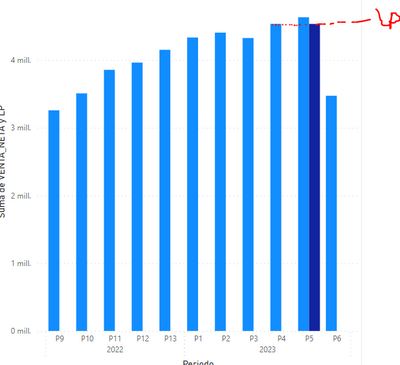
Hi, Is there any way to calculate the amount of the LP, for each period?

Helpful resources


Featured Topics


Top Kudoed Authors (Last Month)
| User | Count |
|---|---|
| 118 | |
| 105 | |
| 84 | |
| 52 | |
| 46 |


Users online (3,791)


