cancel
Showing results for 
Search instead for 
Did you mean: 

We've captured the moments from FabCon & SQLCon that everyone is talking about, and we are bringing them to the community, live and on-demand. Starts on April 14th. Register now

Reply
Anonymous
Not applicable

Calculate total days from a selected date

I have a project currently I am working on right now, and I am struggling to get this methodology to work.


For instance, end user selects a date, based on the date selection, it calculates


1. Date diff between the selected date and “Referral date”

2. Calculates the weeks based on the step1.

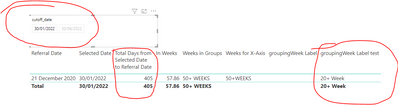
3. Group step 1 ( so it’s the week falls <10 then group 0-10 week, >=10 && <20 then 10-20 etc) I am particularly struggling around the groups which I am trying to do it in a column as Id need to create another column to sort the Week order and need to show this is a clustered chart.


Sherin89_0-1644331747796.png


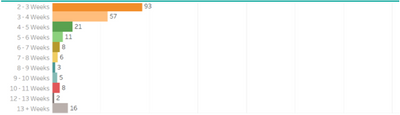
What I really want to do is this. 


Sherin89_1-1644331747727.png


Any help would be appreciated. 

2 REPLIES 2
Syndicate_Admin
Administrator
Administrator

To calculate the total days from a selected date in Power BI, create a calculated column that subtracts the "Reference date" from the selected date to get the difference in days. Then, calculate the weeks by dividing this difference by 7. To group weeks (e.g., 0-10, 10-20, etc.), use a calculated column with a SWITCH or IF function to assign ranges based on the number of weeks. Finally, sort the groups by creating an auxiliary column with numerical values for the order and visualize the results on a grouped chart, making sure to set up the axis correctly.

AlexisOlson
Super User
Super User

One name for this is "static segmentation". I'd recommend checking out this article and/or associated video:

https://www.daxpatterns.com/static-segmentation/

Helpful resources

Announcements
New to Fabric survey Carousel

New to Fabric Survey

If you have recently started exploring Fabric, we'd love to hear how it's going. Your feedback can help with product improvements.

Power BI DataViz World Championships carousel

Power BI DataViz World Championships - June 2026

A new Power BI DataViz World Championship is coming this June! Don't miss out on submitting your entry.

Join our Fabric User Panel

Join our Fabric User Panel

Share feedback directly with Fabric product managers, participate in targeted research studies and influence the Fabric roadmap.

March Power BI Update Carousel

Power BI Community Update - March 2026

Check out the March 2026 Power BI update to learn about new features.