Join us at FabCon Atlanta from March 16 - 20, 2026, for the ultimate Fabric, Power BI, AI and SQL community-led event. Save $200 with code FABCOMM.
Register now!The Power BI Data Visualization World Championships is back! Get ahead of the game and start preparing now! Learn more
Hello all, I need help...
Want to create 2 things:
1. a column with the remaining task for a month split and also to carry it onto the next month until it was closed.
2. a trendline with the percentage of task completed each month.
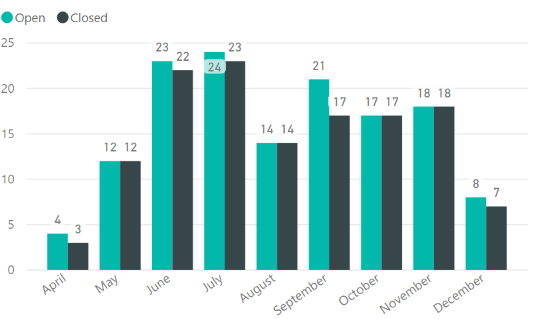
At the moment I have 2 columns, with the open date, and the closed one - format dd/mm/yyyy hh:mm and created this:
Can someone help me with the formulas for the two?
Kind Regards
Solved! Go to Solution.
Hello @v-yuezhe-msft,
Thank you for the lead provided to me, I've been following it for a few weeks now but unfortunately, I haven't reached the result.
Do you think you can help me with a different form DAX to achieve the result?
Thank you in advance for the support.
@remi,
Could you please share dummy data of your table and post expected result in table format?
Regards,
Lydia
Hi Lydia,
thank you for getting back to me.
desired chart
example of a table
| REQ NO | Created Date | Closed Date | Rezidual req. (that was not closed within a specific month/week) |
| REQ00456 | 3/10/2017 9:53 | 11/12/2017 13:29 | |
| REQ00457 | 20/10/2017 11:08 | 11/12/2017 13:29 | |
| REQ00458 | 24/10/2017 10:32 | 8/12/2017 9:16 | |
| REQ00459 | 10/7/2017 16:10 | 11/12/2017 13:29 | |
| REQ00460 | 19/05/2017 13:47 | 11/12/2017 13:29 | |
| REQ00461 | 24/10/2017 11:44 | 11/12/2017 13:29 | |
| REQ00462 | 20/10/2017 11:12 | 11/12/2017 13:29 | |
| REQ00463 | 20/09/2017 16:15 | 11/12/2017 13:29 | |
| REQ00464 | 2/10/2017 20:42 | 11/12/2017 13:29 | |
| REQ00465 | 10/7/2017 12:24 | 11/12/2017 13:29 | |
| REQ00466 | 13/06/2017 15:37 | 11/12/2017 13:29 | |
| REQ00467 | 2/5/2017 10:30 | 11/12/2017 13:29 | |
| REQ00468 | 24/07/2017 13:32 | 11/12/2017 12:37 | |
| REQ00469 | 26/04/2017 14:19 | 11/12/2017 12:35 | |
| REQ00470 | 26/04/2017 14:18 | 11/12/2017 12:33 | |
| REQ00471 | 22/11/2017 09:51 | 11/12/2017 12:30 | |
| REQ00472 | 22/11/2017 09:50 | 4/1/2017 12:30 | |
| REQ00473 | 21/11/2017 13:18 | 11/14/2017 12:30 | |
| REQ00474 | 21/11/2017 13:01 | 11/15/2017 12:30 | |
| REQ00475 | 21/11/2017 13:02 | 11/16/2017 12:30 | |
| REQ00476 | 21/11/2017 13:03 | 11/17/2017 12:30 | |
| REQ00477 | 21/11/2017 13:04 | 11/18/2017 12:30 | |
| REQ00478 | 21/11/2017 13:05 | 11/19/2017 12:30 |
@remi,
Please review the solution in the following similar thread.
https://community.powerbi.com/t5/Desktop/dax-how-to-count-open-tickets/td-p/100614
Regards,
Lydia
Hello @v-yuezhe-msft,
Thank you for the lead provided to me, I've been following it for a few weeks now but unfortunately, I haven't reached the result.
Do you think you can help me with a different form DAX to achieve the result?
Thank you in advance for the support.
The Power BI Data Visualization World Championships is back! Get ahead of the game and start preparing now!
| User | Count |
|---|---|
| 40 | |
| 38 | |
| 36 | |
| 29 | |
| 28 |
| User | Count |
|---|---|
| 127 | |
| 88 | |
| 78 | |
| 66 | |
| 64 |