cancel
Showing results for 
Search instead for 
Did you mean: 

The Power BI Data Visualization World Championships is back! Get ahead of the game and start preparing now! Learn more

Reply
Syndicate_Admin
Administrator
Administrator

Calculate the Sales Forecast

Good community,

I would like to make a sales forecast, according to the past days. For example, if today is Tuesday, July 18, 2023, to know the sales forecast, I will add Tuesday, July 11 and Tuesday, July 4 and divide it by two to have the average. That figure will be the sales forecast for today. When it's Tuesday, July 25, I'll add Tuesday 4, Tuesday 11, and Tuesday 18 and divide it by three. So with every day of the week.

I've been thinking about it, but I can't find a way to do it at DAX.

Any ideas you can think of?

Thank you for your help.

Best regards

1 ACCEPTED SOLUTION
Syndicate_Admin
Administrator
Administrator

Hello Neeko Tang,

Thank you for your proposal. In the end, I solved it by consulting with experts, who provided me with this formula:

Sales Forecast=

VAR __Mes=FORMAT(TODAY(), "YYYYMM", "ES-es")

VAR __Dia=MAX(dimCalendario[ORDENDIA])

VAR __MaxDate=MAX(dimCalendar[DATE])

VAR __Total=CALCULATETABLE(

dimCalendario,

dimCalendar[YEAR-MONTH]=VALUE(__Mes),

dimCalendario[ORDENDIA]=VALUE(__Dia),

dimCalendar[DATE]<=___MaxDate,

REMOVEFILTERS(dimCalendario)

)

RETURN

CALCULATE(

AVERAGEX(

VALUES(dimCalendar[DATE]),

[Sales]

),

__Total

)

I create a table with the calendar records, where the year-month is equal to the current year-month, the number of day of the week equal to the number of day of the largest week, the date less than or equal to the largest date of the calendar and clear all filters that apply to the calendar table.

Then, I calculate the average sales according to the table I just generated.

I share this code so that it can be useful to the community.

Thank you very much for the contribution!

View solution in original post

2 REPLIES 2
Syndicate_Admin
Administrator
Administrator

Hello Neeko Tang,

Thank you for your proposal. In the end, I solved it by consulting with experts, who provided me with this formula:

Sales Forecast=

VAR __Mes=FORMAT(TODAY(), "YYYYMM", "ES-es")

VAR __Dia=MAX(dimCalendario[ORDENDIA])

VAR __MaxDate=MAX(dimCalendar[DATE])

VAR __Total=CALCULATETABLE(

dimCalendario,

dimCalendar[YEAR-MONTH]=VALUE(__Mes),

dimCalendario[ORDENDIA]=VALUE(__Dia),

dimCalendar[DATE]<=___MaxDate,

REMOVEFILTERS(dimCalendario)

)

RETURN

CALCULATE(

AVERAGEX(

VALUES(dimCalendar[DATE]),

[Sales]

),

__Total

)

I create a table with the calendar records, where the year-month is equal to the current year-month, the number of day of the week equal to the number of day of the largest week, the date less than or equal to the largest date of the calendar and clear all filters that apply to the calendar table.

Then, I calculate the average sales according to the table I just generated.

I share this code so that it can be useful to the community.

Thank you very much for the contribution!

Anonymous
Not applicable

Hi @Syndicate_Admin ,


According to your description, here are my steps you can follow as a solution.

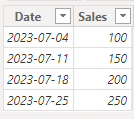
(1) This is my test data. 

vtangjiemsft_0-1689820291876.png

(2) We can create a measure. 

Sales Forecast = 
VAR CurrentDate = MAX('Table'[Date])
VAR CurrentWeekday = WEEKDAY(CurrentDate, 2)
VAR PastDates = 
    FILTER(
        ALL('Table'[Date]),
        WEEKDAY('Table'[Date], 2) = CurrentWeekday && 'Table'[Date] < CurrentDate
    )
VAR PastSales = 
    CALCULATE(
        SUM('Table'[Sales]),
        'Table'[Date] IN PastDates
    )
VAR PastDaysCount = COUNTROWS(PastDates)
RETURN IF(PastDaysCount = 0, BLANK(), PastSales / PastDaysCount)

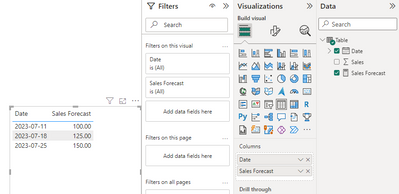
(3) Then the result is as follows.

vtangjiemsft_1-1689820355088.png


If the above one can't help you get the desired result, please provide some sample data in your tables (exclude sensitive data) with Text format and your expected result with backend logic and special examples. It is better if you can share a simplified pbix file. Thank you.


Best Regards,

Neeko Tang

If this post  helps, then please consider Accept it as the solution  to help the other members find it more quickly. 

Helpful resources

Announcements
Power BI DataViz World Championships

Power BI Dataviz World Championships

The Power BI Data Visualization World Championships is back! Get ahead of the game and start preparing now!

December 2025 Power BI Update Carousel

Power BI Monthly Update - December 2025

Check out the December 2025 Power BI Holiday Recap!

FabCon Atlanta 2026 carousel

FabCon Atlanta 2026

Join us at FabCon Atlanta, March 16-20, for the ultimate Fabric, Power BI, AI and SQL community-led event. Save $200 with code FABCOMM.

Users online (4,250)