FabCon is coming to Atlanta
Join us at FabCon Atlanta from March 16 - 20, 2026, for the ultimate Fabric, Power BI, AI and SQL community-led event. Save $200 with code FABCOMM.
Register now!- Power BI forums
- Get Help with Power BI
- Desktop
- Service
- Report Server
- Power Query
- Mobile Apps
- Developer
- DAX Commands and Tips
- Custom Visuals Development Discussion
- Health and Life Sciences
- Power BI Spanish forums
- Translated Spanish Desktop
- Training and Consulting
- Instructor Led Training
- Dashboard in a Day for Women, by Women
- Galleries
- Data Stories Gallery
- Themes Gallery
- Contests Gallery
- QuickViz Gallery
- Quick Measures Gallery
- Visual Calculations Gallery
- Notebook Gallery
- Translytical Task Flow Gallery
- TMDL Gallery
- R Script Showcase
- Webinars and Video Gallery
- Ideas
- Custom Visuals Ideas (read-only)
- Issues
- Issues
- Events
- Upcoming Events
The Power BI Data Visualization World Championships is back! Get ahead of the game and start preparing now! Learn more
- Power BI forums
- Forums
- Get Help with Power BI
- Desktop
- Re: Calculate sum of the past 3 months
- Subscribe to RSS Feed
- Mark Topic as New
- Mark Topic as Read
- Float this Topic for Current User
- Bookmark
- Subscribe
- Printer Friendly Page

- Mark as New
- Bookmark
- Subscribe
- Mute
- Subscribe to RSS Feed
- Permalink
- Report Inappropriate Content
Calculate sum of the past 3 months
Hi guys,
I'm fairly new to Power BI and my DAX knowledge is fairly limited, so bear with me.
I have a tabel with the following information:
Month Start, Company, # Safety Briefings for month
1/01/2016, Company A, 5
1/01/2016, Company B, 10
1/01/2016, Company C, 15
1/02/2016, Company A, 6
1/02/2016, Company B, 4
1/02/2016, Company C, 6
etc
What I want to do is calculate the total number of safety briefings completed over the past 3 months.
I have tried creating a new measure using the following:
Safety Briefings last 3 months = CALCULATE(sum(Table1[Safety Briefings]), DATESINPERIOD(Table1[Start Date], LASTDATE(Table1[Start Date]), -3, MONTH))
However, this only gives me the total for the month, NOT the past 3 months.
Any help would be greatly appreciated.
Cheers
Solved! Go to Solution.


- Mark as New
- Bookmark
- Subscribe
- Mute
- Subscribe to RSS Feed
- Permalink
- Report Inappropriate Content
Hi @CourtneyLeah, it would be best to have a Date Table and link your Month Start to the date table.
If that is done you could then create the following calculated measure which should work for you.
Safety Briefings last 3 months =
CALCULATE (
    SUM ( Table1[Safety Briefings] ),
    DATEADD ( 'Date'[Calendar Date], -3, MONTH )
)

- Mark as New
- Bookmark
- Subscribe
- Mute
- Subscribe to RSS Feed
- Permalink
- Report Inappropriate Content
How do you do the calculate sum of the past 3 months for each company?
I created a measure using your dax below, but it doesn't work if I put in a filter for each company
Cheers
- Mark as New
- Bookmark
- Subscribe
- Mute
- Subscribe to RSS Feed
- Permalink
- Report Inappropriate Content
- Mark as New
- Bookmark
- Subscribe
- Mute
- Subscribe to RSS Feed
- Permalink
- Report Inappropriate Content
Hi @CourtneyLeah, it would be best to have a Date Table and link your Month Start to the date table.
If that is done you could then create the following calculated measure which should work for you.
Safety Briefings last 3 months =
CALCULATE (
    SUM ( Table1[Safety Briefings] ),
    DATEADD ( 'Date'[Calendar Date], -3, MONTH )
)
- Mark as New
- Bookmark
- Subscribe
- Mute
- Subscribe to RSS Feed
- Permalink
- Report Inappropriate Content
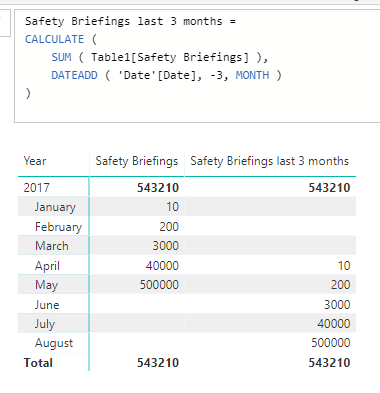
I am a little confused by this solution. From what I understand this won't summarize over all three months, it will just summarize what happened three months ago. I.e. if I put "Safety Briefings last 3 months" in a table grouped per month and look at the April-row, then I will see the sum of January and not the sum of Januari-March, right!?
- Mark as New
- Bookmark
- Subscribe
- Mute
- Subscribe to RSS Feed
- Permalink
- Report Inappropriate Content
So if you had to put this measure into a table and drag in the Month column from your date table you should then see the previous 3 months
- Mark as New
- Bookmark
- Subscribe
- Mute
- Subscribe to RSS Feed
- Permalink
- Report Inappropriate Content
Hmmm... do you mean like this? To me this doesn't look like the sum of the last three months but I might misunderstand you?
- Mark as New
- Bookmark
- Subscribe
- Mute
- Subscribe to RSS Feed
- Permalink
- Report Inappropriate Content
For anyone else stumbling into this thread these solutions might be of interest (2 more ways of doing almost the same thing are commented out). They could all be useful depending on challenge...


- Mark as New
- Bookmark
- Subscribe
- Mute
- Subscribe to RSS Feed
- Permalink
- Report Inappropriate Content
Great formula! Thanks!
In case you want to show the total of jan + Feb (ie 210) in Feb line instead of Mar line, then this works:
DATESINPERIOD('Dim Calendar'[Date], LASTDATE(DATEADD('Dim Calendar'[Date], 0, MONTH)), -3, MONTH)- Mark as New
- Bookmark
- Subscribe
- Mute
- Subscribe to RSS Feed
- Permalink
- Report Inappropriate Content
That is great! So simple example with the datesbetween function!
Thank you very much!
- Mark as New
- Bookmark
- Subscribe
- Mute
- Subscribe to RSS Feed
- Permalink
- Report Inappropriate Content


- Mark as New
- Bookmark
- Subscribe
- Mute
- Subscribe to RSS Feed
- Permalink
- Report Inappropriate Content
Hi @CourtneyLeah,
Please mark the corresponding reply as answer, which will help more people find solution clearly.
Best Regards,
Angelia
- Mark as New
- Bookmark
- Subscribe
- Mute
- Subscribe to RSS Feed
- Permalink
- Report Inappropriate Content


Helpful resources

Power BI Dataviz World Championships
The Power BI Data Visualization World Championships is back! Get ahead of the game and start preparing now!

Power BI Monthly Update - November 2025
Check out the November 2025 Power BI update to learn about new features.

FabCon Atlanta 2026
Join us at FabCon Atlanta, March 16-20, for the ultimate Fabric, Power BI, AI and SQL community-led event. Save $200 with code FABCOMM.

| User | Count |
|---|---|
| 59 | |
| 43 | |
| 42 | |
| 23 | |
| 17 |


| User | Count |
|---|---|
| 190 | |
| 122 | |
| 96 | |
| 66 | |
| 47 |


