Join us at FabCon Atlanta from March 16 - 20, 2026, for the ultimate Fabric, Power BI, AI and SQL community-led event. Save $200 with code FABCOMM.
Register now!The Power BI Data Visualization World Championships is back! Get ahead of the game and start preparing now! Learn more
Hi All,
I want to calculate standard deviation on the yield of 5 previous lots.
Here is the data:
Device | Lot_ID | Pass_Dies | Total_Dies | Yield | Std.Dev. |
Device1 | Lot1 | 50 | 100 | 50.00 | ? |
Device1 | Lot2 | 60 | 120 | 50.00 | ? |
Device1 | Lot3 | 80 | 100 | 80.00 | ? |
Device1 | Lot4 | 60 | 80 | 75.00 | ? |
Device2 | Lot5 | 55 | 80 | 68.75 | ? |
Device2 | Lot6 | 80 | 150 | 53.33 | ? |
Device2 | Lot7 | 81 | 110 | 73.64 | ? |
Device2 | Lot8 | 95 | 140 | 67.86 | ? |
Device2 | Lot9 | 75 | 100 | 75.00 | ? |
Device2 | Lot10 | 43 | 70 | 61.43 | ? |
I can calculate yield using following measure:
Total Dies = SUM(Table1[Total_Dies])
Pass Dies = SUM(Table1[Pass_Dies])
Yield = DIVIDE([Pass Dies], [Total Dies], 0) * 100
Std Dev = ?
For every lot, take yield of previous 5 lots and calculate standard deviation.
Anybody how to achieve this?
Solved! Go to Solution.
I added an index column and use your instruction and it worked.
Here is the updated list of columns:
Device, Program, Lot_Id, Lot_Finish_Date, Total_Dies, Pass_Dies
I have a line chart where Lot_ID is on x-axis. On y-axis, there are two measures, 1) yield, 2) std.dev. of yield. I also have a couple of slicers e.g. year, quarter, device etc.
Now the problem is that if I apply different filters on the data either throuh visual/page filters or slicers, then Std. Dev. does not always update itself correctly because index column has fixed values.
Is it possible that index (or rank) column works in such a way that it updates itself (i.e. start from 1) whenever filters/slicers are used so that std.dev. measure is also more dynamic.
Can we use Lot_Finish_Date column in a measure to get yield of last 5 lots and calculate std.dev. e.g. get yield of latest 5 lots where Lot_Finish_Date <= This_Lot_Finish_Date and calculate std.dev.
Hi @javedbh,
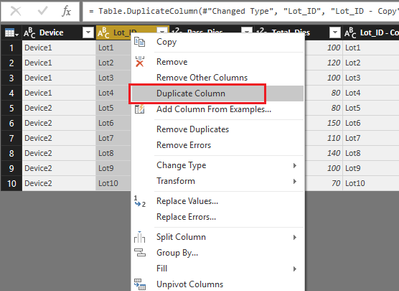
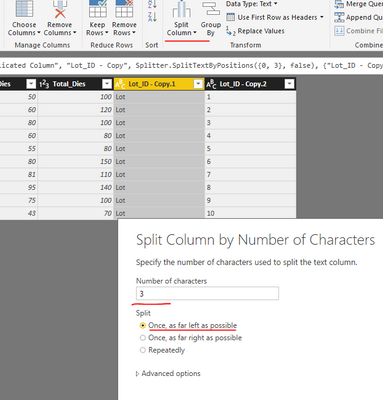
In Query Editor mode, duplicate [Lot_ID] column, then, split the duplicated column in order to get the ID number.
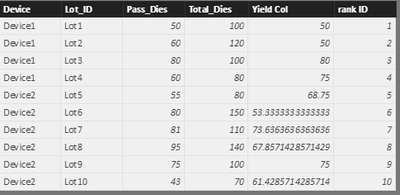
In data view mode, rather than creating a measure, please create a calculated column to get the [Yield] values.
Yield Col = (Table1[Pass_Dies]/Table1[Total_Dies])*100
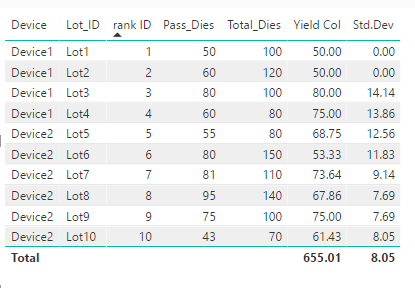
Refer to below measure to calculate the standard deviation.
Std.Dev = CALCULATE ( STDEV.P ( Table1[Yield Col] ), FILTER ( ALL ( Table1 ), Table1[rank ID] <= MAX ( Table1[rank ID] ) && Table1[rank ID] >= MAX ( Table1[rank ID] ) - 4 ) )
Best regards,
Yuliana Gu
Thanks @v-yulgu-msft
Values in Lot_ID column are only for reference. Actual values differ. However I can add an index column and use it in the standard deviation measure. I will try it and let you know.
I added an index column and use your instruction and it worked.
Here is the updated list of columns:
Device, Program, Lot_Id, Lot_Finish_Date, Total_Dies, Pass_Dies
I have a line chart where Lot_ID is on x-axis. On y-axis, there are two measures, 1) yield, 2) std.dev. of yield. I also have a couple of slicers e.g. year, quarter, device etc.
Now the problem is that if I apply different filters on the data either throuh visual/page filters or slicers, then Std. Dev. does not always update itself correctly because index column has fixed values.
Is it possible that index (or rank) column works in such a way that it updates itself (i.e. start from 1) whenever filters/slicers are used so that std.dev. measure is also more dynamic.
Can we use Lot_Finish_Date column in a measure to get yield of last 5 lots and calculate std.dev. e.g. get yield of latest 5 lots where Lot_Finish_Date <= This_Lot_Finish_Date and calculate std.dev.
The Power BI Data Visualization World Championships is back! Get ahead of the game and start preparing now!
Check out the November 2025 Power BI update to learn about new features.
| User | Count |
|---|---|
| 59 | |
| 43 | |
| 42 | |
| 23 | |
| 17 |
| User | Count |
|---|---|
| 190 | |
| 122 | |
| 96 | |
| 66 | |
| 47 |