Join us at FabCon Atlanta from March 16 - 20, 2026, for the ultimate Fabric, Power BI, AI and SQL community-led event. Save $200 with code FABCOMM.
Register now!The Power BI Data Visualization World Championships is back! Get ahead of the game and start preparing now! Learn more
Hi,
I've a simple model, Iput a pbix file https://1drv.ms/u/s!Amd7BXzYs7AVhBEkwk7KkWhVqete?e=sireeV
I'm trying to calculate runnig total till last month between two selected dates, as example:
| Year | month | day | time | running total( classic) | Prior till last month (expected) |
| 2019 | 1 | 12 | 12 | 12 | 0 |
| 2019 | 1 | 14 | 15 | 27 | 12 |
| 2019 | 2 | 12 | 18 | 45 | 27 |
| 2019 | 2 | 13 | 21 | 66 | 45 |
| 2019 | 2 | 14 | 24 | 90 | 66 |
| 2019 | 5 | 15 | 27 | 117 | 90 |
| 2019 | 5 | 16 | 30 | 147 | 117 |
| 2019 | 5 | 17 | 33 | 180 | 147 |
| 2019 | 12 | 18 | 36 | 216 | 180 |
| 2020 | 4 | 19 | 39 | 255 | 216 |
| 2020 | 4 | 20 | 42 | 297 | 255 |
| 2020 | 4 | 21 | 45 | 342 | 297 |
| 2020 | 5 | 22 | 48 | 390 | 342 |
| 2020 | 5 | 23 | 51 | 441 | 390 |
| 2020 | 7 | 24 | 54 | 495 | 441 |
| 2020 | 8 | 25 | 57 | 552 | 495 |
| 2020 | 9 | 26 | 60 | 612 | 552 |
| 2020 | 12 | 27 | 63 | 675 | 612 |
I tried, but prior to date is too slowly, how to optimize it? When I do a search on net, may be I need to use RANKX but I don't to figure out how to use it?
Solved! Go to Solution.
Hi @Anonymous ,
You have already used the 'Date'[date] in the table, so you could simply use the below formulas.
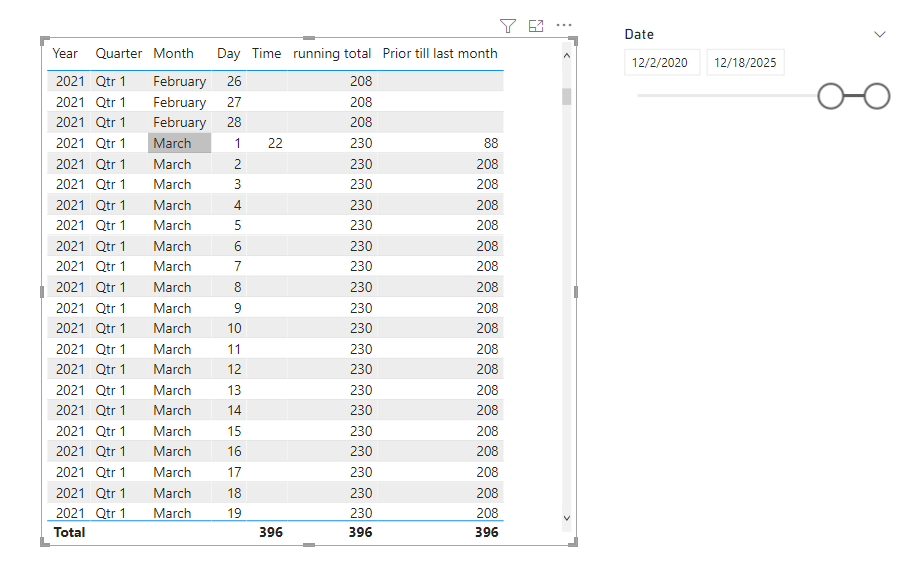
running total = CALCULATE(SUM('Table (2)'[Time ]),FILTER(ALLSELECTED('Date'[Date]),'Date'[Date]<=MAX('Date'[Date])))
Prior till last month = CALCULATE(SUM('Table (2)'[Time ]),FILTER(ALLSELECTED('Date'[Date]),'Date'[Date]<=EDATE(MAX('Date'[Date]),-1)))
Best Regards,
Jay
Hi @Anonymous ,
You have already used the 'Date'[date] in the table, so you could simply use the below formulas.
running total = CALCULATE(SUM('Table (2)'[Time ]),FILTER(ALLSELECTED('Date'[Date]),'Date'[Date]<=MAX('Date'[Date])))
Prior till last month = CALCULATE(SUM('Table (2)'[Time ]),FILTER(ALLSELECTED('Date'[Date]),'Date'[Date]<=EDATE(MAX('Date'[Date]),-1)))
Best Regards,
Jay
@Anonymous , Try a measure like
calculate(sum('Table (2)'[Time ]), filter(all('Date'), 'Date'[Date]<= eomonth(max('Date'[Date]),-1) ))+0
or
calculate(sum('Table (2)'[Time ]), filter(allselected('Date'), 'Date'[Date]<= eomonth(max('Date'[Date]),-1) ))+0
@amitchandak It's too much slowly, and I need to use selected periods, I update my question with more details.
@Anonymous , the measure with all selected should do
calculate(sum('Table (2)'[Time ]), filter(allselected('Date'), 'Date'[Date]<= eomonth(max('Date'[Date]),-1) ))
You should display it with the month year from the date table.
No need of +0 too
@amitchandak I need to disply all dates between two selected dates, so for that I need +0
I'm looking for a better solution.
The Power BI Data Visualization World Championships is back! Get ahead of the game and start preparing now!
Check out the November 2025 Power BI update to learn about new features.
| User | Count |
|---|---|
| 59 | |
| 43 | |
| 42 | |
| 23 | |
| 17 |
| User | Count |
|---|---|
| 190 | |
| 122 | |
| 96 | |
| 66 | |
| 47 |