Join us at FabCon Atlanta from March 16 - 20, 2026, for the ultimate Fabric, Power BI, AI and SQL community-led event. Save $200 with code FABCOMM.
Register now!The Power BI Data Visualization World Championships is back! Get ahead of the game and start preparing now! Learn more
In the following table, there is a filter on Date column:
| Date | Products | Units |
| 8/5/2017 | A | 10 |
| 8/5/2017 | B | 5 |
| 8/6/2017 | A | 25 |
| 8/6/2017 | B | 15 |
| 8/7/2017 | A | 30 |
| 8/7/2017 | B | 20 |
I want if no value is selected for Date in slicer then show the product wise comparison for maximum date and previous day. If a value is selected in slicer then show the comparison for the selected day and its previous day. If the minimum date value is selected then show details only for selected Date.
I want to create a matrix visual with expected output for Date for 8/7/2017 (or no filter selected, since this is a maximum date):
| Products | Units | Total | |
| Date | 8/7/2017 | 8/6/2017 | |
| A | 30 | 25 | 55 |
| B | 20 | 15 | 35 |
| Total | 50 | 40 | 90 |
I tried creating the DAX expression below but in the visual, no data is displaying if any of the filters is selected.
Previous Day Count = CALCULATE(SUM(Dataset[Units]), FILTER(Dataset, Dataset[Date] = IF (ISFILTERED(Dataset[Date]) && HASONEVALUE(Dataset[Date]), FIRSTDATE(Dataset[Date])-1, MAX(Dataset[Date])-1)))
Solved! Go to Solution.
@abhay03 wrote:
In the following table, there is a filter on Date column:
Date Products Units 8/5/2017 A 10 8/5/2017 B 5 8/6/2017 A 25 8/6/2017 B 15 8/7/2017 A 30 8/7/2017 B 20
I want if no value is selected for Date in slicer then show the product wise comparison for maximum date and previous day. If a value is selected in slicer then show the comparison for the selected day and its previous day. If the minimum date value is selected then show details only for selected Date.
I want to create a matrix visual with expected output for Date for 8/7/2017 (or no filter selected, since this is a maximum date):
Products Units Total Date 8/7/2017 8/6/2017 A 30 25 55 B 20 15 35 Total 50 40 90
I tried creating the DAX expression below but in the visual, no data is displaying if any of the filters is selected.
Previous Day Count = CALCULATE(SUM(Dataset[Units]), FILTER(Dataset, Dataset[Date] = IF (ISFILTERED(Dataset[Date]) && HASONEVALUE(Dataset[Date]), FIRSTDATE(Dataset[Date])-1, MAX(Dataset[Date])-1)))
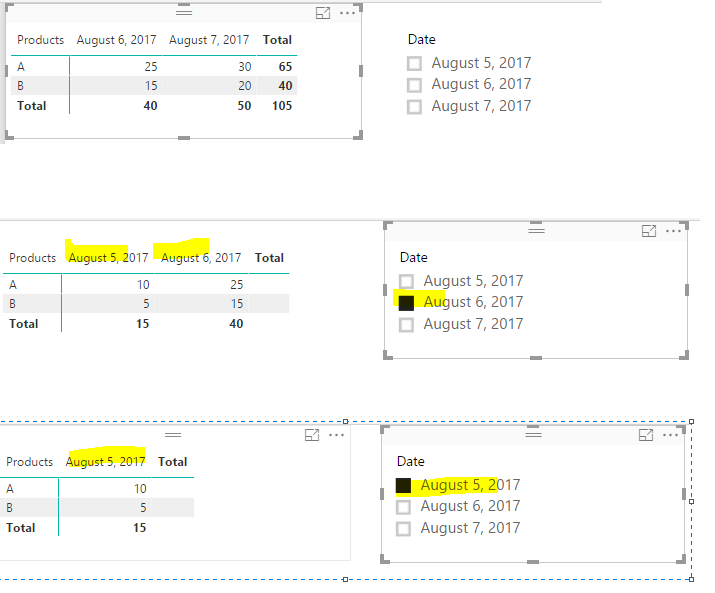
Try to create a calendar table and a measure as below. See more details in the attached pbix.
Calendar =
CALENDAR ( MIN ( Table1[Date] ), MAX ( Table1[Date] ) )
SumUnit =
IF (
MAX ( Table1[Date] )
= MAXX ( ALLSELECTED ( Calendar[Date] ), Calendar[Date] ) - 1
|| MAX ( Table1[Date] ) = MAXX ( ALLSELECTED ( Calendar[Date] ), Calendar[Date] ),
SUM ( Table1[Units] ),
BLANK ()
)
@abhay03 wrote:
In the following table, there is a filter on Date column:
Date Products Units 8/5/2017 A 10 8/5/2017 B 5 8/6/2017 A 25 8/6/2017 B 15 8/7/2017 A 30 8/7/2017 B 20
I want if no value is selected for Date in slicer then show the product wise comparison for maximum date and previous day. If a value is selected in slicer then show the comparison for the selected day and its previous day. If the minimum date value is selected then show details only for selected Date.
I want to create a matrix visual with expected output for Date for 8/7/2017 (or no filter selected, since this is a maximum date):
Products Units Total Date 8/7/2017 8/6/2017 A 30 25 55 B 20 15 35 Total 50 40 90
I tried creating the DAX expression below but in the visual, no data is displaying if any of the filters is selected.
Previous Day Count = CALCULATE(SUM(Dataset[Units]), FILTER(Dataset, Dataset[Date] = IF (ISFILTERED(Dataset[Date]) && HASONEVALUE(Dataset[Date]), FIRSTDATE(Dataset[Date])-1, MAX(Dataset[Date])-1)))
Try to create a calendar table and a measure as below. See more details in the attached pbix.
Calendar =
CALENDAR ( MIN ( Table1[Date] ), MAX ( Table1[Date] ) )
SumUnit =
IF (
MAX ( Table1[Date] )
= MAXX ( ALLSELECTED ( Calendar[Date] ), Calendar[Date] ) - 1
|| MAX ( Table1[Date] ) = MAXX ( ALLSELECTED ( Calendar[Date] ), Calendar[Date] ),
SUM ( Table1[Units] ),
BLANK ()
)
The Power BI Data Visualization World Championships is back! Get ahead of the game and start preparing now!
| User | Count |
|---|---|
| 39 | |
| 38 | |
| 38 | |
| 28 | |
| 27 |
| User | Count |
|---|---|
| 124 | |
| 88 | |
| 73 | |
| 66 | |
| 65 |