Join us at FabCon Atlanta from March 16 - 20, 2026, for the ultimate Fabric, Power BI, AI and SQL community-led event. Save $200 with code FABCOMM.
Register now!The Power BI Data Visualization World Championships is back! Get ahead of the game and start preparing now! Learn more
Hi,
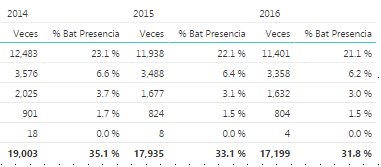
I have data displayed in a matrix:
(I removed sensitive first column, but there is a first column with product names)
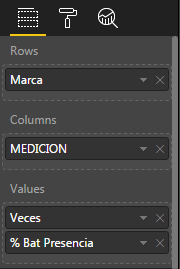
Here is the definition of the matrix:
What I want to do is that every column percentage sums 100% at the bottom, My tries always gives as the percentage of the whole data.
My variable definition is as follows:
% Bat Presencia = var paso1= CALCULATE(SUM('BATERÍAS'[Veces]),ALLSELECTED()) return sum('BATERÍAS'[Veces])/paso1
This works nice when there is one column.
Help is greatly appreciated.
Solved! Go to Solution.
@Anonymous
% Bat Presencia =
VAR paso1 =
CALCULATE (
SUM ( 'BATERÍAS'[Veces] ),
ALLEXCEPT ( 'BATERíAS', 'BATERíAS'[Medicion] )
)
RETURN
SUM ( 'BATERÍAS'[Veces] ) / paso1
@Anonymous
You can't remove other filters in table1, but keep a column for context filter from table2 reserved. Even you have built the relationship between two tables, it will return entire table1 as context without taking the values from [MEDICION] column. You have to put the [MEDICION] into table1 to group your calculation as you have done.
Regards,
@Anonymous
Hi, if i understand correctly
Do You need every column Sum 100% and each row the Correct %. Example: (12483/19003)=65.7%
That is correct, I need that the percentages shown total 100% en every column.
Regards,
@Anonymous
% Bat Presencia =
VAR paso1 =
CALCULATE (
SUM ( 'BATERÍAS'[Veces] ),
ALLEXCEPT ( 'BATERíAS', 'BATERíAS'[Medicion] )
)
RETURN
SUM ( 'BATERÍAS'[Veces] ) / paso1
Fixed!!!
With your proposed solution a got 100% on every row of the table, my measure "MEDICION" comes from another table. I moved MEDICION to the analysis table and now it is fixed. I do not have the time to figure out why a valid related column from another table was causing the problem.
Thank you!!!
@Anonymous
You can't remove other filters in table1, but keep a column for context filter from table2 reserved. Even you have built the relationship between two tables, it will return entire table1 as context without taking the values from [MEDICION] column. You have to put the [MEDICION] into table1 to group your calculation as you have done.
Regards,
The Power BI Data Visualization World Championships is back! Get ahead of the game and start preparing now!
Check out the November 2025 Power BI update to learn about new features.
| User | Count |
|---|---|
| 59 | |
| 43 | |
| 42 | |
| 23 | |
| 17 |
| User | Count |
|---|---|
| 190 | |
| 122 | |
| 96 | |
| 66 | |
| 47 |