cancel
Showing results for 
Search instead for 
Did you mean: 

The Power BI Data Visualization World Championships is back! Get ahead of the game and start preparing now! Learn more

Reply
Anonymous
Not applicable

Calculate percentage of categorical variables that is grouped by another categorical varibable

Hi,

Essentially I would like to be able to get the percentage of a unique variable in a column (Type) over a group defined by another column (Level 1 or Level 2). Much like the percentage that is displayed by a pie chart. 


This is my hypothetical table, Level 1 and Level 2 are the categorical variables in which I would like to group by, and the percentage should be calculated based on the Type column. 


The rest of the columns are all values that should be calculated using DAX, but I ran into many difficulties trying to get those figures. Would really appreciate some help here. 

Ultimately, I would like to dynamically create a column that outputs the percentage of 'Type' depending on what the users selects on:

1. Which type he would like to compute the percentage on, for example, 'Malaysia', or 'India'

2. The level of hiarachy that is selected 

Thanks in advance! 


Level 1Level 2TypeNumber of Malaysia in Level 1 GroupTotal number of Type in Level 1Proportion of Malaysia in Level 1Number of Malaysia in Level 2 GroupTotal number of Type in Level 1Proportion of Malaysia in Level 2
AAChina2450.00%020.00%
ABMalaysia2450.00%22100.00%
BCIndia1425.00%010.00%
BDChina1425.00%020.00%
BEMalaysia1425.00%1250.00%
CETaiwan040.00%020.00%
CFTaiwan040.00%020.00%
CFNorway040.00%020.00%
CGNorway040.00%010.00%
1 ACCEPTED SOLUTION
v-juanli-msft
Community Support
Community Support

Hi @Anonymous 

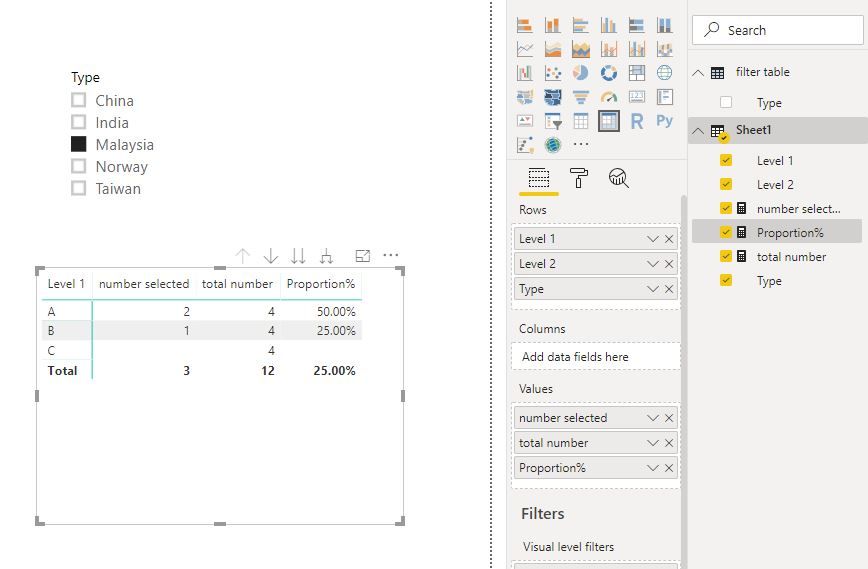
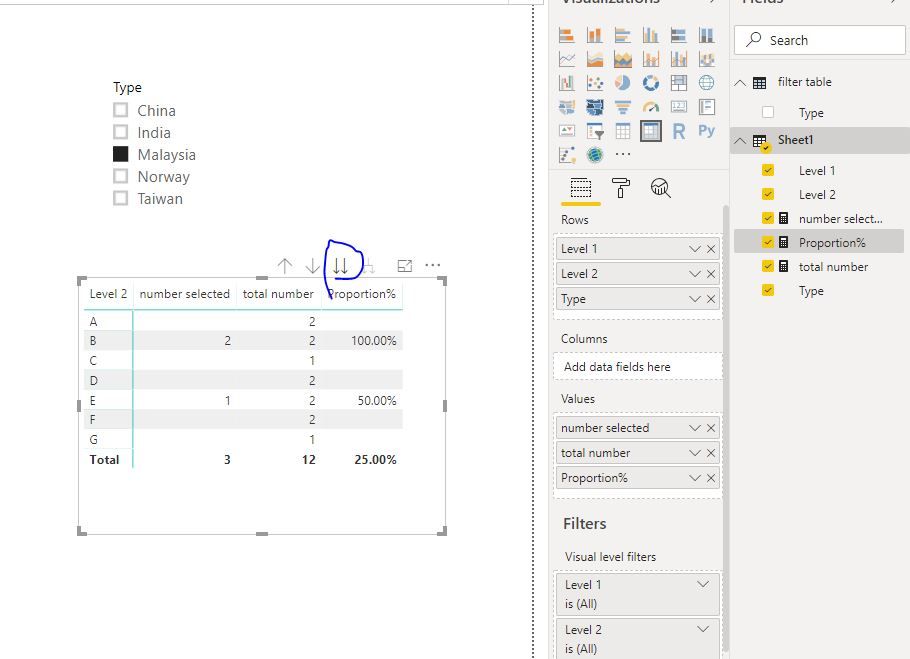
Create a new table without any relationship to other tables,

filter table = VALUES(Sheet1[Type])

Add Type column from "filter table" to the slicer,

Add measures in Sheet1,

number selected = CALCULATE( COUNT(Sheet1[Type]),FILTER(Sheet1,Sheet1[Type]=SELECTEDVALUE('filter table'[Type])))

total number = COUNT(Sheet1[Type])

Proportion% = [number selected]/[total number]

Capture7.JPGCapture8.JPG

Best Regards
Maggie


Community Support Team _ Maggie Li
If this post helps, then please consider Accept it as the solution to help the other members find it more quickly.

View solution in original post

5 REPLIES 5
v-juanli-msft
Community Support
Community Support

Hi @Anonymous 

Create a new table without any relationship to other tables,

filter table = VALUES(Sheet1[Type])

Add Type column from "filter table" to the slicer,

Add measures in Sheet1,

number selected = CALCULATE( COUNT(Sheet1[Type]),FILTER(Sheet1,Sheet1[Type]=SELECTEDVALUE('filter table'[Type])))

total number = COUNT(Sheet1[Type])

Proportion% = [number selected]/[total number]

Capture7.JPGCapture8.JPG

Best Regards
Maggie


Community Support Team _ Maggie Li
If this post helps, then please consider Accept it as the solution to help the other members find it more quickly.

Anonymous
Not applicable

Hi @Anonymous ,


Can you upload sample data, output expected, pbix to Google / One Drive and share the link here.


From the sample data set is it that you always calculate % with respect to Malaysia only or does it change also.


Cheers


CheenuSing

Anonymous
Not applicable

Hi @Anonymous,


The PBIx file is here : https://mega.nz/#!HApW0KYS!-OqOsLaRfT_rlgKUhTjq6gJvG0v3u4k02f8hP_UcLT8

1. The first three columns are the raw data 
2. The rest of the columns are the expected ouput 
3. I am interested in one column only, the proportion/percentage of the selected Type over a selected Level, e.g. 'Level 1', or 'Level 2'. Column F if type = Malaysia and Level = Level 1, Column I if type = Malaysia and Level = Level 2
4. Yes, I would like the user to be able to select a different Type, e.g. 'India','China', and also select the level of hierarchy, e.g. 'Level 1','Level 2'

Anonymous
Not applicable

hi @Anonymous 


Please upload to Google or One Drive and share the link.  The link you provided takes me to a suspicious site.


Cheers


CheenuSing

Anonymous
Not applicable

@Anonymous,

Sure, my Google Drive quota has reached that's why. 


Link to PBIx

Helpful resources

Announcements
Power BI DataViz World Championships

Power BI Dataviz World Championships

The Power BI Data Visualization World Championships is back! Get ahead of the game and start preparing now!

December 2025 Power BI Update Carousel

Power BI Monthly Update - December 2025

Check out the December 2025 Power BI Holiday Recap!

FabCon Atlanta 2026 carousel

FabCon Atlanta 2026

Join us at FabCon Atlanta, March 16-20, for the ultimate Fabric, Power BI, AI and SQL community-led event. Save $200 with code FABCOMM.