Join us at FabCon Atlanta from March 16 - 20, 2026, for the ultimate Fabric, Power BI, AI and SQL community-led event. Save $200 with code FABCOMM.
Register now!The Power BI Data Visualization World Championships is back! Get ahead of the game and start preparing now! Learn more
Hi,
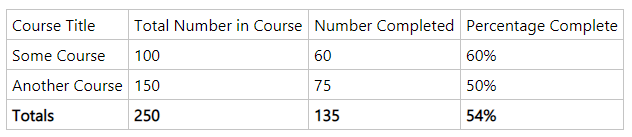
I'm a novice Power BI user trying to upskill, and was hoping for some help after hours of no progress. 🙂 I have a table that contains three rows. Course Title, Total Number in Course, and Number Completed.
I am trying to create the last column, Percentage Complete
The data for column 2 and 3 comes from different tables, Student Records, and Survey. The common item for the relationship is course title. I don't know do I create a Measure, quick measure, table, or maybe case some chicken bones.
Any help or links would be greatly appreaciated.
Thanks
Solved! Go to Solution.
@MarkRIRL it is pretty straight forward, the key part is how these tables are connected.
Total Course = COUNTROWS ( TableCourse )
Number Completed = SUM ( TableCompleted[Completed] )
or
Number Completed = COUNTROWS ( TableCompleted )
Percent Complete = DIVIDE ( [Number Completed], [Total Course] )
add above measure, in table visual, add course column from the common table and add above measures
I would ❤ Kudos if my solution helped. 👉 If you can spend time posting the question, you can also make efforts to give Kudos whoever helped to solve your problem. It is a token of appreciation!
⚡Visit us at https://perytus.com, your one-stop shop for Power BI related projects/training/consultancy.⚡
Subscribe to the @PowerBIHowTo YT channel for an upcoming video on List and Record functions in Power Query!!
Learn Power BI and Fabric - subscribe to our YT channel - Click here: @PowerBIHowTo
If my solution proved useful, I'd be delighted to receive Kudos. When you put effort into asking a question, it's equally thoughtful to acknowledge and give Kudos to the individual who helped you solve the problem. It's a small gesture that shows appreciation and encouragement! ❤
Did I answer your question? Mark my post as a solution. Proud to be a Super User! Appreciate your Kudos 🙂
Feel free to email me with any of your BI needs.
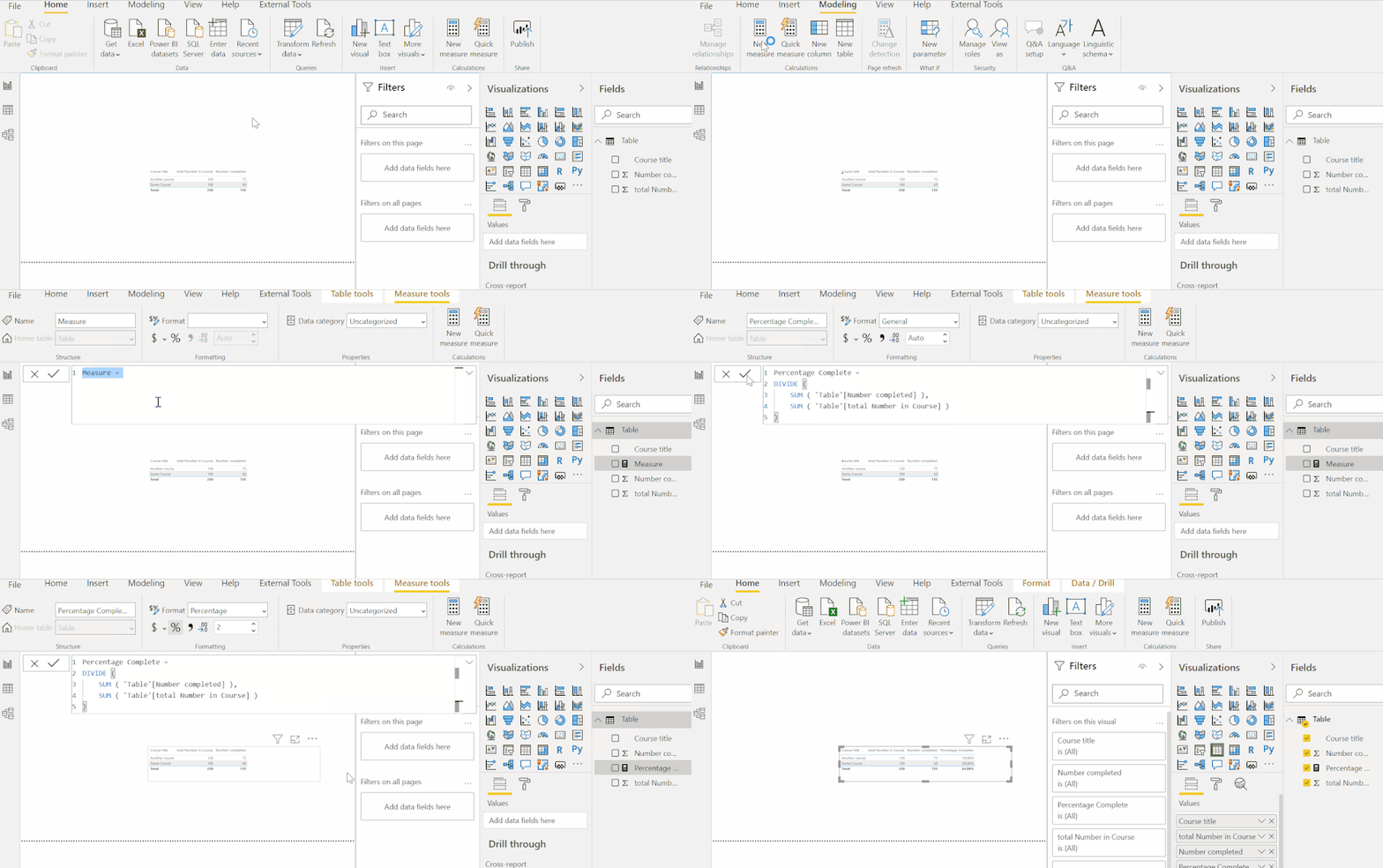
@MarkRIRL You can create a measure from the ribbon, or right-clicking the table name and choosing "New Measure". You can try this:
Percentage Complete =
DIVIDE (
SUM ( 'Table'[Number completed] ),
SUM ( 'Table'[total Number in Course] )
)
Respectfully,
Zoe Douglas (DataZoe)
Follow me on LinkedIn at https://www.linkedin.com/in/zoedouglas-data
See my reports and blog at https://www.datazoepowerbi.com/
Thank you both so much. Betwen your two answers I was able to get what I wanted. Below is what worked for me. I thought I had down something wrong, until I realized I just needed to add some decimal places.
@MarkRIRL it is pretty straight forward, the key part is how these tables are connected.
Total Course = COUNTROWS ( TableCourse )
Number Completed = SUM ( TableCompleted[Completed] )
or
Number Completed = COUNTROWS ( TableCompleted )
Percent Complete = DIVIDE ( [Number Completed], [Total Course] )
add above measure, in table visual, add course column from the common table and add above measures
I would ❤ Kudos if my solution helped. 👉 If you can spend time posting the question, you can also make efforts to give Kudos whoever helped to solve your problem. It is a token of appreciation!
⚡Visit us at https://perytus.com, your one-stop shop for Power BI related projects/training/consultancy.⚡
Subscribe to the @PowerBIHowTo YT channel for an upcoming video on List and Record functions in Power Query!!
Learn Power BI and Fabric - subscribe to our YT channel - Click here: @PowerBIHowTo
If my solution proved useful, I'd be delighted to receive Kudos. When you put effort into asking a question, it's equally thoughtful to acknowledge and give Kudos to the individual who helped you solve the problem. It's a small gesture that shows appreciation and encouragement! ❤
Did I answer your question? Mark my post as a solution. Proud to be a Super User! Appreciate your Kudos 🙂
Feel free to email me with any of your BI needs.
The Power BI Data Visualization World Championships is back! Get ahead of the game and start preparing now!
Check out the November 2025 Power BI update to learn about new features.
| User | Count |
|---|---|
| 59 | |
| 43 | |
| 42 | |
| 23 | |
| 17 |
| User | Count |
|---|---|
| 190 | |
| 122 | |
| 96 | |
| 66 | |
| 47 |