Join us at FabCon Atlanta from March 16 - 20, 2026, for the ultimate Fabric, Power BI, AI and SQL community-led event. Save $200 with code FABCOMM.
Register now!The Power BI Data Visualization World Championships is back! Get ahead of the game and start preparing now! Learn more
Hi all,
I tried to find a solution for my problem, but did not yet found an answer for this on this forum.
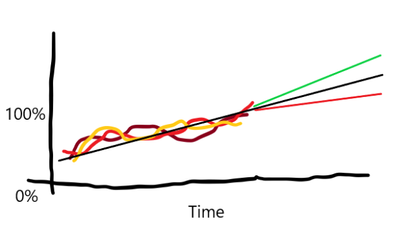
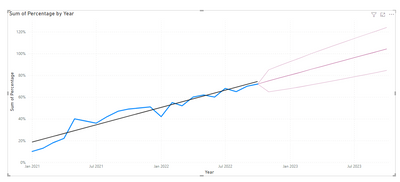
I have created a PowerBI dashboard that shows a few percentages lines in a graph. It shows the lines over time until today. I have added a trendline to the graph that shows the trend of all these percentages lines. What I would like to do is to show this trendline one year in the future. Is there a way to extend this line in the graph?
Bonus question: ultimately I would like to show 2 other trendlines, one that shows a line if the trendline is 95% of the average and one if it is 105%. Is there a way to do this?
Ultimate result:
Solved! Go to Solution.
Hi @michielolie ,
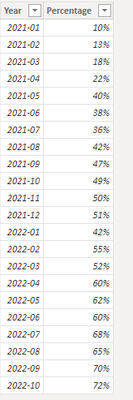
This is my test table:
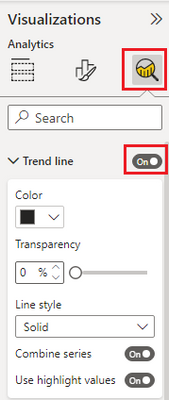
Create a line chart and then trend line switch:
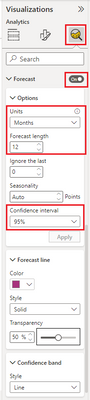
Open forecast switch. If you want to show trendline is 95% of the average and one if it is 105%, please select 95% confidence interval.
Last, you will get a line chart like this:
Best regards,
Yadong Fang
If this post helps, then please consider Accept it as the solution to help the other members find it more quickly.
Were those forecast options removed from the line chart visual, or is this a non-standard visual?
//Edit - X-Axis needs to be set to Continuous in order to see the option
Hi @KyleMB350
If you scroll down to the bottom of the Analytics pane, you should see it.
Thanks! I discovered it's required you have the X-Axis set to Continuous in order to get the option.
Hi @michielolie ,
This is my test table:
Create a line chart and then trend line switch:
Open forecast switch. If you want to show trendline is 95% of the average and one if it is 105%, please select 95% confidence interval.
Last, you will get a line chart like this:
Best regards,
Yadong Fang
If this post helps, then please consider Accept it as the solution to help the other members find it more quickly.
The Power BI Data Visualization World Championships is back! Get ahead of the game and start preparing now!
| User | Count |
|---|---|
| 38 | |
| 38 | |
| 37 | |
| 28 | |
| 28 |
| User | Count |
|---|---|
| 124 | |
| 89 | |
| 73 | |
| 66 | |
| 65 |