FabCon is coming to Atlanta
Join us at FabCon Atlanta from March 16 - 20, 2026, for the ultimate Fabric, Power BI, AI and SQL community-led event. Save $200 with code FABCOMM.
Register now!- Power BI forums
- Get Help with Power BI
- Desktop
- Service
- Report Server
- Power Query
- Mobile Apps
- Developer
- DAX Commands and Tips
- Custom Visuals Development Discussion
- Health and Life Sciences
- Power BI Spanish forums
- Translated Spanish Desktop
- Training and Consulting
- Instructor Led Training
- Dashboard in a Day for Women, by Women
- Galleries
- Data Stories Gallery
- Themes Gallery
- Contests Gallery
- Quick Measures Gallery
- Notebook Gallery
- Translytical Task Flow Gallery
- TMDL Gallery
- R Script Showcase
- Webinars and Video Gallery
- Ideas
- Custom Visuals Ideas (read-only)
- Issues
- Issues
- Events
- Upcoming Events
Join the Fabric FabCon Global Hackathon—running virtually through Nov 3. Open to all skill levels. $10,000 in prizes! Register now.
- Power BI forums
- Forums
- Get Help with Power BI
- Desktop
- Re: Calculate number of working days in current mo...
- Subscribe to RSS Feed
- Mark Topic as New
- Mark Topic as Read
- Float this Topic for Current User
- Bookmark
- Subscribe
- Printer Friendly Page

- Mark as New
- Bookmark
- Subscribe
- Mute
- Subscribe to RSS Feed
- Permalink
- Report Inappropriate Content
Calculate number of working days in current month
Hi,
I am having a hard time figuring how to calculate the number of working days already passed since the beginning of the month, as of today. The number should dynamically change everyday as a result.
I have tried using a Calendar table to differentiate the type of days, but I am lost in the way to make it work in the end, and I wonder if there isn't just a simple way to do this..
Thanks !
Solved! Go to Solution.


- Mark as New
- Bookmark
- Subscribe
- Mute
- Subscribe to RSS Feed
- Permalink
- Report Inappropriate Content
Hi @mperrot,
I forgot to change it.
Please see:
count working days =
CALCULATE (
    COUNTROWS ( 'Dim table' ),
    FILTER (
        'Dim table',
        'Dim table'[Date].[Day] <= DAY ( TODAY () )
            && 'Dim table'[Date].[MonthNo] = MONTH ( TODAY () )
            && 'Dim table'[Weekday] <= 5
    )
)
Best regards,
Yuliana Gu
If this post helps, then please consider Accept it as the solution to help the other members find it more quickly.
- Mark as New
- Bookmark
- Subscribe
- Mute
- Subscribe to RSS Feed
- Permalink
- Report Inappropriate Content
Hi @mperrot,
Create a calendar table which lists unique continual dates, and add a calculated column to show weekday number for each date.
Weekday = WEEKDAY('Dim table'[Date],2)
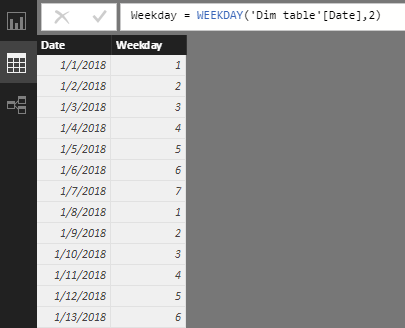
Then, create a measure to get the number of working days already passed since the beginning of the month, as of today.
count working days =
CALCULATE (
    COUNTROWS ( 'Dim table' ),
    FILTER (
        'Dim table',
        'Dim table'[Date].[Dia] <= DAY ( TODAY () )
            && 'Dim table'[Date].[MonthNo] = MONTH ( TODAY () )
            && 'Dim table'[Weekday] <= 5
    )
)
Best regards,
Yuliana Gu
If this post helps, then please consider Accept it as the solution to help the other members find it more quickly.
- Mark as New
- Bookmark
- Subscribe
- Mute
- Subscribe to RSS Feed
- Permalink
- Report Inappropriate Content


- Mark as New
- Bookmark
- Subscribe
- Mute
- Subscribe to RSS Feed
- Permalink
- Report Inappropriate Content
I am also unable to enter any of my column names (mine are called dayofmonth and monthofyear) into the formula - what am I doing wrong?
- Mark as New
- Bookmark
- Subscribe
- Mute
- Subscribe to RSS Feed
- Permalink
- Report Inappropriate Content
Thanks Yuliana for your help!
What are [Dia] and [MonthNo] referring to ? I get a message telling me they cannot be found in the Date Column
- Mark as New
- Bookmark
- Subscribe
- Mute
- Subscribe to RSS Feed
- Permalink
- Report Inappropriate Content
Hi @mperrot,
I forgot to change it.
Please see:
count working days =
CALCULATE (
    COUNTROWS ( 'Dim table' ),
    FILTER (
        'Dim table',
        'Dim table'[Date].[Day] <= DAY ( TODAY () )
            && 'Dim table'[Date].[MonthNo] = MONTH ( TODAY () )
            && 'Dim table'[Weekday] <= 5
    )
)
Best regards,
Yuliana Gu
If this post helps, then please consider Accept it as the solution to help the other members find it more quickly.
- Mark as New
- Bookmark
- Subscribe
- Mute
- Subscribe to RSS Feed
- Permalink
- Report Inappropriate Content
Hi @v-yulgu-msft ,
I have that formula in my calendar. However, we report as of the prior day. On the first of the month I need to count total working days as of last month.
Example: Today is October 1 (22 working days). But, we are reporting September (21 working days).
The below does not work for me for total work days in the reporting period month. But it does when counting actual work days past in the month:


- Mark as New
- Bookmark
- Subscribe
- Mute
- Subscribe to RSS Feed
- Permalink
- Report Inappropriate Content
Hi iam working through this sme problem. I have calculated the number of working days er month. Happy with that.
Your line:
'Dim table'[Date].[Day] <= DAY ( TODAY () )
what is the [Date].[Day] as I do not get that option. is it a column in your date table? If so what format?
when I select my weekday (ie the column <=5) I get a returned value that is the same as the total for the month. today is the 15th, so it can not return 22 for April, which is what I am currently getting. But I can not put the dax exactly as you have it as I dont have [day]. Is it just 1 to 30?
- Mark as New
- Bookmark
- Subscribe
- Mute
- Subscribe to RSS Feed
- Permalink
- Report Inappropriate Content
Thank you so much for your help ! Have a great day 🙂

Helpful resources

Power BI Monthly Update - September 2025
Check out the September 2025 Power BI update to learn about new features.

FabCon Atlanta 2026
Join us at FabCon Atlanta, March 16-20, for the ultimate Fabric, Power BI, AI and SQL community-led event. Save $200 with code FABCOMM.


